
Granular
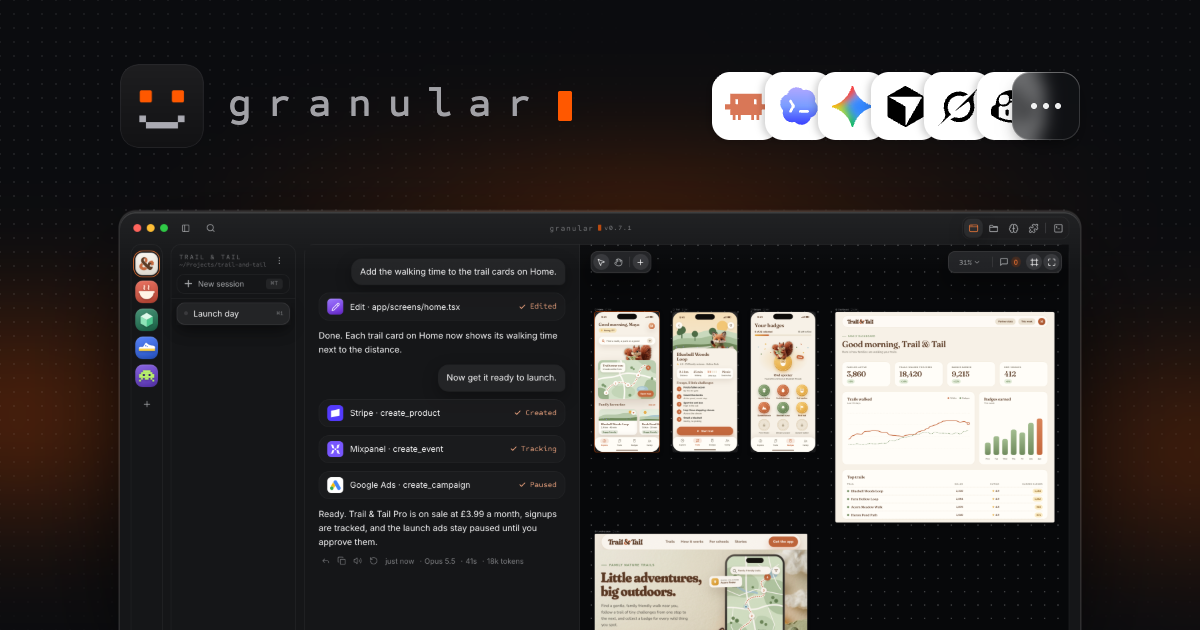
Granular is a Mac and Windows app that runs Claude, Codex, Gemini and other agents in real terminals on your own projects, with a boss agent that delegates to workers, a project brain, a live preview canvas, connectors and plugins. Free tier; Pro from $12.99/month or $259 once.
About Granular
What Granular is
Granular is a desktop app for Mac and Windows that wraps AI coding agents in a visual workspace. You sign in with an AI account you already pay for (Claude, ChatGPT/Codex, Gemini) or add API keys, point the app at a folder, and chat with an agent that works in real terminals on your machine while a live preview, a file browser and a project "brain" sit beside the conversation. One session can act as a boss agent that starts worker agents, hands them tasks and merges their work back. The pitch is that the tools that can actually run agents today (VS Code, Cursor, the terminal) were built for people who write code, and Granular is meant for founders, designers, marketers and other builders as well as developers. It launched on Product Hunt on November 24, 2026 as "Put your AI agents to work in a visual workspace".
Granular is built by Omar Farook, who signs the site and posts build videos as @buildwithomar. The app itself is closed source; installers are published on a public GitHub releases repository.
How it works
- Bring your own AI. Sessions can run on a Claude or ChatGPT subscription, Gemini via an API key, OpenRouter (one-click sign-in), DeepSeek, Kimi, GLM, Grok, Groq, Mistral and other providers, local models in Ollama or LM Studio, or other coding agents used as engines: OpenCode, Pi, the Cursor CLI, xAI's Grok CLI and GitHub's Copilot CLI. Granular says it never marks up tokens when you bring your own account.
- Projects and sessions. A project is a folder on your computer; a session is one agent conversation in it, and you can run several at once. Branch sessions put an agent on its own git branch in a worktree so its changes stay separate until you merge, without the user having to know git.
- Boss and worker agents. Make one session the boss and it delegates to workers, collects their reports and merges results. The free plan allows one boss and two workers.
- Digital brain and roadmap. When you open a project, Granular writes a
brain/folder of linked Markdown notes on goals, rules and decisions that every agent reads before starting, plus a six-column kanban roadmap you can hand cards from to an agent. - Preview canvas. Pages, images, videos and PDFs sit side by side on a zoomable board at desktop, tablet and phone sizes; you can pin comments on a page and send them to the agent as one batch with screenshots. Version 0.7.0 added a real browser in Preview and a code editor in Files.
- Connectors and plugins. 44 built-in connectors (GitHub, Gmail, Slack, Notion, Linear, Stripe, Vercel, Sentry, Figma and others) plus what the company calls 1,400+ more apps inside the app, custom MCP servers, and reuse of MCP servers already set up in Claude, Claude Code, Codex or Gemini. Each app can be set to Read only, Read and write, or Everything. Plugins are small apps that open as tabs beside the chat (ten official ones, including an iPhone simulator tab and a kanban board), and agents can build, remix and publish them.
- Vault and permissions. API keys are stored encrypted on your computer and passed to sessions by name. You choose extra folders an agent may edit or only read, and whether it asks before changing files or running commands.
- Remote. An opt-in relay (remote.granular.build) lets you reach your computer from other devices; the privacy policy says messages are sealed so the relay cannot read them and are not stored.
What we checked: the release history and update feed
Granular's installers are published on GitHub at buildwithomar/granular-releases. On November 25, 2026 we pulled the repository's full release list from GitHub's public API (two pages, 108 releases) and summarised it with our own script; we did not download or run the app.
$ python3 granular_releases.py
releases 108   first v0.1.0 2026-06-11   latest v0.7.4 2026-11-20
per month 2026-06 41 · 2026-07 34 · 2026-08 8 · 2026-09 13 · 2026-10 7 · 2026-11 5
installer downloads, all releases: granular-mac.dmg 1451 · granular-win.exe 695 · granular-mac-intel.dmg 129 (sum 2275)
latest assets: Granular-0.7.4-arm64-mac.zip 298.6 MB, Granular-0.7.4-mac.zip 315.8 MB,
               granular-mac.dmg 298.8 MB, granular-mac-intel.dmg 315.8 MB, granular-win.exe 247.2 MB,
               latest-mac.yml, latest.yml
pre-releases 1   releases with notes 58

$ curl -sL .../releases/latest/download/latest-mac.yml | grep url
  - url: Granular-0.7.4-mac.zip
  - url: Granular-0.7.4-arm64-mac.zip
  - url: granular-mac-x64.dmg      -> 404 on the release
  - url: granular-mac-arm64.dmg    -> 404 on the release
What this tells you. First, the build: the blockmap files and latest*.yml feeds are what electron-builder produces, so Granular is an Electron app, which explains installers of roughly 250 to 316 MB. Second, the pace: 108 releases in just over five months, very fast in June and July and settling to a release every few days since. Expect frequent updates and occasional churn; fewer than half of releases carry written notes, so the docs' "What's new" pages are the better changelog. Third, a packaging slip: the macOS update feed lists two .dmg names that do not exist on the release. Electron's macOS auto-updater installs from the .zip entries, which are present, so updates should be unaffected, but it is a sign the release pipeline is still being tidied. Fourth, adoption so far is modest: about 2,300 installer downloads from GitHub across all versions, roughly two Mac downloads for every Windows one. These counts only cover the GitHub links the site uses and exclude auto-updates.
Pricing (checked November 25, 2026)
| Plan | Price | What it includes |
|---|---|---|
| Free | $0 | Bring your own Claude, Codex or Gemini; 1 boss and 2 worker agents; 2 projects; 4 sessions per project |
| Pro Monthly | $12.99/month | Unlimited projects, sessions, boss and worker agents; 2 computers |
| Pro Annual | $129/year | Same as Monthly, about $10.75/month |
| Pro Lifetime | $259 once | Same, all future updates, 2 computers |
| AI Add-on (optional) | $20 / $50 / $100 per month | Hosted models: 1,600 / 4,000 / 8,000 credits a month across 34 models from 9 providers |
Our arithmetic: twelve months of Monthly is $155.88, so Annual saves $26.88 (17%). Lifetime costs the same as 20 months of Monthly or almost exactly two years of Annual, so it only pays off if you expect to keep using the app beyond two years. On every add-on tier a credit costs 1.25 cents ($20 / 1,600); the site does not say how many credits a message to a given model uses, so the add-on's real cost per task cannot be worked out in advance. Every Pro plan has a 30-day money-back guarantee; the AI Add-on and credit packs do not. During the launch the site showed a Black Friday banner offering 50% off Pro.
Granular vs the alternatives
| Granular | Craft Agents | Harness by Autonomous | Toone | |
|---|---|---|---|---|
| What it is | Visual workspace around coding agents, with boss/worker delegation, brain and preview canvas | Desktop app for working with agents, MCP, APIs and a built-in browser | Command center for running many coding agents across machines | Native Mac app that turns repeat work into checked agent routines |
| Licence | Closed source, freemium | Open source (Apache 2.0) | Open source (MIT) | Closed source, paid |
| Platforms | macOS 12+ (Apple silicon and Intel), Windows 10/11 beta | See vendor | See vendor | macOS |
| Engines | Claude, Codex, Gemini, OpenCode, Pi, Cursor, Copilot, Grok CLIs, API keys, local models | See vendor | Claude Code, Codex, Cursor, OpenCode and more | Claude Code or Codex |
| Price | Free tier; Pro $12.99/mo, $129/yr or $259 once | Free | Free | From €9.99/month or €199.99 lifetime |
Granular is the most beginner-facing of these, with a canvas, a roadmap board and plugins aimed at people who do not live in a terminal. Developers who want an open-source tool they can audit should look at Harness or Craft Agents; those who want one agent in a terminal rather than a workspace can use OpenCode directly. Granular's own comparison pages cover Claude Code, Codex, Cursor, Warp, VS Code, Antigravity and DeepSeek Harness.
Limits and trade-offs
- Agents act on your real files. Granular's terms say plainly that its agents "can read, create, edit, and delete files and run commands" on your machine at your direction, and that you are responsible for backups. Branch sessions and ask-before-acting settings help, but this is not a sandbox.
- Young, one-maker product. The terms and privacy policy both still describe themselves as a starting template to be reviewed by counsel before launch, and on November 25 the home page's HTML contained hidden placeholder testimonials (not shown to visitors). Neither affects the app, but buyers who need vendor due diligence should note it.
- Windows is a beta and unsigned. Windows shows a SmartScreen warning on first run and updates are manual until the build is signed; Linux is planned, not available.
- Your AI bill is separate. Unless you buy the add-on, every agent runs on your own subscription or keys, and running several workers in parallel multiplies that usage.
- Closed source with telemetry on the website. The site uses PostHog and Dub and, with consent, Meta, TikTok and Google ad pixels; the privacy policy says these do not reach inside the app, and that project files, chats and keys stay on your computer.
Who it is for
Founders, indie hackers, designers and marketers who already pay for Claude or ChatGPT and want to run agents on real projects without working in a terminal, and developers who want a visual front end for several agents at once, with a shared project memory and a preview canvas.
Value & Audience
Value Proposition
Lets builders use the AI subscriptions they already pay for to run several agents in parallel on real files, with previews, a project memory and a roadmap board, without working in a terminal.
Problem Solved
Tools that can run AI agents today (terminals, code editors) are built for programmers and handle one agent at a time, leaving non-developers and multi-agent work without a workspace.
Tech Stack
Social & Links
Loading ratings...
Loading comments...
Gallery
Feedback & Roadmap
Granular FAQ
Common questions about Granular's features, pricing, and use cases
Is Granular free to use?
Granular has a free tier plus paid plans, starting at Free - $0 - bring your own AI, 1 boss + 2 worker agents, 2 projects, 4 sessions per project. Plans listed: Free - $0 - bring your own AI, 1 boss + 2 worker agents, 2 projects, 4 sessions per project; Pro - $12.99/month, $129/year or $259 lifetime - unlimited projects, sessions and agents, 2 computers; 30-day money-back; AI Add-on - $20/$50/$100 per month - 1,600/4,000/8,000 hosted-model credits across 34 models from 9 providers.
What are some alternatives to Granular?
Popular AI Agents & Automation alternatives to Granular include NeverApply, Composio and Harness².
Granular appears in
You May Also Like

NeverApply
AI job-search agent that matches jobs, tailors your resume, and auto-applies.
View Product
Composio
Composio connects AI assistants and custom agents to more than 1,500 apps through managed authentication, SDKs and an MCP gateway, and its new Instant tools let agents pay per call for search, scraping, audio and data services from one balance.
View Product
Harness²
Harness² is an Apache-2.0 research framework from Google Cloud AI Research that automatically refines an LLM agent's harness (prompts, tools, memory, skills and more) for each task and carries lessons forward to future tasks, without changing model weights.
View Product
Craft Agents
Craft Agents is an open-source (Apache 2.0) desktop app from the makers of Craft Docs for working with AI agents. It connects agents to MCP servers, REST APIs, local files and a built-in browser, with multi-session workspaces, Skills, Automations and Pages.
View ProductOne email a week
TechLogHub tracks 947 tools and 623 open-source projects. Get the week's new launches, release roundups and open-source picks — nothing else.
Get the TechLogHub digest
One email a week: new and trending developer tools, fresh comparisons, and what shipped. Unsubscribe in one click.