Cache-Control Headers Explained: max-age, s-maxage and no-cache
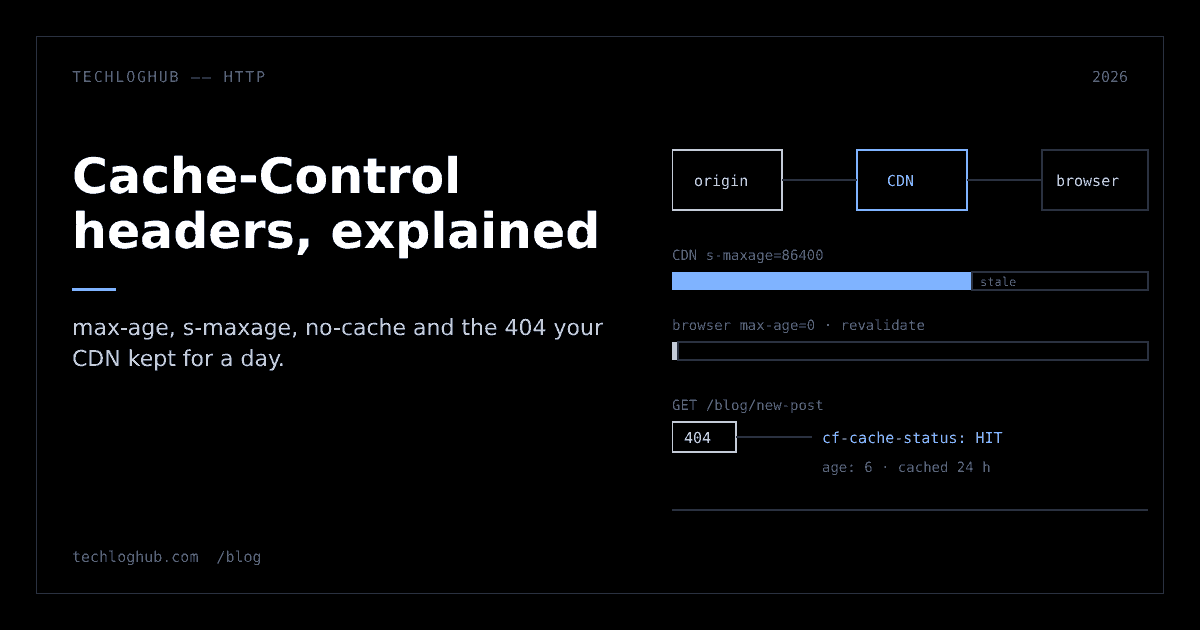
Quick answer: Cache-Control tells every cache between your server and the user how long a response stays fresh and who may store it. max-age sets freshness for all caches, s-maxage overrides it for shared caches such as CDNs, no-cache means "store it but revalidate before every reuse", and no-store means "do not keep it at all". Most production bugs come from forgetting that shared caches store error pages too: on our own site, a 404 cached with s-maxage=86400 kept a newly published page invisible for most of a day.
Cache-Control is one header with about a dozen directives, and most teams copy one value from a framework default and never look again. That works until a CDN serves yesterday's page, a logged-in user sees someone else's dashboard, or a fix you deployed an hour ago is still not live. Each of those failures maps to one misread directive.
This guide explains the directives that matter, in the order caches actually apply them, using the HTTP caching standard (RFC 9111) and real headers we captured from techloghub.com on 25 November 2026. It ends with a set of header recipes you can copy.
How a cache decides: fresh, stale and revalidated
RFC 9111, published in June 2022 as Internet Standard 98, replaced RFC 7234 as the definition of HTTP caching. Its model is simple once you have the vocabulary:
- A fresh response can be served from the cache without asking the origin.
- A stale response is one whose age has passed its freshness lifetime. The cache must check with the origin before reusing it, unless a directive allows serving stale.
- Revalidation is that check: a conditional request with
If-None-Match(an ETag) orIf-Modified-Since. If nothing changed, the origin answers304 Not Modifiedwith no body, and the cache marks its copy fresh again.
There are two kinds of cache. A private cache belongs to one user, which in practice means the browser. A shared cache serves many users: a CDN edge, a reverse proxy such as Varnish or Nginx, a corporate proxy. Several directives behave differently depending on which kind is reading them, and that split causes most of the confusion.
The freshness lifetime, in order
RFC 9111 section 4.2.1 says a cache computes the freshness lifetime from the first rule that applies:
1. If the cache is shared and the response has s-maxage, use that. 2. Otherwise, if the response has max-age, use that. 3. Otherwise, if there is an Expires header, use Expires minus Date. 4. Otherwise, the cache may guess (heuristic freshness).
The heuristic is the part people forget. Section 4.2.2 says that when a response has a Last-Modified date but no explicit lifetime, caches are encouraged to use no more than some fraction of the time since that date, and "a typical setting of this fraction might be 10%". A file last modified 30 days ago can be treated as fresh for three days without your server ever saying so. MDN's caching guide puts it bluntly: basically all responses should send an explicit Cache-Control header.
The Age header tells you how long a response has been in a shared cache, in seconds. Per RFC 9111, its presence implies the response was not generated or validated by the origin for this request.
Revalidation in practice
To see the whole cycle without a CDN in the way, we served a JSON file with Python 3.13.18's built-in http.server, which sends Last-Modified but no Cache-Control at all, and asked for it three ways:
$ curl -sI http://127.0.0.1:8765/data.json
HTTP/1.0 200 OK
Server: SimpleHTTP/0.6 Python/3.13.18
Date: Wed, 25 Nov 2026 01:47:10 GMT
Content-type: application/json
Content-Length: 12
Last-Modified: Fri, 20 Nov 2026 10:00:00 GMT

$ curl -s -o /dev/null -w '%{http_code} %{size_download}\n' \
    -H 'If-Modified-Since: Fri, 20 Nov 2026 10:00:00 GMT' http://127.0.0.1:8765/data.json
304 0
$ curl -s -o /dev/null -w '%{http_code} %{size_download}\n' \
    -H 'If-Modified-Since: Thu, 19 Nov 2026 10:00:00 GMT' http://127.0.0.1:8765/data.json
200 12
A conditional request with the current date got 304 and zero body bytes. A conditional request with an older date got the full file. That is revalidation, and it is why no-cache is cheap: the cache keeps the body and the origin only confirms it.
The first response also shows the trap from the previous section. There is no Cache-Control, and the file was last modified about 4 days and 16 hours before the request. Under the 10% heuristic, a cache may treat it as fresh for roughly 11 hours without ever asking. Change the file during that window and some users will not see the change until the guess runs out. Static file servers like this one are where it usually bites: they send Last-Modified out of the box, and nobody thinks to add a caching header until a stale file reaches users.
The directives that matter
max-age and s-maxage
max-age=N says the response becomes stale once its age is greater than N seconds. It applies to every cache.
s-maxage=N applies only to shared caches, and for them it overrides both max-age and Expires. That is how you give a CDN a long lifetime while browsers revalidate every time:
Cache-Control: public, max-age=0, s-maxage=86400Browsers see max-age=0 and check back on every navigation. The CDN sees s-maxage=86400 and keeps its copy for a day. Cloudflare's documentation confirms that browsers ignore s-maxage. RFC 9111 adds a detail that matters later: s-maxage also carries proxy-revalidate semantics, so a shared cache must not reuse a stale response without validating it.
no-cache and no-store
These two are named badly and swapped constantly.
no-cache does not mean "don't cache". RFC 9111 says the response "MUST NOT be used to satisfy any other request without forwarding it for validation and receiving a successful response." The cache can store it. It just has to ask the origin every time, and a cheap 304 is the usual answer. MDN repeats the warning in almost the same words.
no-store is the one that means "do not keep this". RFC 9111: a cache "MUST NOT store any part of either the immediate request or the response". Use it for responses that contain secrets or personal data you never want written to disk.
private and public
private says a shared cache must not store the response because it is intended for a single user. Browsers may still cache it. This belongs on every page that differs per logged-in user.
public explicitly marks a response as cacheable, and RFC 9111 says a cache may store it "even if it would otherwise be prohibited". MDN notes the main case: responses to requests that carried an Authorization header. If your API authenticates with bearer tokens, as described in our guide to how JWTs work, adding public to an authenticated response tells shared caches they may store it and serve it to other users. Only do that for responses that are identical for everyone.
must-revalidate
Once a response with must-revalidate is stale, a cache must not reuse it until the origin validates it. If the cache cannot reach the origin, RFC 9111 says it must generate an error, and the status should be 504 Gateway Timeout. Without this directive, caches may serve stale content in some situations, such as when disconnected. proxy-revalidate is the same rule for shared caches only.
stale-while-revalidate and stale-if-error
These come from RFC 5861, an informational RFC from 2010:
Cache-Control: max-age=600, stale-while-revalidate=30
Cache-Control: max-age=600, stale-if-error=1200
The first means fresh for 600 seconds, then servable stale for up to 30 more seconds while the cache refreshes in the background, so no user waits on the origin. The second means that if the origin returns 500, 502, 503 or 504, the cache may serve a stale copy for up to 1,200 seconds past freshness instead of passing the error through.
immutable
RFC 8246 defines immutable: the origin promises not to change the resource during its freshness lifetime, so clients should not send conditional requests while it is fresh, even on reload. Use it only for fingerprinted asset URLs such as app.3f9a1c.js, typically as max-age=31536000, immutable. Cloudflare's docs note that immutable changes browser behaviour but has no effect on Cloudflare's own cache.
What we measured on techloghub.com
Theory is easy to misremember. Here are the real headers from our own production site, fetched on 25 November 2026 with fetch(path, {cache: 'no-store'}) from a browser tab so the browser cache was skipped and only the CDN answered:
| Path | Status | Cache-Control | cf-cache-status | Age |
|---|---|---|---|---|
| / | 200 | public, max-age=0, s-maxage=300, stale-while-revalidate=86400 | HIT | – |
| /blog/how-jwt-works | 200 | public, max-age=0, s-maxage=86400, stale-while-revalidate=604800 | HIT | – |
| /tools/base64 | 200 | public, max-age=0, s-maxage=86400, stale-while-revalidate=604800 | HIT | 48955 |
| /feed.xml | 200 | public, max-age=3600, stale-while-revalidate=86400 | UPDATING | 5431 |
| /robots.txt | 200 | public, max-age=0, must-revalidate | EXPIRED | – |
| /logo.png | 200 | public, max-age=0 | EXPIRED | – |
| /blog/this-slug-does-not-exist-zz9 | 404 | public, max-age=0, s-maxage=86400, stale-while-revalidate=604800 | HIT | 6 |
Four lessons are in that table.
The CDN cached a 404 for a day. The last row is a URL we made up. We requested it once and got a miss; six seconds later the same request was a HIT with Age: 6. The 404 carried the same s-maxage=86400 as a real page, so the edge will now answer "not found" for that URL for up to 24 hours. RFC 9111 explicitly allows caches to store negative results such as 404. This is how our own incident happened: on 19 November 2026, a pre-publish link check requested two blog URLs before their records existed. The CDN cached both 404s, and the posts stayed unreachable at their canonical URLs for most of a day after publishing, while the same pages with a cache-busting query string loaded fine.
stale-while-revalidate worked on one response and not the others. /feed.xml has no s-maxage, and it came back UPDATING, which Cloudflare's cache response docs define as an expired copy served while the origin updates it in the background. That is stale-while-revalidate doing its job. The pages that combine s-maxage with stale-while-revalidate do not get that behaviour at Cloudflare, whose docs state that s-maxage disables stale-while-revalidate and advise against combining them.
Age shows when your purge did not happen. /tools/base64 had been sitting in the edge for 48,955 seconds, about 13.6 hours. If you deployed a change to that page this morning and it is not showing, Age tells you immediately that the edge never fetched the new version.
must-revalidate with max-age=0 makes every request a round trip. /robots.txt and /logo.png came back EXPIRED, meaning the edge had a copy but had to go to the origin. For a logo that never changes, that is wasted work. A fingerprinted URL with immutable would remove it.
You can reproduce this table against your own site with curl -sI https://example.com/path, and convert those commands to browser code with the curl to fetch converter. Save the before and after header sets and compare them with the text diff checker whenever you change caching config.
A freshness calculator you can run
To check our reading of the rules, we wrote the RFC 9111 order as a 24-line Python script and ran it against the headers above. The logic is: refuse to store on no-store, refuse shared storage on private, then take s-maxage (shared only), max-age, Expires, or the 10% heuristic, in that order.
public, max-age=0, s-maxage=86400, stale-while-revalidate=604800
    browser: fresh 0s via max-age; +604800s stale-while-revalidate
    CDN:     fresh 86400s via s-maxage; +604800s stale-while-revalidate
public, max-age=3600, stale-while-revalidate=86400
    browser: fresh 3600s via max-age; +86400s stale-while-revalidate
    CDN:     fresh 3600s via max-age; +86400s stale-while-revalidate
private, max-age=600
    browser: fresh 600s via max-age
    CDN:     not stored (private)
no-cache
    browser: stored, revalidate on every use
    CDN:     stored, revalidate on every use
(no Cache-Control, Last-Modified 30 days ago)
    browser: fresh 259200s via heuristic 10%
    CDN:     fresh 259200s via heuristic 10%
The first line is what the standard says. In practice, as the previous section showed, Cloudflare will not apply the 604,800-second stale window on that response because s-maxage is present. The last line is the heuristic case: no header at all, and both caches may still treat the response as fresh for three days. That is the strongest argument for always sending Cache-Control, even if the value is just no-cache.
CDN-Cache-Control: separate rules for the edge
s-maxage lets you treat shared caches differently from browsers, but it cannot tell your CDN apart from a corporate proxy. RFC 9213, from June 2022, adds targeted fields for that. CDN-Cache-Control uses the same directives as Cache-Control and is read only by CDNs. Its own example:
Cache-Control: max-age=60, s-maxage=120
CDN-Cache-Control: max-age=600
Here the CDN keeps the response for 600 seconds, other shared caches for 120 and browsers for 60. Per the RFC, a cache that finds a valid targeted field must ignore Cache-Control and Expires for that response. Cloudflare supports CDN-Cache-Control and its own Cloudflare-CDN-Cache-Control, in that order of precedence, and passes Cache-Control through unchanged to the browser when either is present. The second one is not forwarded downstream, which makes it the cleanest place for edge-only rules.
| Need | Cache-Control alone | + s-maxage | + CDN-Cache-Control |
|---|---|---|---|
| Same lifetime everywhere | Yes | Not needed | Not needed |
| Browser short, all shared caches long | No | Yes | Yes |
| CDN different from other proxies | No | No | Yes |
| Keep stale-while-revalidate working at Cloudflare | Yes | No (disabled) | Yes, if no s-maxage |
| Standard | RFC 9111 | RFC 9111 | RFC 9213 |
Header recipes for common responses
These are starting points, not laws. Each one says what it optimises for.
| Response | Cache-Control | Why |
|---|---|---|
| Fingerprinted JS, CSS, fonts | public, max-age=31536000, immutable | URL changes on every deploy, so the content never does |
| HTML page, same for everyone | public, max-age=0, s-maxage=300 | Browsers always check; the CDN absorbs traffic for 5 minutes |
| HTML page per logged-in user | private, no-cache | Never in a shared cache; the browser revalidates |
| JSON API, public data | public, max-age=60, stale-while-revalidate=300 | Short freshness, no user ever waits on a refresh |
| JSON API, per user | private, no-store | Nothing written to disk anywhere |
| 404 for content that may be published soon | public, max-age=0, s-maxage=60 | Limits how long a missing page stays missing |
| robots.txt, sitemap.xml | public, max-age=3600 | Changes rarely; crawlers re-fetch on their own schedule |
| Logo or image with a fixed URL | public, max-age=86400 | Avoids a round trip on every view |
The 404 row is the one most frameworks get wrong, because they apply the page's caching header to whatever status the page returns. If your CMS publishes content at predictable URLs, give 404s a short shared lifetime, or purge the URL as part of publishing. Generating sitemaps and robots files is easy with the sitemap.xml generator and the robots.txt generator. Caching them for a day or more just delays every fix you make to them.
Purge or version?
There are two ways to make a cached response change before its lifetime runs out. Purging asks the CDN to drop its copy of a URL, so the next request goes to the origin. Versioning changes the URL itself, usually with a content hash in the file name, so the old cached copy is simply never requested again.
Versioning is more reliable, because it does not depend on the purge reaching every edge location or on browsers that already hold a copy. That is why fingerprinted assets can safely carry a one-year lifetime and immutable. It only works for resources whose URLs you control from the page that references them, though. HTML pages, feeds, robots.txt and sitemaps live at fixed URLs that people and crawlers request directly, so for those you need short shared lifetimes, a purge step in your publishing pipeline, or both.
A useful test for any header you set: if this response turns out to be wrong, how long until every user sees the fix, and what do I have to do to make that happen? If the answer is "up to a day, and nothing", the lifetime is too long for that URL.
If you are choosing a CDN or reverse proxy, our comparison pages and the developer tools directory list the options side by side.
Debugging checklist
When a change "is not live", go through these in order:
1. Fetch with the browser cache off. In code, fetch(url, {cache: 'no-store'}); in DevTools, tick "Disable cache". If the old version still appears, the problem is upstream. 2. Read the CDN status header. On Cloudflare it is cf-cache-status. HIT with a large Age means the edge never refetched. DYNAMIC or BYPASS means the edge did not cache it at all, so look at the origin. 3. Read Age. Compare it with your s-maxage. If age is under the lifetime, the edge is behaving correctly and you need a purge, not a fix. 4. Add a query string. ?v= plus a timestamp creates a new cache key. If that works and the plain URL does not, you have a cached copy, possibly a cached 404, at the canonical URL. 5. Check the origin's header, not just the edge's. Cache rules at the CDN can override what the origin sends. Cloudflare documents that a status-code TTL rule overrides both its defaults and origin headers. 6. Purge the specific URL. Then repeat steps 2 and 3 to confirm MISS followed by HIT with a small Age.
One more reason caching matters beyond speed: duplicate cached variants of the same page, such as with and without tracking parameters, are separate cache entries and separate URLs to search engines. Our guide to canonical tags covers that side of the problem.
FAQ
What is the difference between no-cache and no-store?
no-cache lets a cache store the response but requires it to revalidate with the origin before every reuse. no-store forbids storing the response at all. Use no-store for sensitive data and no-cache when you want freshness checks without losing cheap 304 responses.
What does s-maxage do?
s-maxage sets the freshness lifetime for shared caches such as CDNs and proxies and overrides max-age and Expires for them. Browsers ignore it. It also implies that a shared cache must revalidate once the response is stale.
Do CDNs cache 404 responses?
They can. RFC 9111 allows caches to store negative results such as 404. Cloudflare caches 404 and 410 for 3 minutes by default when the origin sends no caching headers, and for as long as Cache-Control allows when it does. On techloghub.com a 404 with s-maxage=86400 was a cache HIT on the second request.
Why does Cloudflare ignore stale-while-revalidate?
Cloudflare's documentation states that s-maxage disables stale-while-revalidate. If a response carries both, Cloudflare will not serve it stale while revalidating. Drop s-maxage, or move the edge lifetime to CDN-Cache-Control.
What happens if I send no Cache-Control header?
Caches may still store the response and assign a heuristic lifetime. RFC 9111 suggests about 10% of the time since Last-Modified, so a file modified 30 days ago can be treated as fresh for about three days. Always send an explicit header.
When should I use immutable?
Only on URLs whose content never changes, typically fingerprinted assets such as app.3f9a1c.js with max-age=31536000. immutable tells browsers not to revalidate while the response is fresh. Cloudflare documents that it has no effect on its own cache.
Headers were captured from techloghub.com on 25 November 2026 and will change as we tune our own config. Check your own responses with curl -I before copying any value.