Canonical Tags Explained: rel=canonical Rules That Actually Matter
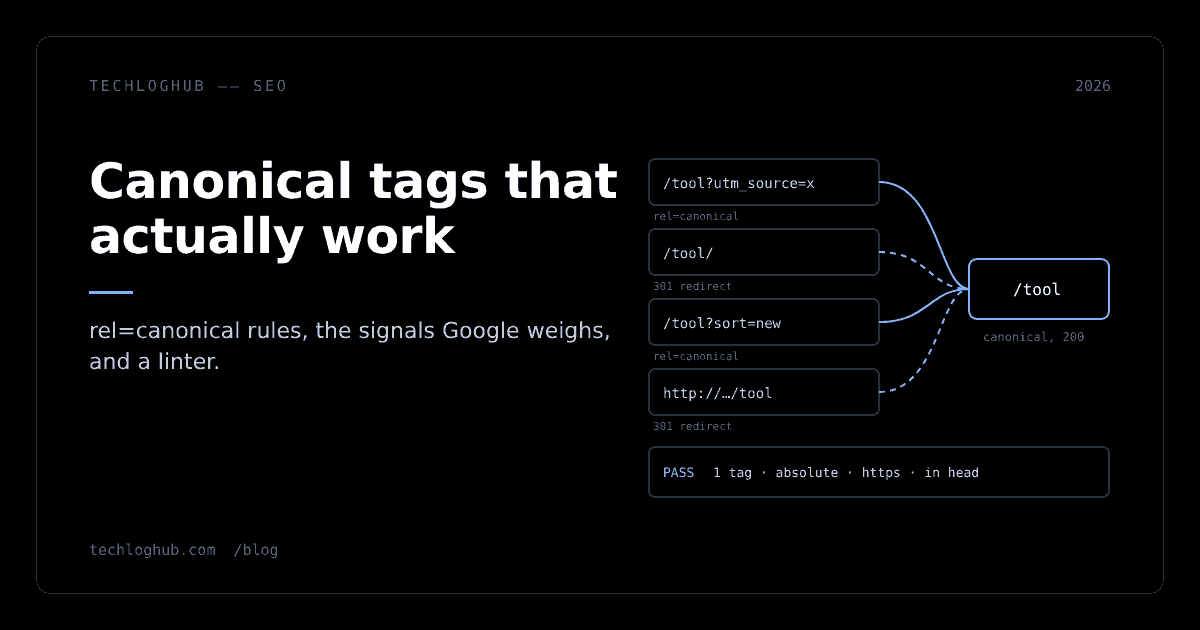
Quick answer: A canonical tag, <link rel="canonical" href="…"> in the page head, tells search engines which URL is the main version of content that appears at several addresses. Google treats it as a strong hint, not a command: redirects are an equally strong signal, sitemaps a weak one, and conflicting signals let Google pick its own canonical. Use one absolute, self-referencing canonical per page, point it at a URL that returns 200, and never canonicalize page 2 of a list to page 1.
Every site with query parameters, trailing-slash variants, sort orders, tracking links or syndicated copies has duplicate URLs, whether its owners know it or not. Canonicalization is how search engines collapse those duplicates into one URL to index and rank. You do not get to opt out of it; you only get to influence the result.
Most canonical advice online is a list of rules without the reasons. This guide ties every rule to its source (Google Search Central, RFC 6596 and the Lighthouse audit), shows the checks we ran against our own site on 21 November 2026, and includes a small linter you can run on your pages. To write the tag itself, our canonical tag generator builds the markup; this article is about getting the URL right.
What a canonical actually tells Google
Google defines canonicalization as "the process of selecting the representative –canonical– URL of a piece of content" (Google: What is canonicalization, updated 20 August 2026). When Google finds several URLs with the same or very similar content, it groups them into a duplicate cluster, picks one to show in results, and treats the rest as alternates.
Your canonical tag is one input into that choice. The same page lists the others: "whether the page is served over HTTP or HTTPS, redirects, presence of the URL in a sitemap, and rel="canonical" link annotations." It also states the part people forget: "indicating a canonical preference is a hint, not a rule."
That word "hint" explains most canonical confusion. If your tag says one thing and your internal links, sitemap and redirects say another, Google weighs them all and may disagree with you. A canonical works best when it confirms what every other signal already says.
The signals, ranked
Google's guide to consolidating duplicate URLs ranks the methods by strength (Google: How to specify a canonical URL, updated 10 July 2026):
| Method | Google's description | Use it when | Cost |
|---|---|---|---|
| Permanent redirect (301) | "A strong signal that the target of the redirect should become canonical" | The duplicate URL should not exist for users either (HTTP to HTTPS, old slugs, trailing slash) | Users never see the duplicate; needs server or framework config |
rel="canonical" link element | "A strong signal that the specified URL should become canonical" | Users need the duplicate (tracking parameters, sort orders, print views) | One tag per page; easy to get wrong in templates |
rel="canonical" HTTP header | Same signal, sent as a Link header | Non-HTML files such as PDFs | Server config per file type |
| Sitemap inclusion | "A weak signal" | Always, as a supporting signal | Only list canonical URLs |
The header form looks like this, using the example from Google's page:
Link: <https://www.example.com/downloads/white-paper.pdf>; rel="canonical"Google describes it as the method for "non-HTML documents such as PDF files". If the same white paper exists as an HTML page and a PDF, the header on the PDF can point at the HTML version.
What we found on our own site
Theory is cheap, so we checked how TechLogHub's own URLs behave. On 21 November 2026 we fetched six variants of our pages from a browser on the site, followed or recorded redirects, and parsed every <link rel="canonical"> in the returned HTML.
| Requested URL | Response | Canonical in HTML | Verdict |
|---|---|---|---|
/tools/canonical-tag-generator | 200 | https://techloghub.com/tools/canonical-tag-generator | Self-referencing, absolute |
/tools/canonical-tag-generator?utm_source=newsletter | 200 | https://techloghub.com/tools/canonical-tag-generator | Tracking variant consolidated |
/tools/canonical-tag-generator/ | Redirect to the slash-less URL | (redirect, no HTML) | Strongest signal used |
/tools/Canonical-Tag-Generator | 404 | none | Case variant does not exist |
/products?sort=new | 200 | https://techloghub.com/products | Sort order consolidated to the base list |
/tools/canonical-tag-generator (count check) | 200 | exactly 1 canonical element | No duplicate tags |
Three patterns are worth copying. Tracking parameters keep a 200 response, because the visitor clicked a real link and should see the page, but the canonical drops the parameters. The trailing-slash variant redirects instead of relying on a tag, because there is no reason for that URL to exist at all. And a sort order, which shows the same set of products in a different order, canonicalizes to the unsorted list.
The case variant returning 404 is a choice, not a mistake. A 404 means search engines never see a second copy. The alternative, redirecting mixed-case URLs to lowercase, is friendlier to people who type URLs by hand; either way, the duplicate never reaches the index with a 200. If you are still deciding how your URLs should look, our post on hyphens versus underscores in URLs covers the slug side of the same problem.
The rules, with the reason for each
These come from Google's consolidation guide unless noted.
Put it in the head, and only once
Google says the link element is "only accepted if it appears in the <head> section." A canonical in the body, which happens when a CMS widget or tag manager injects it late, is ignored. Two canonical elements with different URLs are worse than none: the Lighthouse SEO audit fails a page when "there is more than one canonical link" (Lighthouse: rel=canonical). This usually comes from two SEO plugins or a theme and a plugin both writing the tag. Check the rendered HTML, not your template.
Use absolute URLs
Relative canonicals are legal. RFC 6596, the specification for the link relation, says the target MAY "Specify a relative IRI" (RFC 6596, April 2012). Google supports them too but tells you to "Use absolute paths rather than relative paths". The reason is resilience: a relative canonical resolves against whatever host served the page, so a staging host, a CDN hostname or a scraper's mirror ends up canonicalizing to itself. An absolute URL with your production host and https survives all of those.
Self-reference the canonical page
Google: "Do include a rel="canonical" link on the canonical page itself." A self-referencing canonical costs nothing and defends against every parameter variant you have not thought of yet, because those variants inherit the template and therefore the same canonical.
Point at a URL that returns 200
RFC 6596 says a canonical target must not be "An IRI that returns an error code, such as a 4xx response in HTTP", and says to avoid targets that are "The source IRI of a permanent redirect". In practice this means canonicals rot. A slug change that adds a redirect leaves every old canonical pointing at a 301; a deleted page leaves canonicals pointing at a 404. Check canonical targets in the same job that checks internal links.
Do not chain canonicals
RFC 6596 also warns against a target "that also specifies a canonical link relation to an IRI other than itself", which creates "chained canonicals" that applications may ignore. If A says B and B says C, fix A to say C.
Keep every signal consistent
Google says not to specify different URLs as canonical for the same page across techniques: the tag, the header and the sitemap must agree. Link internally to the canonical URL too. Internal links are not on Google's list of canonical methods, but its best-practice list asks for it, and every link to a non-canonical variant is a vote for the wrong URL. Our internal linking suggester helps spot pages that link to variants instead of the main URL.
Do not use robots.txt, noindex or the removal tool
Google lists all three as things not to use for canonicalization. Blocking a duplicate in robots.txt stops Google from crawling it, so Google can never see the canonical tag on it. A noindex combined with a canonical sends opposite instructions: "drop this page" and "this page is a copy of that one". The URL removal tool hides URLs temporarily and does not consolidate anything. Use the robots.txt generator for crawl control, not for duplicates.
Pagination, hreflang and JavaScript
Three situations produce most canonical mistakes on developer sites.
Paginated lists
Google's pagination guide is explicit: "Don't use the first page of a paginated sequence as the canonical page", and instead "give each page its own canonical URL" (Google: Pagination best practices, updated 10 December 2025). RFC 6596 says the same thing: the first page of a multi-page listing should not be the canonical for later pages.
The logic is that page 3 of a blog archive is not a duplicate of page 1. It lists different posts. Canonicalizing it to page 1 tells Google the posts linked only from page 3 are not worth discovering through that page. Each ?page=n URL should canonicalize to itself. The same guide notes that Google "no longer uses" rel=next and rel=prev, so plain <a href> links between pages are what carry the crawl.
Sort orders and filters are different. ?sort=new shows the same items as the base list, which makes it a real duplicate, and canonicalizing it to the base list (as our products page does) is correct.
Language versions
Language variants are not duplicates of each other, even when the layout is identical. Google's guide says that with hreflang you should specify a canonical in the same language. A German page canonicalizing to the English page tells Google to drop the German page from German results. Each language version gets a self-referencing canonical, and hreflang annotations connect them. Lighthouse fails a page whose canonical "points to a page for a different region or language".
JavaScript-rendered pages
Google's JavaScript SEO guide says you "shouldn't use JavaScript to change the canonical URL" to something different from the original HTML, and to "always set the canonical URL to the same value as the original HTML" (Google: JavaScript SEO basics, updated 4 March 2026). The best method, per the same page, is to set it in HTML. If JavaScript must set it, it must be the only canonical tag on the page.
For Next.js App Router sites, set alternates.canonical in metadata. With metadataBase: new URL('https://acme.com') and alternates: { canonical: '/' }, the Next.js docs show the output <link rel="canonical" href="https://acme.com" />. Two details from those docs matter: a relative URL without metadataBase "will cause a build error", and an absolute URL in the field makes Next.js ignore metadataBase. Set metadataBase once in the root layout and pass relative paths per route, and every canonical comes out absolute.
Pair the canonical with the rest of your head tags in one place. Our meta tag generator and Open Graph tag generator produce matching markup, and og:url should equal the canonical.
A canonical linter you can run
To make the rules testable, we wrote a short Python checker. It parses one page's HTML, resolves the canonical against the page URL, and applies the rules above: head placement, duplicates, absolute URL, fragment, HTTPS, cross-host, root-pointing, target status and noindex conflicts. The core of it:
def lint(page_url, html, status_of=lambda u: 200, header_canon=None):
    p = P(); p.feed(html); out = []
    if p.body_canon: out.append('FAIL  canonical in <body> is ignored (Google: only accepted in <head>)')
    if len(set(p.canon)) > 1: out.append(f'FAIL  {len(p.canon)} conflicting canonicals: {p.canon}')
    if not p.canon: out.append('WARN  no canonical; Google will pick one itself'); return out
    href = p.canon[0]; target = urljoin(page_url, href); t = urlsplit(target); src = urlsplit(page_url)
    if not urlsplit(href).scheme: out.append(f'WARN  relative href "{href}" (allowed, Google recommends absolute)')
    if t.fragment: out.append('FAIL  canonical has a #fragment')
    if t.scheme != 'https': out.append('WARN  canonical is not HTTPS')
    if t.netloc != src.netloc: out.append(f'WARN  cross-host canonical -> {t.netloc} (Lighthouse fails this)')
    if t.path in ('', '/') and src.path not in ('', '/'): out.append('FAIL  deep page points at site root')
    code = status_of(target)
    if code >= 400: out.append(f'FAIL  canonical target returns {code} (RFC 6596: must not be an error)')
    elif 300 <= code < 400: out.append(f'FAIL  canonical target redirects ({code}); point at the final URL')
    if 'noindex' in p.robots: out.append('FAIL  noindex + canonical send opposite signals')
    ...
We ran it against nine test pages that reproduce the mistakes we see most often. This is the real output:
--- clean  (https://example.com/tools/json?utm_source=x)
   PASS  https://example.com/tools/json
--- relative  (https://example.com/blog/post)
   WARN  relative href "/blog/post" (allowed, Google recommends absolute)
--- two plugins  (https://example.com/pricing)
   FAIL  2 conflicting canonicals: ['https://example.com/pricing', 'https://example.com/pricing/']
--- injected late  (https://example.com/a)
   FAIL  canonical in <body> is ignored (Google: only accepted in <head>)
   WARN  no canonical; Google will pick one itself
--- paginated  (https://example.com/blog?page=3)
   FAIL  deep page points at site root
--- stale target  (https://example.com/docs)
   FAIL  canonical target redirects (301); point at the final URL
--- deleted target  (https://example.com/x)
   FAIL  canonical target returns 404 (RFC 6596: must not be an error)
--- noindex mix  (https://example.com/tag/js)
   FAIL  noindex + canonical send opposite signals
--- syndicated  (https://partner.dev/repost)
   FAIL  canonical has a #fragment
   WARN  canonical is not HTTPS
   WARN  cross-host canonical -> example.com (Lighthouse fails this)
Two results deserve comment. The "two plugins" case fails even though both URLs differ only by a trailing slash; to a crawler they are different URLs, and the page has announced two canonicals. The "injected late" case fails twice: the body tag is ignored, so as far as search engines are concerned the page has no canonical at all.
The cross-host case is a warning, not a failure, on purpose. Lighthouse fails any canonical that "points to a different domain", but a syndication partner pointing at your original is a legitimate use. Our linter flags it for a human to confirm instead of treating it as an error. Google's troubleshooting page lists both "syndicated content" and "a copycat website" among common canonicalization issues (Google: Fix canonicalization issues), so a cross-domain canonical on someone else's site is a request, not a guarantee.
Where this linter falls short
It checks one page in isolation. It cannot see whether your sitemap lists the same URL, whether internal links point at the canonical, or whether two different pages both claim the same canonical. Those need a crawl. It also takes target status codes as an input rather than fetching them, which keeps the example short; in a real pipeline, fetch each unique canonical target once with redirects disabled. Pair it with your XML sitemap build so both come from the same list of canonical URLs.
When Google picks a different canonical
Sometimes you do everything right and Search Console still shows a different "Google-selected canonical". The troubleshooting guide's first step is to use the URL Inspection tool to "check which page Google considers to be the canonical page". Its table of common causes:
- Language variants without localized annotations, where pages in different languages look like duplicates because hreflang is missing.
- Incorrect canonical elements, usually a CMS or plugin writing the wrong URL or redirect.
- Misconfigured servers, such as identical soft-404 pages or one host serving another host's content.
- Malicious hacking that injects redirects or cross-domain canonicals.
- Syndicated content and copycat websites.
Two practical notes. First, patience is part of the fix: the troubleshooting page says Google "might hold pages in a duplicate cluster for up to two weeks". Do not change canonicals daily while waiting. Second, if Google keeps choosing a different URL, ask whether your pages really are different. Thin template pages with the same boilerplate and a few changed words often get clustered no matter what the tag says. Our post on programmatic SEO without thin pages covers how to make templated pages distinct enough to stand alone, and designing a content taxonomy covers how to avoid creating near-duplicate category pages in the first place.
A pre-launch canonical checklist
- Every indexable page has exactly one
<link rel="canonical">in the rendered<head>. - The canonical is absolute,
https, on your production host, with no fragment. - Canonical pages reference themselves; parameter, sort and tracking variants point to the base URL.
- Paginated pages each canonicalize to themselves, never to page 1.
- Each language version canonicalizes to itself, with hreflang connecting them.
- Canonical targets return 200: no redirects, no 404s, no chains.
- Variants that users never need (HTTP, trailing slash, old slugs) redirect instead of relying on a tag.
- The sitemap lists only canonical URLs; internal links use canonical URLs.
- No page combines
noindexwith a canonical pointing elsewhere, androbots.txtdoes not block duplicates you want consolidated. - After launch, spot-check the Google-selected canonical in URL Inspection for each template.
More SEO utilities, including the breadcrumb schema generator and heading structure analyzer, are on our free tools page.
FAQ
What is a canonical tag?
A canonical tag is a <link rel="canonical" href="URL"> element in a page's head that tells search engines which URL is the main version of content available at several addresses. Search engines use it to consolidate duplicates and show one URL in results. It is defined in RFC 6596 and supported by Google as a strong hint.
Does Google always follow rel=canonical?
No. Google calls a canonical preference "a hint, not a rule". It also weighs redirects, HTTPS, sitemap inclusion and other signals, and can choose a different canonical if those signals disagree with your tag. Check the Google-selected canonical with the URL Inspection tool in Search Console.
Should every page have a self-referencing canonical?
Yes. Google recommends including a rel="canonical" link on the canonical page itself. A self-referencing canonical makes every parameter or tracking variant of the page point back to the clean URL automatically, because the variants share the same template.
Should paginated pages canonicalize to page 1?
No. Google's pagination guidance says not to use the first page of a paginated sequence as the canonical and to give each page its own canonical URL. Page 2 lists different items from page 1, so it is not a duplicate. Sort orders and filters that show the same items can canonicalize to the base list.
Can a canonical tag point to another domain?
It can, and syndication partners sometimes use one to credit the original. Google treats it as a hint, its troubleshooting guide lists syndicated and copied content as common canonical issues, and Lighthouse fails canonicals that point to a different domain. Use cross-domain canonicals deliberately, never by accident from a misconfigured host.
What is the difference between a canonical tag and a 301 redirect?
A 301 redirect sends users and crawlers to the new URL, so the old URL effectively disappears; Google calls it a strong canonical signal. A canonical tag keeps both URLs reachable and asks search engines to index one of them. Redirect when users do not need the duplicate, and use a canonical when they do, as with tracking or sort parameters.
Checks and linter output in this article are from 21 November 2026; re-run them against your own templates after every redesign or CMS upgrade.