
tensorViz
tensorViz draws a PyTorch or JAX/Flax model as an interactive graph from the Python in your project, with recorded tensor shapes, layer-to-source links and revision diffs, in VS Code, Cursor or VSCodium or through a Claude Code/Codex/Cursor plugin. Free and MIT-licensed.
About tensorViz
What tensorViz is
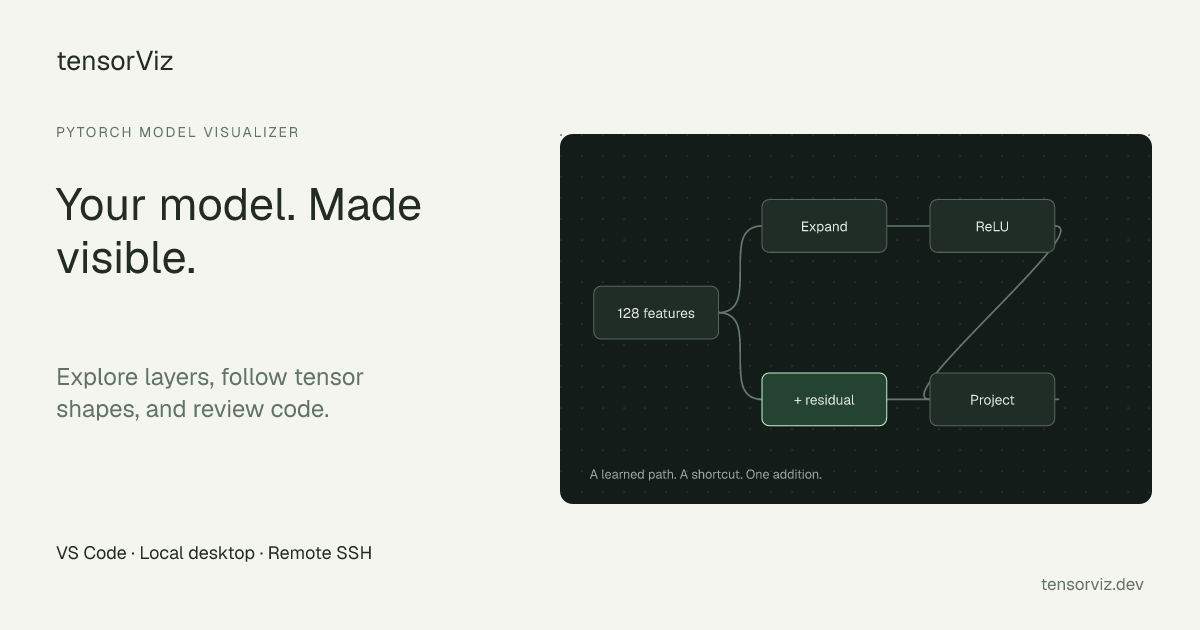
tensorViz is a free, MIT-licensed tool that draws a PyTorch (or, in the editor, JAX/Flax) model as an interactive graph straight from the Python source in your project. It runs one ordinary forward call of the model on your machine, records the tensor shape flowing through every module, and opens a canvas where you can expand blocks, follow tensors through the architecture and jump from any layer to the line of Python that defines it. It ships two ways: an editor extension for VS Code, Cursor and VSCodium, where an "Open as Graph" action appears above each nn.Module class, and a coding-agent plugin (in preview) for Claude Code, Codex and Cursor.
The agent side is what the November 2026 launch, "Let your coding agent see inside your PyTorch model", is about. Through tools such as get_graph, inspect_nodes and propose_edit, an agent can read the captured graph instead of guessing shapes from code, and propose a change ("edit the classifier head to output 20 classes") that you review as a graph and a Python diff before accepting or discarding it. A Graph review mode compares two revisions of a model layer by layer with the code diff beside it, and shared graphs and published models open in the browser in tensorViz's Model Explorer without installing anything.
The project is developed in the open on GitHub as tensorviz-org/tensorviz, with the licence notice reading "Copyright (c) 2026 TensorViz contributors". The VS Code Marketplace listing, by publisher tensorviz, was first published on September 26, 2026, and version 1.0.2 of the extension and plugin was released on November 19, 2026. Note that the tensorviz package on PyPI is an unrelated project: pip install tensorviz does not install this tool.
How capture works
- Eager, not exported. No
torch.export, TorchScript or ONNX step. Capture runs one normal eager forward call in the Python environment you choose and records shapes with forward module hooks and aTorchDispatchMode. - Inputs from a comment or your code. A comment such as
# tensorviz: input=1,16above the class supplies an example input shape when no saved setup or unambiguous example call does; you can review and change inputs before a capture. "Inspect source only" draws the graph from the code without running the model, with shapes shown as "Not recorded". - Local execution. The model runs on your machine; with VS Code Remote SSH, tensorViz is installed on the remote host and files and execution stay there. Core graph tools do not need an AI subscription or provider key.
- Shareable files. A
.tensorviz.jsonfile holds the graph, capture details, layout, saved views and notes. Model source and weights are not included. - Library bases it recognises. Besides
torch.nncontainers and layers, the source scanner treats Hugging FacePreTrainedModel, diffusersModelMixin, LightningLightningModule, PEFT models, timm and torchvision backbones, PyTorch GeometricMessagePassingand MMEngine models as model classes. A Hugging Face path brings supported Hub models into the editor as graphs.
What we ran: the source scanner on a two-model file
On November 21, 2026 we cloned the repository at commit 6d08ed1 (November 20, 2026) and called its static scanner directly from Python, without PyTorch installed and without the extension, on a file with two models and a plain config class, with the input comment placed above the outer model:
# two.py
class Encoder(nn.Module):              # line 4
    ...  self.proj = nn.Linear(16, 32)
# tensorviz: input=1,16                # line 11
class Classifier(nn.Module):           # line 12
    ...  self.enc = Encoder(); self.head = nn.Linear(32, 4)
class Config:
    hidden = 32

$ python3 -I run.py tensorviz/ two.py .
scan_source: [('Encoder', 4, ['nn.Module']), ('Classifier', 12, ['nn.Module'])]
Encoder    -> ([], None)
Classifier -> ([('1,16', 11)], None)
ranked:    ['Classifier', 'Encoder']
What it showed:
- Only modules count.
Configwas ignored; the twonn.Moduleclasses were found from the AST alone, which is how "Inspect source only" can work without importing torch. - The input comment belongs to one class. In a file with several models, the declaration on line 11 applied to
Classifieronly, andEncodergot none. The module docstring explains why this was centralised: before, "one class could be drawn, run and saved with three different inputs". - The outer model is the default entry point. The ranking put
Classifier, which composesEncoder, ahead of it, so opening the file starts from the whole model rather than a sub-block.
We did not run a capture: that needs PyTorch and the extension's service runtime. The site's published shape-mismatch example shows what a capture records: a residual block delivering 128 features into a head declared with nn.Linear(64, 10) fails at line 31 with RuntimeError: mat1 and mat2 shapes cannot be multiplied (1x128 and 64x10), and the graph marks the mismatch at the head (recorded September 16, 2026 on CPU with PyTorch 2.7.1).
Requirements and status (checked November 21, 2026)
| Item | Value |
|---|---|
| Price and licence | Free; source under MIT. The canvas uses tldraw 5.0.1 under the tldraw licence |
| Current release | v1.0.2, November 19, 2026 (VSIX, Cursor ZIP, plugin catalog and per-platform runtimes on GitHub Releases) |
| Editor extension | VS Code 1.106 or newer, Cursor, VSCodium (Marketplace and Open VSX); model Python 3.10+, tensorViz service Python 3.11+ |
| Agent plugin (preview) | Claude Code, Codex, Cursor on macOS ARM64/x64, Linux x64 (glibc 2.31+) and ARM64 (glibc 2.35+), Windows x64/ARM64 through Codex; CPython 3.12, CPU capture; downloads a verified runtime on first connection |
| Adoption | 111 Marketplace installs and one 5-star rating; 8 GitHub stars (repository created October 27, 2026) |
tensorViz vs the alternatives
| tensorViz | Netron | torchview / torchviz | Google Model Explorer | |
|---|---|---|---|---|
| Input | Python source in your project, plus one eager forward call | Saved model files (ONNX, TorchScript, safetensors and others) | Python model object | Converted graphs; PyTorch through torch.export |
| Output | Interactive, expandable canvas in the editor or agent | Interactive viewer | Static Graphviz diagram | Interactive viewer for very large graphs |
| Layer to source link | Yes | No | No | No |
| Revision diff | Graph review between commits | No | No | Split view of two graphs |
| Coding-agent access | Plugin with graph and edit tools | No | No | No |
The comparison follows tensorViz's own FAQ, which recommends Netron for exported files and Model Explorer for very large or converted graphs; torchinfo, which prints a text summary, is the other common lightweight option.
Who it's for
ML engineers and researchers who debug shape errors or explain architectures to teammates; people reviewing model changes in pull requests who want to see what changed in the graph, not only in the code; and developers who let a coding agent edit PyTorch models and want the agent working from recorded shapes, with a human approving each edit.
Limits and trade-offs
- Capture runs your code. One forward pass executes the model and whatever its module imports do, in your environment; use "Inspect source only" for code you do not trust.
- CPU capture in the plugin. The agent plugin is a preview with CPU-only capture on CPython 3.12; very large models will be slow or exceed memory, and Windows Claude Code/Cursor and musl Linux are outside its tested scope.
- One host per agent. The docs say not to connect the same agent to both the plugin and the editor extension.
- Redistribution needs a tldraw key. tensorViz's code is MIT, but anyone shipping their own build of the extension or plugin needs their own tldraw licence key; using the published builds is unaffected.
- Early and small. 1.0 shipped in November 2026 with a small user base so far; the name clash with the unrelated PyPI package can confuse installs.
- Privacy is local by default, with care around agents. The privacy notice says nothing reaches tensorviz.dev unless you publish a graph, and the plugin's browser and panel builds exclude the hosted sign-in and analytics modules. But graph details the plugin hands to a coding agent can enter that agent's model-provider conversation, so the agent vendor's policies apply to proprietary architectures.
Related on TechLogHub
- AI agent, LLM and MCP, the layer coding-agent plugins build on.
- The Python cheat sheet and Git cheat sheet for model code and revision diffs.
- JSON formatter for reading
.tensorviz.jsongraph files. - RunLocalAI, for checking which AI models run on your own hardware.
- Observability and CI/CD for taking model checks into pipelines.
Value & Audience
Value Proposition
See a model's real architecture and tensor shapes next to its code, compare revisions as graphs, and let a coding agent work from that graph with every edit reviewed by you.
Problem Solved
Shape mismatches and architecture changes are hard to see in PyTorch code, existing visualisers need exported files or produce static diagrams, and coding agents edit models without seeing their shapes.
Tech Stack
Social & Links
Loading ratings...
Loading comments...
Gallery
Feedback & Roadmap
tensorViz FAQ
Common questions about tensorViz's features, pricing, and use cases
Is tensorViz free to use?
Yes. tensorViz is open source and free to use.
What are some alternatives to tensorViz?
Popular Developer Tools alternatives to tensorViz include CodeSpy, DevOp and Global TTFB Checker.
tensorViz appears in
You May Also Like

CodeSpy
CodeSpy quietly scans your WordPress site for what's actually wrong, from messy code and plugin conflicts to broken forms and layout issues, explaining it in plain language.
View Product
DevOp
An Agentic IDE for Windows, Mac, and Linux that leverages intelligent, autonomous AI coding agents to accelerate software development.
View ProductGlobal TTFB Checker
Free global TTFB checker. Measure Time To First Byte from 114 countries with live world map, city-level results, and instant latency reports. No signup.
View Product
Next.js AI SaaS Cursor Rules Pack
15 battle-tested .mdc Cursor rules for Next.js AI SaaS, covering Supabase, Clerk, Stripe, and Verc/AI SDK.
View ProductOne email a week
TechLogHub tracks 920 tools and 614 open-source projects. Get the week's new launches, release roundups and open-source picks — nothing else.
Get the TechLogHub digest
One email a week: new and trending developer tools, fresh comparisons, and what shipped. Unsubscribe in one click.