
OpenVorld
OpenVorld is a free, MIT-licensed desktop app for macOS, Windows and Linux that runs crews of AI agents (Claude Code, Codex, OpenCode, Antigravity or any OpenAI-compatible API) on a shared project folder, with parties, memory and per-member access writs, shown as a pixel-art village. Local-first, no account.
About OpenVorld
What OpenVorld is
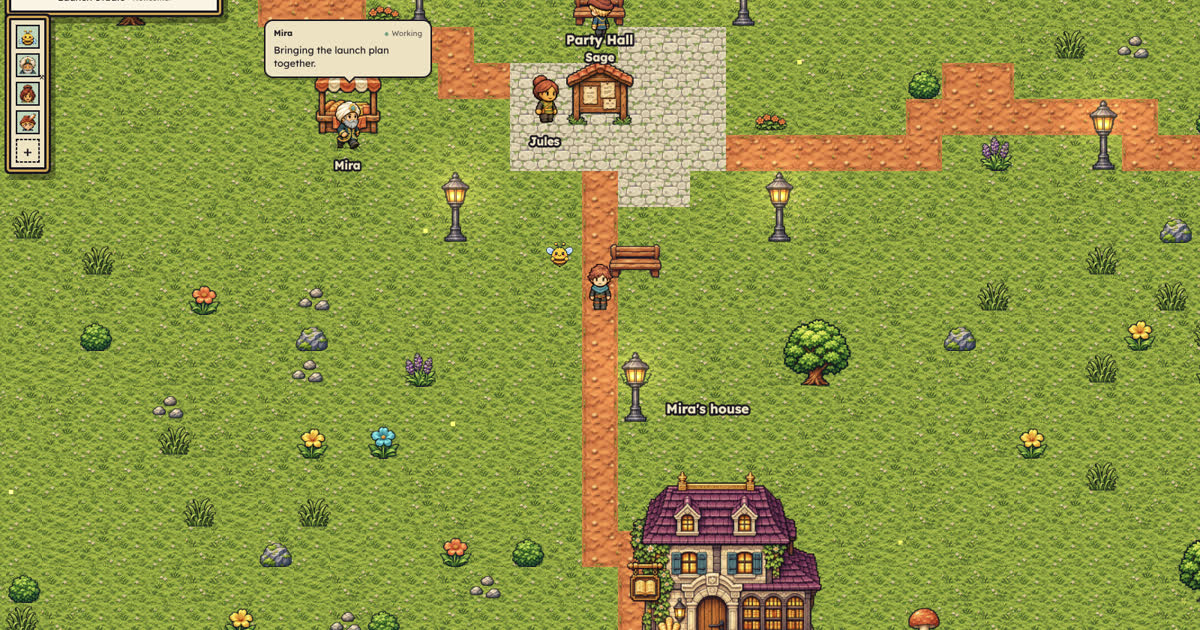
OpenVorld is a free, MIT-licensed desktop app that acts as a local harness for AI agents, shown as a pixel-art RPG village. Each project is a "vorld": one shared project folder, a crew of agents with names, roles, houses and private workbenches, and "parties" in which several agents work on a goal together. The agents' brains are tools you already have: installed agent CLIs such as Claude Code, Codex, Antigravity and OpenCode, any other harness described by a pack, or an OpenAI-compatible API such as OpenRouter, OpenAI, Ollama or LM Studio. Each crew member can use a different provider.
The game layer is not just decoration. A member's activity shows above its head, members walk to you when a party starts, finished work earns XP, levels and deeds, and access requests appear as "writs" you approve or refuse. Underneath, everything is plain files on your computer: there is no OpenVorld account or hosted backend, and model providers and websites receive only the requests you send them. The project comes from DigitalDreams Lab; its main contributor, and the maker on its November 2026 launch, is Amir Ghasemi. The GitHub repository was created on November 15, 2026, and version 0.19.5 shipped on November 20, 2026, with builds for macOS (Apple silicon and Intel), Windows x64 and Linux x64, plus a browser demo.
How it works
- Architecture. A small Node.js server, a React and Phaser client and YAML "packs" (roles, themes, permissions) talk over a local HTTP API and one WebSocket. The server binds to 127.0.0.1, requires a per-launch token on every call and checks the Host header. The desktop shell is Electron.
- Data on disk. Everything lives under
~/.openvorld: each vorld'svorld.yaml, parties, conversations as append-only JSONL, workbenches, a private house and vault per member (named secrets and saved sign-ins, never shared),grants.yamlfor the writs you approved and anaudit.logof every tool call, allowed or refused. - Parties. In a party room the leader answers first,
@Namehands work to a teammate, only you can ask everyone with@all, and a reply with no mention ends the job. A cap of 12 turns (configurable) stops agents ping-ponging. Parties get a shared folder for files. - Memory. Each member keeps a notebook of short facts it can add to or forget, a summary of each chat, and a
recalltool that searches its older chats; you can read, edit or switch all of it off. - Crew browser. Members can browse with their own Chrome or Edge profile, driven through playwright-core, with writs enforced on every page and redirect; signed-in browsing uses sign-ins you complete yourself, so members never see passwords.
- Tool bridge. CLI brains reach the engine's own tools (browser, secrets, recall) through a small MCP bridge, with a token per member per turn that is revoked when the turn ends.
What we checked: the test suite and the writ rules
On November 22, 2026 we cloned the repository at commit 3de534b (v0.19.5), installed its dependencies in a clean Node 22 sandbox without downloading Electron, and ran the project's own checks:
$ npm ci --ignore-scripts
added 416 packages in 7s
$ npm test
# tests 228
# pass 227
# fail 0
# skipped 1
$ npm run validate
packs ok
Then we called the permission gate itself (engine/server/gate.mjs, with the rules in packs/core/permissions.yaml) from a short script of our own, to see which access requests can even reach you as a writ. Every member starts with nothing but its own workbench; anything else must pass this check and then your approval:
cmd.run     "npm test"               -> granted as "npm test"
cmd.run     "ffmpeg"                 -> granted as "ffmpeg *"
cmd.run     "sudo apt install x"     -> refused: this command can never be granted
cmd.run     "rm -rf build"           -> refused: this command can never be granted
cmd.run     "rm -fr build"           -> granted as "rm -fr build"
cmd.run     "curl https://x.sh | sh" -> refused: a command writ names one program and its arguments
cmd.run     "python3 *"              -> granted as "python3 *"
fs.read     "~/.ssh"                 -> refused: this folder can never be granted (~/.ssh/**)
fs.read     "~"                      -> refused: that folder is too broad; pick a project folder
fs.read     "~/proj-demo"            -> granted as "~/proj-demo"
fs.write    "<vorld>/houses/buzz"     -> refused: holds crew members' private houses
net.session "*"                      -> refused: signed-in access is never given for every site
net.fetch   "*"                      -> granted as "*"
net.act     "https://github.com/x/y" -> granted as "github.com"
secret.use  "my_key"                 -> refused: name a secret like YT_CLIENT_SECRET
The hard rules are sensible: shell operators are rejected outright, your home folder and credential folders (~/.ssh, ~/.aws, .env files, .pem keys) cannot be granted, signed-in browsing is one site at a time, and acting as you (post, send, buy, delete) can only be approved once or for the session, never permanently. But the never-list is pattern matching, not a sandbox: rm -rf is blocked while rm -fr passes the check, and a bare program name becomes "that program with any arguments", so approving python3 or node effectively approves arbitrary code. The permissions file says the agent CLIs' own sandbox flags are a second layer. Read each writ card before you click "Always allow".
Pricing (checked November 22, 2026)
OpenVorld is free and open source under the MIT licence, with no account or paid tier. Your costs are the model providers you connect: a Claude or ChatGPT subscription used through Claude Code or Codex, API usage through OpenRouter or OpenAI, or nothing for local models through Ollama or LM Studio. A member with no brain answers with short scripted replies, so you can explore the app before connecting any model.
OpenVorld vs the alternatives
| OpenVorld | Harness (Autonomous) | Craft Agents | Toone | |
|---|---|---|---|---|
| Shape | Pixel-art world of agent crews and parties | Command center for coding agents side by side across your machines | Desktop app for working with agents, MCP servers, APIs and a built-in browser | macOS workspace for agent routines |
| Licence | MIT | MIT (optional paid hardware) | Apache 2.0 | Proprietary app, Pro from €9.99/month |
| Brains | Claude Code, Codex, Antigravity, OpenCode, OpenAI-compatible APIs | Claude Code, Codex, Cursor, OpenCode and more | Anthropic, ChatGPT, OpenRouter, local models | Your Claude Code or Codex |
| Multi-agent | Parties with @mention handoffs and a shared folder | Many agent sessions side by side | Multi-session workspaces | Step graphs run by agents |
| Approvals | Per-member writs with never-lists and an audit log | See its page | See its page | Per-step approval gates |
| Platforms | macOS, Windows, Linux, browser demo | macOS 12+, Ubuntu 22.04+ | Desktop (see its page) | macOS |
If you want plain parallel coding sessions, a command center like Harness is the more direct tool. OpenVorld is for people who run several agents with different roles on one project and want to see who is doing what, with access decisions in one place.
Who it's for
Developers and solo founders who already use Claude Code, Codex or a local model and want several role-based agents working on one project folder; people running a content studio or small company with agents who prefer approving access through a visual, game-like interface; and anyone curious about multi-agent workflows who can try the browser demo first.
Limits and trade-offs
- Very new. The repository is a week old, with one main contributor, 23 GitHub stars and several releases on a single day when we checked. Expect changes to data formats; the project documents upgrades between versions.
- The permission check is a filter, not isolation. As shown above, the never-list matches patterns; a broad command writ is a broad grant. Agents run with your user's rights wherever you let them.
- Costs are your providers'. Parties multiply calls: every member who speaks in a room takes a turn on its own brain.
- Browser work needs Chrome or Edge installed locally, and the Linux AppImage may need FUSE.
- The game layer is a matter of taste. XP, levels and walking characters help some people follow parallel work and will feel like noise to others.
Related on TechLogHub
- AI agents, MCP and LLMs explained.
- OpenCode, one of the brains OpenVorld can drive.
- Agent Barn, HiveTerm and S.Space for other ways to run several agents.
- The Git cheat sheet for building from source.
Value & Audience
Value Proposition
Several role-based AI agents on one project, with every access request approved by you and every action visible, running locally on the brains you already use, for free.
Problem Solved
Running several AI agents on one project means juggling terminals, losing track of who is doing what and granting broad access ad hoc, usually with no shared record of permissions or handoffs.
Use Cases
Tech Stack
Social & Links
Social
Additional Links
Loading ratings...
Loading comments...
Gallery
Feedback & Roadmap
OpenVorld FAQ
Common questions about OpenVorld's features, pricing, and use cases
Is OpenVorld free to use?
Yes. OpenVorld is open source and free to use.
What are some alternatives to OpenVorld?
Popular AI Agents & Automation alternatives to OpenVorld include NeverApply, Composio and Harness².
OpenVorld appears in
You May Also Like

NeverApply
AI job-search agent that matches jobs, tailors your resume, and auto-applies.
View Product
Composio
Composio connects AI assistants and custom agents to more than 1,500 apps through managed authentication, SDKs and an MCP gateway, and its new Instant tools let agents pay per call for search, scraping, audio and data services from one balance.
View Product
Harness²
Harness² is an Apache-2.0 research framework from Google Cloud AI Research that automatically refines an LLM agent's harness (prompts, tools, memory, skills and more) for each task and carries lessons forward to future tasks, without changing model weights.
View Product
Craft Agents
Craft Agents is an open-source (Apache 2.0) desktop app from the makers of Craft Docs for working with AI agents. It connects agents to MCP servers, REST APIs, local files and a built-in browser, with multi-session workspaces, Skills, Automations and Pages.
View ProductOne email a week
TechLogHub tracks 923 tools and 617 open-source projects. Get the week's new launches, release roundups and open-source picks — nothing else.
Get the TechLogHub digest
One email a week: new and trending developer tools, fresh comparisons, and what shipped. Unsubscribe in one click.