



Google Added creator to VideoObject. It Is Not a Ranking Lever
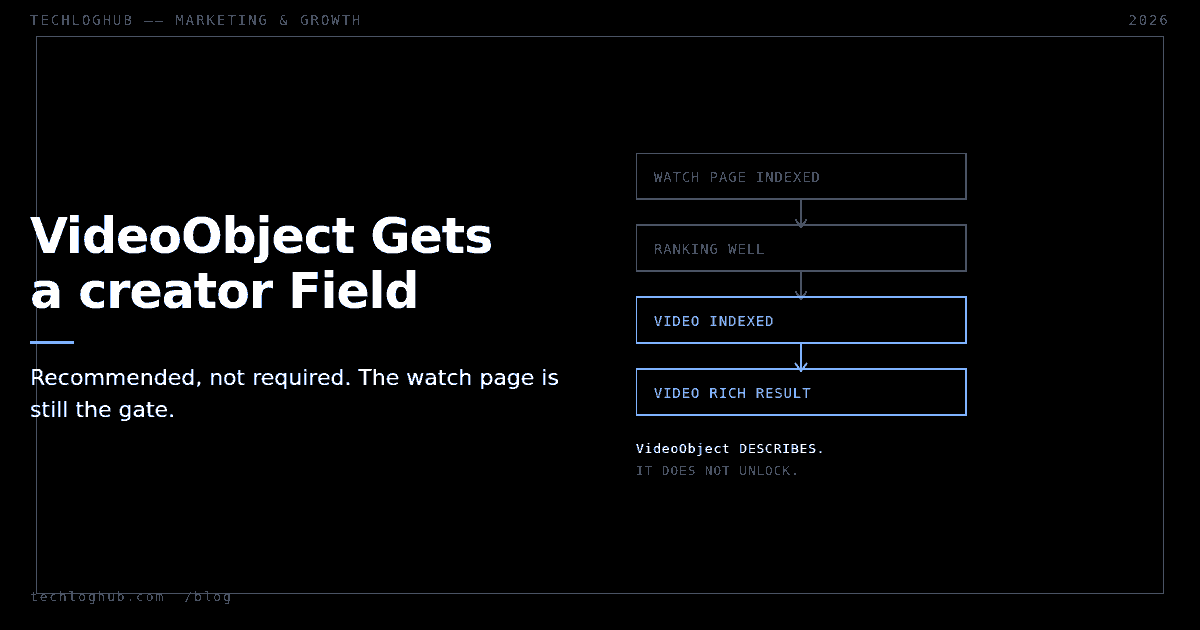
Quick answer: On 24 September 2026 Google added the creator property to the VideoObject docs and updated interactionStatistic. Both are recommended, not required — VideoObject still requires only name, thumbnailUrl and uploadDate. Adding them will not get an unindexed video indexed. Google's own gate is blunter than any property: the watch page "must be performing well in Search before its video can be considered for indexing."
If you publish developer tutorials with a screencast on the page, this doc change is worth ten minutes of your attention and no more. The temptation is to treat a new schema property as a lever. It is closer to a label.
Here is what actually changed, what it is for, and where the real constraint sits.
What the 24 September change says
Google's documentation updates log records it in one line: added the creator property, noting support for author, and updated interactionStatistic. No announcement, no blog post, no change to what is required.
The VideoObject reference now documents creator as "the person or organization that created or published the video," typed as Person or Organization, with author named as an accepted alternative field. If you supply it, creator.name is required and creator.url should be "a link to a web page that uniquely identifies the creator."
"creator": {
  "@type": "Person",
  "name": "Jane Doe",
  "url": "https://example.com/authors/jane-doe"
}
That url requirement is the tell. Google is not asking for a display string, it is asking for an identifier — something that resolves to a page and can be reconciled with the same entity elsewhere. If you publish under a team name, point every video at one stable author page rather than inventing a URL per post.
interactionStatistic, and what Google does not promise
The shape is an InteractionCounter, described as "user statistics applied to the video, if applicable." The interactionType accepts WatchAction, LikeAction, CommentAction or ShareAction, and userInteractionCount takes an integer.
"interactionStatistic": {
  "@type": "InteractionCounter",
  "interactionType": { "@type": "WatchAction" },
  "userInteractionCount": 5647018
}
Read the documentation for what it commits to, which is nothing about display. It is listed as recommended. It does not state that the count appears in a result, and it does not state that it influences ranking. Anyone telling you view counts in schema will lift your video in Search is filling that silence with a guess.
There is also a self-inflicted risk here that people walk into. If you hardcode a watch count into a static page and never update it, you have shipped a number that is wrong within a week and will stay wrong for years. Either wire it to real data or leave the property out. This is the same discipline that applies to any figure you emit in structured data — a point worth revisiting alongside what schema is still actually for now that several rich result types have been retired.
The requirements that actually gate you
VideoObject requires exactly three properties:
| Property | Type | Catch |
|---|---|---|
name | Text | Must be unique per video on your site |
thumbnailUrl | Repeated URL | Stable URL, min 60×30px, mostly opaque |
uploadDate | DateTime | ISO 8601, first publication not last edit |
The thumbnail rule that catches people is the opacity one: at least 80% of the thumbnail's pixels must have an alpha value greater than 250. A PNG exported with a transparent background will not meet it, and that is a common default in design tooling. Accepted formats are BMP, GIF, JPEG, PNG, WebP, SVG and AVIF. If your build pipeline generates thumbnails, run one through an image format converter and confirm what you are actually shipping.
The real gate is the page, not the markup
Google's video best practices state the condition plainly: the watch page must be indexed, and "the indexed watch page must be performing well in Search before its video can be considered for indexing."
That is a dependency ordering, and it runs the opposite way from how most people approach video SEO. Ranking comes first; video indexing is downstream of it. Perfect VideoObject markup on a page that nobody finds buys you nothing.
Two more structural requirements follow from the same doc. The video must be embedded on the watch page and "can't be hidden behind other elements" — a video inside a collapsed accordion or a modal that only opens on click is at risk. And Google wants a dedicated watch page per video, one whose main purpose is that single video. A tutorial index page with eight embeds is not eight watch pages; it is one page with a lot of video on it.
For a developer site that means the architecture decision comes before the schema decision. If you run a tutorials section where each screencast has its own URL, transcript and description, you are set up correctly. If videos are scattered as illustrations inside long written guides, adding VideoObject to those guides is not going to produce video results, and that is fine — the written page is the thing that ranks.
Structured data or a video sitemap, and the features beyond both
Google accepts either approach and asks that the information be consistent across them, with unique thumbnailUrl, name and description per video. Most teams already emit JSON-LD for other reasons, so structured data is usually less work than maintaining a second feed — though if you generate sitemaps programmatically, a sitemap generator makes the alternative cheap.
Two optional features are worth knowing about. Key moments can be detected automatically by Google or declared explicitly with Clip or SeekToAction markup; Clip works across all Google Search languages while SeekToAction is limited to twelve. For a chaptered tutorial, Clip is the safer choice. The LIVE badge comes from BroadcastEvent markup and needs the Indexing API so Google crawls at the right moment — relevant if you stream, irrelevant otherwise.
Verify with Search Console rather than by eye. The Video indexing report shows which watch pages have an indexed video and why the others failed; the Video rich result report surfaces VideoObject errors specifically. Those two reports will tell you more in five minutes than a week of markup tweaking. For the flat structured-data types you hand-maintain elsewhere on the site, a FAQ schema generator or HowTo schema generator beats writing JSON-LD by hand.
FAQ
Is creator now required in VideoObject?
No. VideoObject still requires only name, thumbnailUrl and uploadDate. creator is recommended, and if you include it, creator.name becomes required.
Should I use creator or author?
Google documents creator as the property and notes that author is supported. New markup should use creator; existing author markup does not need urgent rewriting.
Will interactionStatistic show my view count in search results?
Google does not say so. The property is documented as recommended and described as "user statistics applied to the video, if applicable," with no stated display surface and no stated ranking effect. Supply it only if the number is accurate and maintained.
Why is my video not getting indexed despite valid markup?
Most likely the watch page itself. Google requires the page to be indexed and performing well in Search before the video is considered, and the video must be visibly embedded rather than hidden behind other elements. Check the Video indexing report in Search Console for the stated reason.
Do I need a separate page for every video?
For video features, yes — Google asks for a dedicated watch page whose main purpose is displaying that single video. Pages where video is secondary content do not qualify as watch pages.
Structured data or a video sitemap — which one?
Either works, and Google asks that the two agree if you use both. Most sites already emit JSON-LD, so VideoObject is usually the lower-maintenance path.
Fix the page first. The markup only describes what is already working.