

pnpm 12.11 Can Install Agent Skills From Your Dependencies
pnpm 12.11 links agent skills from direct dependencies into .claude/skills after pnpm approve. What the new permissions setting covers and how to review it.
pnpm 12.11 Can Install Agent Skills From Your Dependencies
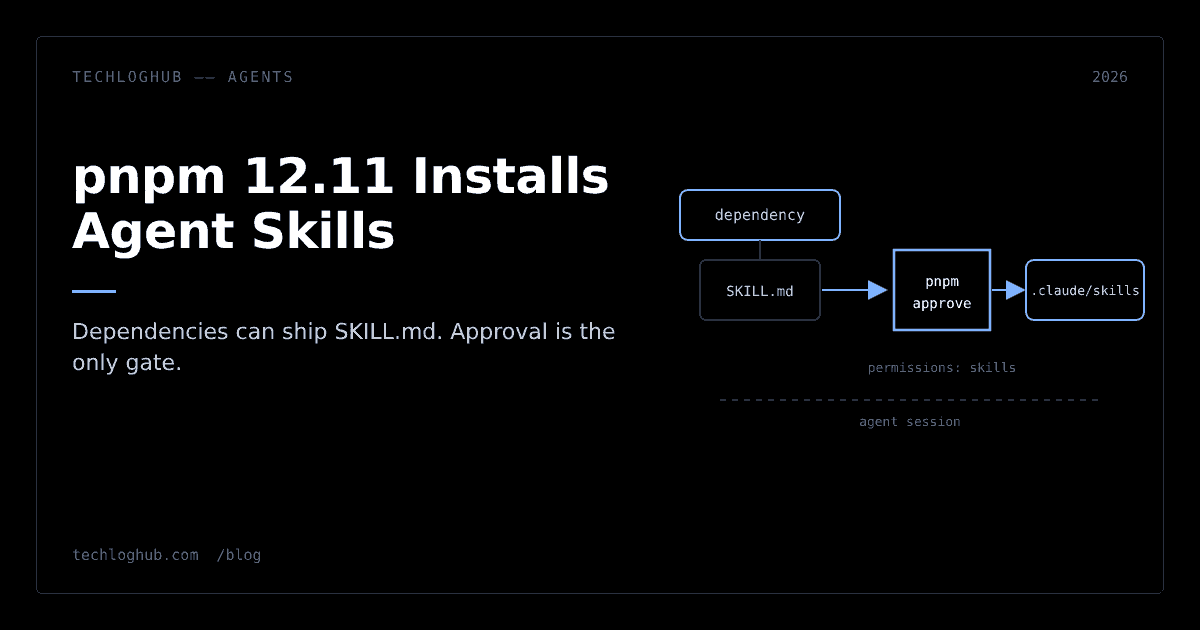
Quick answer: Since pnpm 12.11.0 (9 October 2026), pnpm install discovers agent skills that direct dependencies ship at skills/<name>/SKILL.md and, once you approve them with pnpm approve, links them into agent directories such as .claude/skills. Treat that approval like approving a build script: a linked skill becomes standing instructions for your coding agent, and skills can bring scripts the agent may run.
Your package manager now installs instructions for your AI agent, not just code for your runtime. That is a genuinely useful feature, and it deserves the same suspicion you already apply to postinstall.
pnpm shipped it carefully: nothing is linked without approval, and approval lives in a reviewable config file. The risk is not the mechanism. It is teams clicking through the prompt the way they once clicked through install-script warnings.
What pnpm 12.11 actually does
According to the pnpm 12.11.0 release notes, pnpm install now finds agent skills shipped by your direct dependencies in the skills/<name>/SKILL.md layout and links them into your project's agent skill directories, such as .claude/skills. A skills.dirs setting chooses the target directories. Skills are linked only after you approve the package with pnpm approve.
The design is spelled out in pnpm/rfcs#35, which was still marked as a draft when we read it this week. Key points from the RFC:
- It reuses the existing
skills/<name>/SKILL.mdconvention instead of inventing a newpackage.jsonfield. - pnpm globs and links the skill directory. It never reads or interpolates the skill's contents.
- Pending skills are listed in install output. Install warns about them but does not block.
- An empty
skills.dirslist disables discovery entirely. - Where skills go is chosen from agent directories that already exist, then the agent detected in the environment, then
skills.dirs. The environment only affects where skills are linked, never whether they are.
Only direct dependencies are considered. A transitive dependency five levels down cannot drop a skill into your agent's context.
The new permissions setting
The approval side comes from a second change. The release adds a permissions setting that "records what each dependency may do." Its build capability does the same job as allowBuilds, and when both apply, permissions wins. pnpm permissions lists granted, denied and pending permissions, and pnpm approve reviews build scripts and agent skills in one prompt.
The release notes do not show the exact syntax, so check pnpm's settings docs for your version. The companion RFC, pnpm/rfcs#36, proposes a section in pnpm-workspace.yaml keyed by package name:
| Package | build | skills |
|---|---|---|
| esbuild | true | — |
| drizzle-kit | true | true |
That is the RFC's own example: esbuild may run its build script, and drizzle-kit may run its build script and link its skills. The RFC also names MCP servers as the likely next capability, which tells you where this is heading: one place to record every kind of trust you extend to a dependency.
One detail affects existing projects. Per the release notes, pnpm approve-builds writes to permissions only if your workspace file already contains that section; otherwise it keeps writing to allowBuilds. Mixed configs will exist for a while, so read both when auditing.
Why approving a skill is not a formality
The RFC is blunt about why approval is required: a linked skill becomes a standing instruction for future agent sessions, and skills can include a scripts/ directory the agent can run.
Compare that with what you approve today. A build script runs once, at install time, in a context you can sandbox. A skill sits in your repo and shapes what an agent does every time it starts, with whatever permissions you have given that agent. If your agent can run shell commands and edit files, a skill is effectively a prompt with those privileges.
There is a second subtlety. The RFC makes approval per package, and approvals persist across upgrades. So approving some-orm today also covers whatever skills some-orm ships next month. A commenter on the RFC proposed recording a digest of the linked skill tree and re-prompting when it changes, but that is a suggestion in the discussion, not part of the spec.
A review policy that keeps the feature useful
Skills from the libraries you depend on can be excellent. An ORM's own skill knows its migration commands better than any general model. The goal is not to refuse them, it is to approve them the way you would review a pull request.
Read the skill before you approve
Open node_modules/<pkg>/skills/ and read every SKILL.md, plus anything under scripts/. Look for broad shell instructions, requests to skip confirmation prompts, instructions unrelated to the library, and hidden or invisible characters. RFC commenters suggested static checks for exactly these patterns, while noting that a clean scan only means no known pattern matched.
Re-read on upgrade
Because approval is per package and persists, add a step to your dependency update routine: diff the skills/ directory between the old and new version. A plain diff in review, or a text diff checker for a quick look, is enough. If the skill changed in ways the changelog does not explain, revoke and ask upstream.
Keep cooldowns on
Release-age cooldowns make new versions sit for a while before installs pick them up. A study presented at the SCORED 2026 workshop, summarised in Andrew Nesbitt's weekly roundup, found 69% of malicious npm version windows closed within eight days and recommended an eight-day minimum release age. pnpm's minimumReleaseAge now also applies to config dependencies, per the same release. We compared those settings in Install Cooldowns in npm, pnpm, Yarn and Bun. A cooldown gives the community time to notice a bad release before its skill lands in your agent's context.
Decide where skills may land
If your team does not want dependency skills at all, set skills.dirs to an empty list to disable discovery. If you do, keep the target directories committed and reviewed like any other config, so a new skill shows up as a diff in a pull request instead of silently on one developer's machine.
How this fits the bigger shift
JavaScript package managers have spent this autumn turning implicit trust into explicit approval. We covered npm's version of that move for lifecycle scripts in npm 12: Install Scripts Are Now Opt-In, and the pnpm 12 line that this release builds on in pnpm 12 Is Now the Default Install.
Skills are the agent-era version of the same question: what is a dependency allowed to do to my machine? MCP has the same issue at the server level, which is why we argued in MCP Registry Verifies Namespaces, Not Servers that a verified name is not a reviewed package.
pnpm's answer is a single permissions ledger. It is the right shape. Whether it works depends on whether teams read what they approve.
The other 12.11 changes worth knowing
Skills got the headlines, but the same release has practical changes:
- With
cargo.enabled,pnpm installinstalls the Rust toolchain named inrust-toolchain.toml, verifies its release signature, and puts that toolchain'scargoandrustconPATHforpnpm runandpnpm exec. pnpm packandpnpm publishnow apply.npmignoreand.gitignorethe way npm does, including negations, and onlyREADME,LICENSE,LICENCEandCOPYINGare always included. Check your published tarball after upgrading.pnpm publish --no-provenance, orprovenance: falsein the workspace file, disables provenance under trusted publishing.- Script output keeps its colours under
pnpm runandpnpm exec, andpnpm -r runno longer garbles output when one script fails.
If you want to browse the tools in this ecosystem, our open-source directory lists package managers and build tools with their repos and activity.
FAQ
Does pnpm link skills from transitive dependencies?
No. According to the release notes and RFC, pnpm discovers skills shipped by direct dependencies only.
Will pnpm install link skills without asking?
No. Skills are linked only after the package is approved with pnpm approve. Pending skills are listed in the install output, and install warns rather than blocks.
How do I turn agent skill discovery off?
The RFC defines a skills.dirs setting, and an empty list disables discovery. Check pnpm's settings documentation for the exact syntax in your version.
What is the difference between permissions and allowBuilds?
The permissions setting records several capabilities per package, and its build capability does the same job as allowBuilds. When both apply, permissions takes precedence.
Do skill approvals carry over when a package is upgraded?
In the RFC, approval is per package and persists across upgrades, so a later version's skills are covered by the earlier approval. Diff the skills directory when you upgrade.
Approving a skill is approving a prompt that runs with your agent's permissions. Read it first.