Base64 Encoding Explained: How It Works and Where It Bites
Quick answer: Base64 turns every 3 bytes into 4 printable characters from a 64-character alphabet, so binary data can travel through systems built for text. It is not encryption and not compression: output is about a third larger, anyone can decode it, and the real bugs come from the variants (padding, URL-safe alphabet, line breaks) and from decoders that silently accept garbage.
Base64 is one of those things every developer uses weekly and few have looked at closely. It hides inside JWTs, data URIs, email attachments, config files and most of the JSON APIs that carry a file. Most of the time it just works. When it does not, the failure is usually silent: a decoder skips a bad character, a token gains padding it should not have, or a string with an accent turns into the wrong bytes.
This guide walks through the encoding by hand, then shows where implementations disagree, with real output we ran on 21 November 2026 in Node.js v22.23.5 and v26.13.1, Python 3.13.18 and GNU coreutils 9.4. If you want to try any of the inputs, our Base64 encoder and decoder runs entirely in your browser.
How Base64 works, one byte at a time
The encoding is defined in RFC 4648, section 4. The idea is simple: take the input 24 bits (3 bytes) at a time, split those 24 bits into four 6-bit groups, and map each 6-bit value (0 to 63) to a character in the alphabet A–Z, a–z, 0–9, +, /.
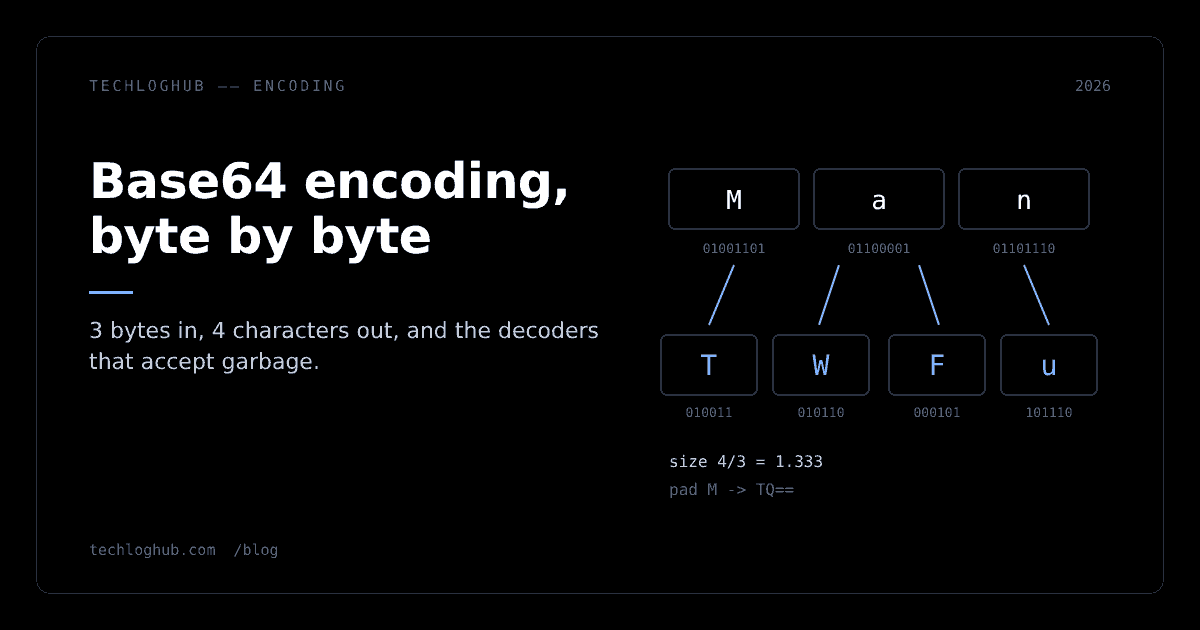
Here is the textbook example, the string Man, worked through:
| Step | M | a | n |
|---|---|---|---|
| ASCII byte | 77 | 97 | 110 |
| Binary | 01001101 | 01100001 | 01101110 |
| Regrouped into 6 bits | 010011 010110 000101 101110 | ||
| Values | 19, 22, 5, 46 | ||
| Alphabet lookup | T, W, F, u |
Our Node.js run printed the same thing: Man -> TWFu 01001101 01100001 01101110. Three bytes in, four characters out, which is where the size overhead comes from: 4/3 is 1.333.
Padding: what the equals signs mean
Input rarely divides into neat 3-byte groups. When one or two bytes are left over, the encoder pads the last group with zero bits and appends = characters so the output length stays a multiple of four. These are the encodings we got for growing inputs:
"M"        TQ==         (1 byte  -> 2 data chars + ==)
"Ma"       TWE=         (2 bytes -> 3 data chars + =)
"Man"      TWFu         (3 bytes -> 4 data chars, no padding)
"Many"     TWFueQ==     (4 bytes -> 3 + 1 leftover)
RFC 4648 section 3.2 says implementations "MUST include appropriate pad characters" unless the specification that uses Base64 says otherwise. Plenty of specifications do say otherwise. JWTs, for example, drop the padding entirely, which is why a JWT header never ends in =.
Size overhead in practice
Because output is always a multiple of four characters, small inputs pay more than a third:
bytes 1       -> chars 4        ratio 4.0000
bytes 2       -> chars 4        ratio 2.0000
bytes 3       -> chars 4        ratio 1.3333
bytes 100     -> chars 136      ratio 1.3600
bytes 1000    -> chars 1336     ratio 1.3360
bytes 1048576 -> chars 1398104  ratio 1.3333
MDN's glossary entry puts it plainly: the Base64 output is "roughly a third larger than its source" (MDN: Base64). A 750,000-byte image becomes exactly 1,000,000 characters. Keep that number in mind for the data URI section.
The variants: standard, URL-safe, MIME
"Base64" is really a family. The differences look cosmetic and cause real outages.
| Variant | Characters 62 and 63 | Padding | Line breaks | Where you meet it |
|---|---|---|---|---|
| Standard (RFC 4648 §4) | + / | Required unless the spec says otherwise | Not allowed by default | Data URIs, most JSON APIs |
| URL and filename safe (RFC 4648 §5) | - _ | Often omitted | No | JWTs, URL parameters, filenames |
| MIME (email) | + / | Yes | Every 76 characters | Email attachments, Python encodebytes, GNU base64 default |
Standard versus URL-safe
+ and / both mean something in URLs, so RFC 4648 section 5 defines a second alphabet that swaps them for - and _. The RFC is blunt that this "should not be regarded as the same as the 'base64' encoding". Three bytes chosen to hit the last two alphabet slots make the difference visible:
>>> base64.b64encode(b'\xfb\xff\xfe'), base64.urlsafe_b64encode(b'\xfb\xff\xfe')
(b'+//+', b'-__-')
For ordinary text the two outputs are often identical. The JWT header {"alg":"HS256","typ":"JWT"} encodes to eyJhbGciOiJIUzI1NiIsInR5cCI6IkpXVCJ9 in both alphabets, which is exactly why bugs here survive testing: they only appear when a payload happens to produce a + or /. Our JWT guide covers why JWTs use the URL-safe form, and the JWT decoder shows each segment decoded.
MDN's advice on when you need the URL-safe variant is narrow and correct: only "if you are putting the data in a path segment or query parameter". Everywhere else, use the standard alphabet and percent-encode if a URL is involved.
MIME line breaks
Email was built for short lines, and MIME caps Base64 lines at 76 characters. RFC 4648 section 3.1 says implementations "MUST NOT add line feeds" unless the referring specification requires them. Two common tools add them anyway:
$ head -c 100 /dev/zero | base64 | awk '{print length}'
76
60
$ head -c 100 /dev/zero | base64 -w0 | awk '{print length}'
136
>>> [len(l) for l in base64.encodebytes(bytes(100)).split(b'\n')]
[76, 60, 0]
GNU base64 wraps at 76 by default, and Python's base64.encodebytes does the same and adds a trailing newline. Paste either output into an environment variable, a JSON string or a Kubernetes manifest and you get a value with embedded newlines. Use base64 -w0 on Linux and base64.b64encode in Python when the destination is not email.
Decoders disagree: we fed them garbage
Encoding is deterministic. Decoding is where implementations make choices, and those choices decide whether a corrupted value fails loudly or quietly turns into different bytes. We fed the same four malformed inputs to five decoders.
| Input | Node Buffer.from(s, 'base64') | Python b64decode(s) | Python b64decode(s, validate=True) | Uint8Array.fromBase64(s) (Node 26) | GNU base64 -d |
|---|---|---|---|---|---|
aGVs!!bG8= (junk inside) | hello | b'hello' | Error: Only base64 data is allowed | SyntaxError | hel then "invalid input", exit 1 |
aGVsbG8_Pg (URL-safe chars) | hello?> | Error: number of data characters (9) cannot be 1 more than a multiple of 4 | Error: Only base64 data is allowed | SyntaxError (works with alphabet: 'base64url') | not tested |
QR== (non-zero pad bits) | [65] | b'A' | b'A' | [65]; SyntaxError with lastChunkHandling: 'strict' | not tested |
aGVsbG8 (missing padding) | not tested | Error: Incorrect padding | Error: Incorrect padding | hello; partial chunk dropped with stop-before-partial | not tested |
What the table says:
- **Node's
Bufferwas the most permissive of the five.** It dropped the two!characters and returnedhello, and it decoded URL-safe input through the standard'base64'encoding. Convenient, but a value corrupted in transit decodes to plausible bytes with no error. - Python's default is permissive about junk (it discarded the
!!too) but strict about length and padding. Onlyvalidate=Truerejects non-alphabet characters, and even then it acceptedQR==. - **The new
Uint8Array.fromBase64is strict by default about the alphabet** and lets you choose how strict to be about the last chunk. - **GNU
base64 -dfails loudly**, but only after writing the bytes it decoded before the bad character, so a pipeline that ignores the exit status keeps a truncatedhel. Its-iflag ignores garbage instead; with it we gothelloand exit code 0.
A strict check you can run before Buffer.from
If you are stuck on a runtime without Uint8Array.fromBase64, a regular expression catches the alphabet and padding problems before Node's lenient decoder hides them. This is the pattern we tested, for padded standard Base64:
const strictB64 = /^(?:[A-Za-z0-9+\/]{4})*(?:[A-Za-z0-9+\/]{2}==|[A-Za-z0-9+\/]{3}=)?$/;
"aGVsbG8="     true
"aGVs!!bG8="   false
"aGVsbG8_Pg"   false
"aGVsbG8"      false
"TWFu"         true
""             true
Note the last line: an empty string is valid Base64 for zero bytes, so reject it separately if empty input is an error for you. The pattern does not check padding bits, so QR== still passes. You can test variations of it in our regex tester.
Why QR== and QQ== are the same thing
The last row needs a word. Q is value 16 and R is 17. With one input byte, only the first 8 of the 12 encoded bits carry data; the last 4 are padding bits. QQ== and QR== differ only in those padding bits, so both decode to byte 65 (A). RFC 4648 section 3.5 says these bits "MUST be set to zero by conforming encoders" and that decoders MAY reject non-zero ones. Most do not reject them, which means one byte string has several valid-looking encodings.
That matters any time you compare encoded values: cache keys, signature inputs, deduplication. Two different strings can hold the same bytes. Decode first, then compare bytes, or use a decoder in strict mode.
Base64 in JavaScript today
For years, the browser's built-in Base64 tools were btoa and atob, and both work on "binary strings" where each character stands for one byte. That design is the source of the classic Unicode bug. MDN's glossary notes that code points above 0xff "will cause btoa to throw an error". We reproduced both failure modes:
btoa('café ✓')   -> InvalidCharacterError - Invalid character
btoa('café')     -> Y2Fm6Q==        (Latin-1 bytes, not UTF-8)
UTF-8 'café'     -> Y2Fmw6k=        (what every other system expects)
The second line is the dangerous one. btoa('café') does not throw, because é fits in Latin-1, but it encodes the single byte 0xE9 instead of the two UTF-8 bytes 0xC3 0xA9. A server that decodes it as UTF-8 gets an invalid sequence. If your app has ever shown café or a replacement character, this is a likely cause.
The new Uint8Array methods
The fix is a set of methods that work on bytes directly: Uint8Array.prototype.toBase64(), Uint8Array.fromBase64(), setFromBase64(), plus matching hex methods. The TC39 proposal page now describes it as a stage 4 proposal, and the web-features explorer lists the feature as Baseline "Newly Available (since 2025-09-05)", with Firefox 133, Safari 18.2 and Chrome and Edge 140 listed, and widely available expected in March 2028.
Here is a run on Node.js v26.13.1:
const bytes = new TextEncoder().encode('café ✓');
bytes.toBase64()                                         // "Y2Fmw6kg4pyT"
bytes.toBase64({ alphabet: 'base64url', omitPadding: true })
new TextDecoder().decode(Uint8Array.fromBase64(bytes.toBase64()))   // "café ✓"
new Uint8Array([222, 173, 190, 239]).toHex()             // "deadbeef"
On Node.js v22.23.5, typeof Uint8Array.prototype.toBase64 printed undefined, so check your runtime before dropping a polyfill. MDN documents the options: alphabet is "base64" or "base64url"; omitPadding defaults to false; and fromBase64 takes lastChunkHandling of "loose" (default), "strict" or "stop-before-partial". It ignores ASCII whitespace and throws SyntaxError for characters outside the chosen alphabet (MDN: fromBase64).
The three modes behaved like this in our run:
"aGVsbG8"  {}                                    -> [104,101,108,108,111]
"aGVsbG8"  {lastChunkHandling:'strict'}          -> SyntaxError
"aGVsbG8"  {lastChunkHandling:'stop-before-partial'} -> [104,101,108]
"QR=="     {lastChunkHandling:'strict'}          -> SyntaxError: The base64 input terminates with non-zero padding bits.
stop-before-partial exists for streaming: decode what you have, keep the incomplete tail for the next chunk.
Node.js Buffer
In Node.js, Buffer.from(str, 'base64') and buf.toString('base64') remain the everyday tools, with 'base64url' available since v15.7.0 and v14.18.0 per the Buffer docs. The URL-safe encoder omits padding. Given how permissive the decoder is (see the table above), validate input with a strict regex or Uint8Array.fromBase64 when the value comes from outside your system.
Write it yourself in a dozen lines
The fastest way to stop treating Base64 as magic is to implement the encoder once. This is the whole algorithm in Python, with no library calls beyond integer conversion:
ALPHABET = "ABCDEFGHIJKLMNOPQRSTUVWXYZabcdefghijklmnopqrstuvwxyz0123456789+/"

def b64encode(data: bytes) -> str:
    out = []
    for i in range(0, len(data), 3):
        chunk = data[i:i+3]
        n = int.from_bytes(chunk.ljust(3, b"\0"), "big")       # 24 bits
        chars = [ALPHABET[(n >> s) & 63] for s in (18, 12, 6, 0)]
        keep = len(chunk) + 1                                   # 1 byte -> 2 chars, 2 -> 3, 3 -> 4
        out.append("".join(chars[:keep]) + "=" * (4 - keep))
    return "".join(out)
We checked it against the standard library on 10,000 random inputs from 0 to 499 bytes long, and every output matched base64.b64encode. It also printed TWFu TWE= TQ== for Man, Ma and M, the same values as the padding table above.
Three things become obvious once you have written it. The padding is pure bookkeeping: keep is the number of characters that carry real bits, and = fills the rest. The zero bytes added by ljust are exactly the "padding bits" that RFC 4648 says must be zero, which is why a hand-edited QR== is technically non-canonical. And there is no state across chunks, so Base64 can be encoded and decoded in streams, three bytes in, four characters out, which is what stop-before-partial relies on.
Do not ship this function. Standard library encoders are faster and tested against edge cases. The point is to know what they do.
Base64 versus hex, Base32 and Base85
Base64 is not the only binary-to-text encoding, and it is not always the right one. We encoded the same 1,000 random bytes with each encoding in Python's standard library:
| Encoding | Output for 1,000 bytes | Size ratio | Alphabet | Pick it when |
|---|---|---|---|---|
| Hex (Base16) | 2,000 chars | 2.000 | 0–9, a–f | Humans read or diff the value: hashes, IDs, byte dumps |
| Base32 (RFC 4648) | 1,600 chars | 1.600 | A–Z, 2–7 | The channel is case-insensitive or values are typed by hand |
| Base64 | 1,336 chars | 1.336 | A–Z, a–z, 0–9, +, / | The default for bytes in JSON, HTML, email and headers |
| Ascii85 / Base85 | 1,250 chars | 1.250 | 85 printable characters | Size matters more than compatibility, inside one system you control |
Base32's alphabet, checked on 5,000 random bytes, contains only 234567 and uppercase A–Z, so it survives systems that lowercase or uppercase everything, at the cost of 20% more size than Base64. Base85 saves about 7% over Base64 but uses 85 characters, including quotes and backslashes in some variants, which makes it awkward inside JSON strings and shell commands. Hex doubles the size but is trivially readable and has no variants at all, which is worth more than it sounds when two teams have to agree on a format.
For most developer work the answer is still Base64. Choose hex when people will read the value, Base32 when people will type it, and Base85 only when you own both ends.
Where Base64 belongs, and where it does not
Base64 solves one problem: moving bytes through a channel that only accepts text. Anything else is a misuse.
It is not encryption. dXNlcjpwYXNz is user:pass; SGkh is Hi!. There is no key, so anyone who can read a Base64 value can decode it in one command. Many "obfuscated" credentials in headers and config files are exactly this. Treat a Base64 secret exactly like a plaintext secret.
It is not compression. It makes data 33% larger. If you are Base64-encoding something big to put in JSON, compare against sending the binary as a separate request or a multipart upload.
Data URIs are a trade-off, not a free win. Inlining a small icon as data:image/png;base64,... saves a request. Inlining a 750 KB hero image adds a million characters to your HTML or CSS. That data travels inside the file that references it, so it cannot be cached on its own and is downloaded again whenever that file changes. A practical rule: inline only assets that are tiny and used on every page. For the rest, shrink the file first with our image format converter or SVG optimizer, and serve it as a normal cached file. Our favicon generator outputs real files for the same reason.
Debugging requests. When an API call carries a Base64 body or a Basic auth header, convert the cURL command with our cURL to fetch converter and decode the field separately. Pretty-print any JSON inside with the JSON formatter.
A checklist for Base64 at system boundaries
- Name the variant in your API docs: standard or URL-safe, padded or not. "Base64" alone is ambiguous.
- Encode text as UTF-8 bytes first. Never pass a JavaScript string with non-ASCII characters to
btoa. - Disable line wrapping (
base64 -w0,b64encode) unless the destination is email. - Decode strictly at trust boundaries. Python
validate=True,Uint8Array.fromBase64withlastChunkHandling: 'strict', or an explicit regex check beforeBuffer.from. - Compare decoded bytes, not encoded strings, because non-zero padding bits give one byte string several encodings.
- Check the exit status in shell pipelines, since
base64 -dwrites partial output before it fails.
More single-purpose utilities like the Base64 tool live on our developer tools page.
FAQ
Is Base64 encryption?
No. Base64 is a reversible encoding with no key, so anyone can decode it. It only changes how bytes are represented so they can pass through text-only systems. Any credential or secret stored as Base64 must be protected like plaintext.
Why does Base64 make data about 33% bigger?
Each group of 3 input bytes (24 bits) becomes 4 output characters of 6 bits each, so output is 4/3 the size of the input. Padding to a multiple of four characters adds more for very small inputs: 1 byte becomes 4 characters. A 750,000-byte file becomes exactly 1,000,000 characters.
What is the difference between Base64 and Base64URL?
Base64URL, defined in RFC 4648 section 5, replaces + with - and / with _ so the output is safe in URLs and filenames, and it usually omits = padding. JWTs use Base64URL. Use it only for URL path segments, query parameters or filenames; use standard Base64 elsewhere.
What do the equals signs at the end of Base64 mean?
They are padding. When the input length is not a multiple of 3 bytes, the encoder adds one = (2 leftover bytes) or two == (1 leftover byte) so the output length is a multiple of 4. Some formats, including JWTs, drop the padding because the length can be inferred.
Why does btoa fail with Unicode characters?
btoa treats each character as one byte, so any character above code point 255 throws an InvalidCharacterError. Characters between 128 and 255, such as é, do not throw but are encoded as Latin-1 instead of UTF-8, producing wrong bytes. Encode the string with TextEncoder first and use Uint8Array.prototype.toBase64() where supported.
Why does my Base64 decoder accept invalid input?
Many decoders are lenient by design. Node.js Buffer.from(s, 'base64') skips invalid characters, and Python's b64decode discards non-alphabet characters unless you pass validate=True. Use a strict decoder at trust boundaries so corrupted values fail instead of decoding to different bytes.
All outputs in this article came from runs on 21 November 2026; decoder behaviour changes between versions, so re-run the table on your own stack.