


KromaStudio
Turn plain code into viral-ready visuals with syntax-highlighted screenshots, browser mockups, and social post cards.
About KromaStudio
Overview
KromaStudio provides a powerful, free toolset for developers and designers to turn plain code into viral-ready visuals. Whether you are sharing your latest project on social media or building a portfolio, KromaStudio helps you create professional-grade graphics without the need for complex design software.
Key Features
Customize your code screenshots with a wide range of options:
- Syntax Highlighting: Support for JavaScript, TypeScript, Python, HTML, CSS, Go, and Rust using popular themes like Dracula, One Dark Pro, GitHub Dark, YouTube Night, and Tokyo Night.
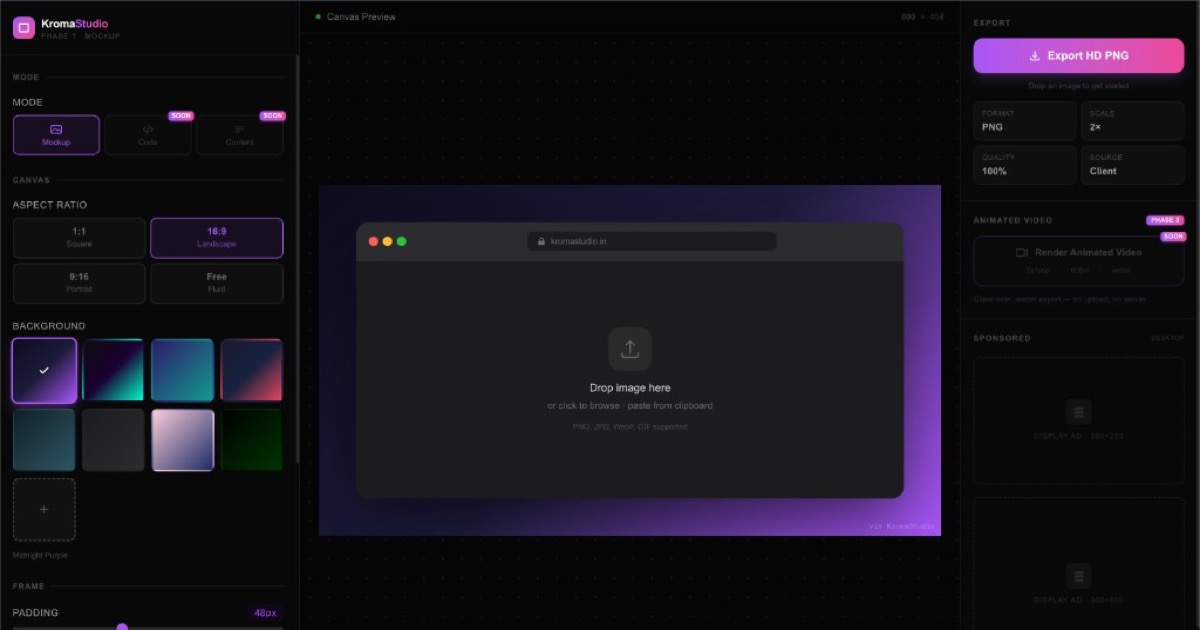
- Aesthetic Backgrounds: Choose from 12 aesthetic gradient presets or upload a custom image background with grain/noise effects.
- Browser & Device Mockups: Create professional mockups using frames for Chrome, Safari, Firefox, Arc, and various devices like Pixel 3, iPhone 11 PM, Watch S3, iPad 9.7", and MacBook Hero banners.
- Headline Overlays: Add a custom headline text overlay to make your social posts more engaging and visuals-ready.
- Social Post Templates: Ready-made templates for LinkedIn, Twitter (X), Threads, Carousel slides, Before-After stories, and Product Hunt launch cards.
- Animated Videos: Render animated videos with effects like Subtle Float, Hover loop, Hover loop, 3D Tilt, and Auto rotate.
- Export Options: Export your creations in HD PNG format at various scales (1x, 2x, 3x, 4x) and animated .webm videos.
- Client-Side Processing: The entire tool is 100% client-side, ensuring fast, instant results with no sign-up required.
How to Use KromaStudio
To get started, paste your code snippet or drop an image for a mockup, and follow these steps:
- Paste Code: Enter your code into the tool's code mode to enable auto-scroll and syntax highlighting.
- Customize Visuals: Select your preferred theme, background, and browser frame.
- Add Overlays & Mockups: Choose a template or a copy of a design for a premium browser mockup.
Why Choose KromoStudio
KromaStudio is the perfect tool for developers-centric design-focused projects. It's free, fast, and privacy-focused because it's processed entirely on your client side.
Value & Audience
Value Proposition
Turn plain code into scroll-stopping visuals with syntax-highlighted screenshots, browser mockups, and visual templates.
Problem Solved
Developers and designers often struggle to create aesthetically pleasing and professional-quality graphics for sharing their other projects on social media or portfolios. KromaStudio solves this problem by providing a single tool that allows them to100% client-side, no sign-up required.
Target Audience
Use Cases
Tech Stack
Frontend
Loading ratings...
Loading comments...
Gallery
Feedback & Roadmap
KromaStudio FAQ
Common questions about KromaStudio's features, pricing, and use cases
Is KromaStudio free to use?
KromaStudio offers a free tier. Plans listed: Free — No Sign-Up Required; Paid tier description or empty string; Enterprise tier description or empty string.
What are some alternatives to KromaStudio?
Popular Design & Creative alternatives to KromaStudio include Magic Eraser, Vipeak AI and NanoScene AI.
KromaStudio appears in
You May Also Like
View all alternatives to KromaStudioMagic Eraser
An AI-powered tool to remove unwanted objects, people, text, and watermarks from images seamlessly in seconds.
View ProductVipeak AI
An AI-powered character video generator that allows users to create high-quality animations from images, text prompts, and reference content.
View Product
NanoScene AI
A powerful AI image generator that allows users to create, edit, upscale, and maintain character consistency in high-quality visuals.
View Product
Free Online Lorem Ipsum Generator
Generate custom Lorem Ipsum placeholder text instantly with advanced options like character counting, HTML tags, and various styles.
View ProductOne email a week
TechLogHub tracks 723 tools and 571 open-source projects. Get the week's new launches, release roundups and open-source picks — nothing else.
Get the TechLogHub digest
One email a week: new and trending developer tools, fresh comparisons, and what shipped. Unsubscribe in one click.