


Magic Eraser
An AI-powered tool to remove unwanted objects, people, text, and watermarks from images seamlessly in seconds.
About Magic Eraser
AI Magic Eraser: Remove Unwanted Objects From Images Free
Magic Eraser is the best AI object remover for anyone who needs to delete objects from pictures—simple, accurate, and fast. Our tool uses advanced inpainting technology to erase a person from photos and seamlessly fill the background, requiring no Photoshop skills.
What Makes Our AI Magic Eraser Special?
Our platform stands out by offering professional-grade results with an incredibly easy user experience. Whether you are cleaning up a group shot or removing a distracting watermark, our AI handles the heavy lifting for you.
- Simple: No skill or experience required; use the brush as freely as a child would.
- Accurate: Zoom in and adjust brush size to control exactly what you erase while respecting edges, textures, and lighting.
- Quick: Get stunning results in seconds instead of hours of manual retouching.
- Powerful: Robust enough for professional designers, photographers, and editors to use every day.
Key Features & Use Cases
Magic Eraser is used across every industry to polish image assets:
- Real Estate: Make listings shine by removing people, furniture, cars, and clutter from property photos.
- Photography: Clean up shots by erasing distractions, power lines, and unwanted background elements.
- Fashion: Polish lookbook and campaign images—delete objects without reshooting.
- Auto Listings: Present vehicles with clean backgrounds by removing license plates and stickers.
- e-Commerce: Create professional product photos for cleaner storefronts.
- Social Media: Post-ready content in seconds for Instagram, TikTok, and more.
How to Remove Unwanted Objects from Your Photos
Follow these four simple steps to erase objects from photos online with our free magic eraser tool:
- Upload: Drag and drop or click to select your image (JPG, JPEG, PNG, WEBP). There is no resolution limit.
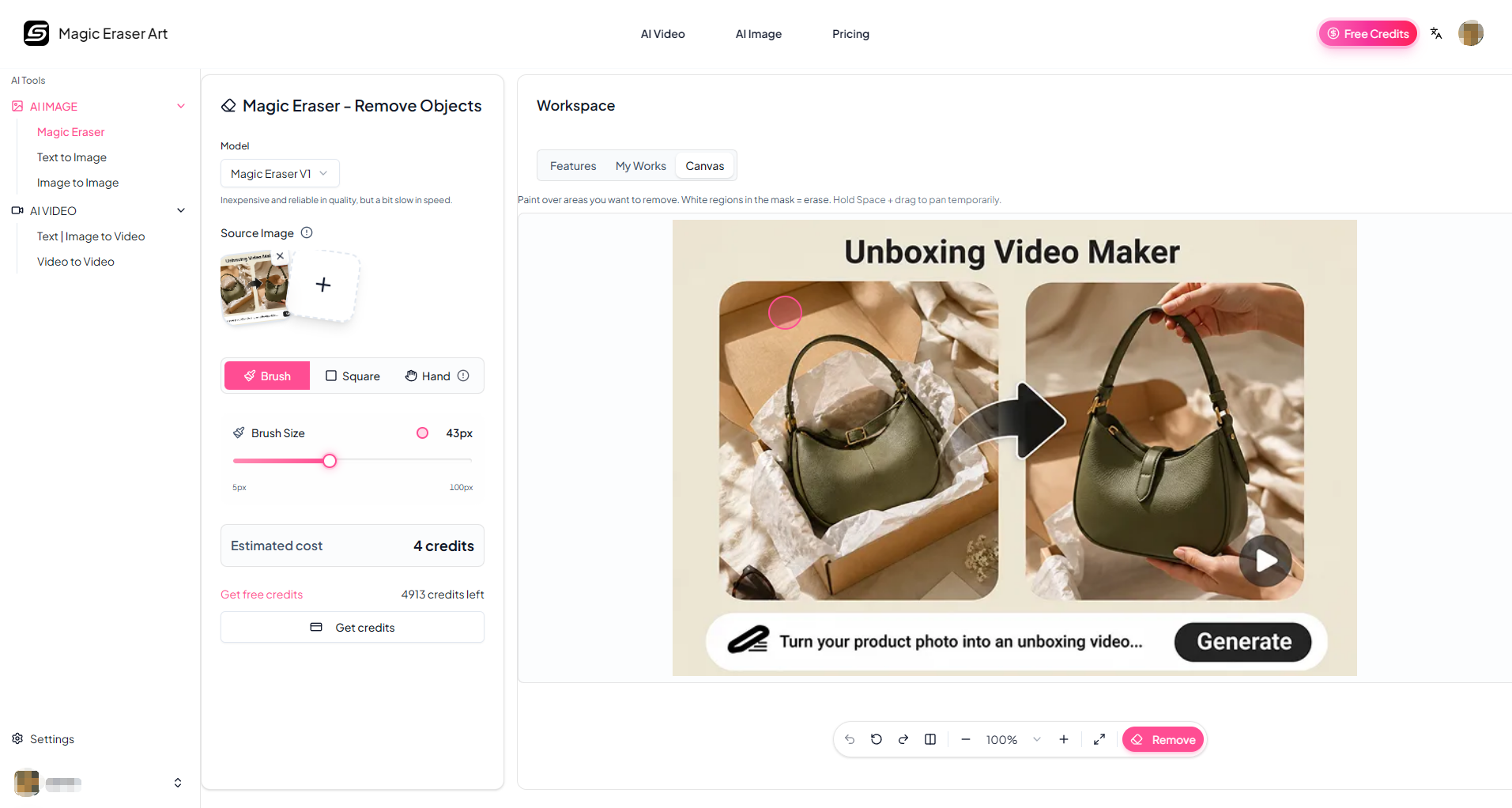
- Select: Use the brush to paint over the area you want removed. Adjust the brush size slider and zoom in for precision. Cover both the object and its shadow.
- **Erase:** Click erase when your selection is ready. If results are not perfect, erase again on the same area—the AI often improves on the next pass.
- Download: Save your edited image in the format you need for social media, listings, or print.
Pro Tips for Amazing Results
Get the best results every time by following these expert tips:
- Include the shadow in your selection to avoid unnatural results. bsp;
- Use Undo rather than re-apply if an area gets filled with unintended content. bsp;
- Use a narrow brush to isolate the target and keep the affected region as tight as possible. bsp;
- Refine the mask and retry iteratively—multiple light passes yield better precision than one large stroke. bsp;
Value & Audience
Value Proposition
Remove unwanted objects, people, text, and watermarks from images seamlessly in seconds using advanced AI inpainting.
Problem Solved
Eliminates the user's need for complex photo editing software like Photoshop to remove distracting elements or clutter from photos.
Target Audience
Loading ratings...
Loading comments...
Gallery
Feedback & Roadmap
Magic Eraser FAQ
Common questions about Magic Eraser's features, pricing, and use cases
Is Magic Eraser free to use?
Magic Eraser is a paid product, starting at Starter: $15/month (300 credits). Plans listed: Starter: $15/month (300 credits); Popular Standard: $29/month (800 credits); Premium: $79/month (3000 credits).
What are some alternatives to Magic Eraser?
Popular Design & Creative alternatives to Magic Eraser include Vipeak AI, Free Online Lorem Ipsum Generator and NanoScene AI.
Magic Eraser appears in
You May Also Like
View all alternatives to Magic EraserVipeak AI
An AI-powered character video generator that allows users to create high-quality animations from images, text prompts, and reference content.
View Product
Free Online Lorem Ipsum Generator
Generate custom Lorem Ipsum placeholder text instantly with advanced options like character counting, HTML tags, and various styles.
View Product
NanoScene AI
A powerful AI image generator that allows users to create, edit, upscale, and maintain character consistency in high-quality visuals.
View ProductREWIND.AI
An AI-powered tool that degrades modern text, photos, and websites into nostalgic retro designs from specific internet eras.
View ProductOne email a week
TechLogHub tracks 704 tools and 568 open-source projects. Get the week's new launches, release roundups and open-source picks — nothing else.
Get the TechLogHub digest
One email a week: new and trending developer tools, fresh comparisons, and what shipped. Unsubscribe in one click.