


npm Took Away Your Publish Token. Good.
Quick answer: npm classic tokens stopped working on December 9, 2025 and cannot be recreated. Granular tokens replaced them with a hard 90-day maximum lifetime. The intended destination is trusted publishing: your CI exchanges an OIDC identity for a short-lived, workflow-scoped credential, and nothing long-lived is ever stored. If your release pipeline still holds an NPM_TOKEN secret, you are maintaining a rotation chore that no longer needs to exist.
Most teams experienced this change as a broken pipeline. A release failed, someone found the token had been revoked, someone minted a granular token, and the build went green again. Ninety days later they will do it again.
That is the wrong fix, and understanding why requires looking at what the registry was actually defending against.
The failure mode that forced this
In September 2025, CISA issued an alert on a widespread compromise of the npm ecosystem affecting over 500 packages. The mechanism is the part that matters here. Malicious code scanned for GitHub personal access tokens and cloud API keys, then — in CISA's wording — "leveraged an automated process to rapidly spread by authenticating to the npm registry as the compromised developer, injecting code into other packages, and publishing compromised versions to the registry."
Read that again. The propagation step was authenticating as the developer. Not exploiting a registry bug, not breaking cryptography. Finding a credential that worked from anywhere, for anything the developer could publish, and using it.
A long-lived publish token is a bearer credential with no context. It does not know which repository it belongs to, which workflow invoked it, or which package it should be allowed to touch. It works from a laptop, a CI runner, or an attacker's container, identically. Rotating one every 90 days shortens the window. It does not change the shape of the problem.
The timeline, compressed
| Date | Change |
|---|---|
| Jul 31, 2025 | npm trusted publishing with OIDC reaches general availability. |
| Sep 23, 2025 | CISA alert on the npm ecosystem compromise, 500+ packages. |
| Dec 9, 2025 | All classic tokens stop working permanently. 2FA becomes the default for new packages. Granular tokens get a 90-day maximum lifetime. |
| Dec 12, 2025 | Login session lifetime raised from 2 hours to 12 after developer pushback. |
The December rollout was rough. The public discussion thread filled with teams reporting publish failures even with correctly configured tokens. That friction is worth naming, because it is why a lot of pipelines landed on the granular-token workaround and stopped there.
What trusted publishing actually does
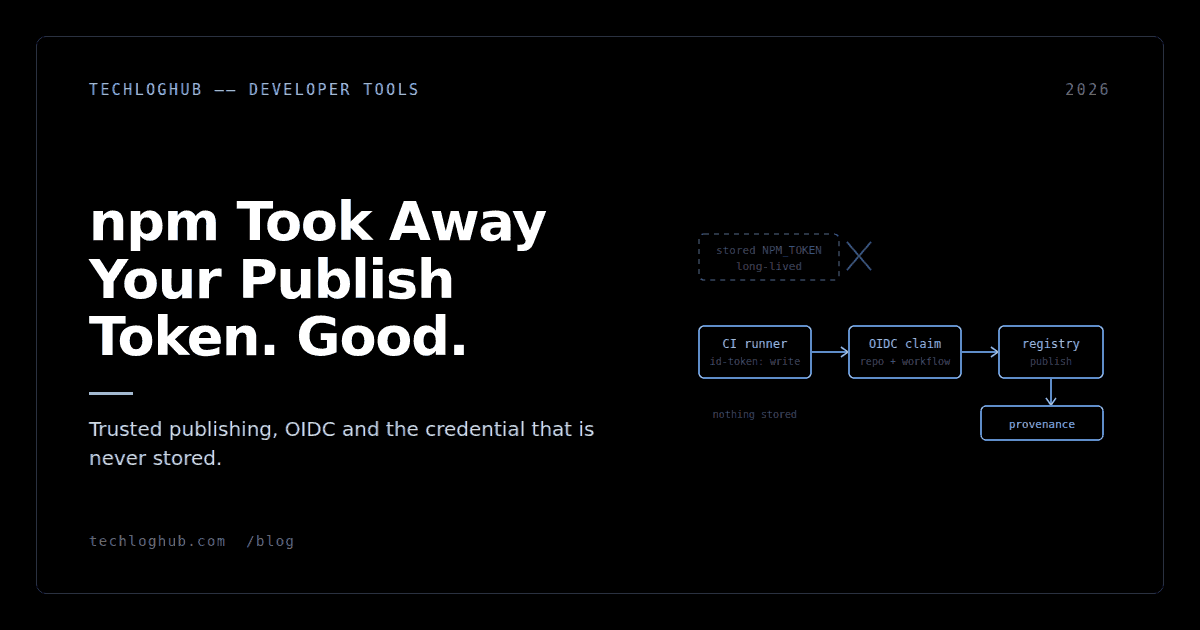
Your CI provider signs a short-lived OIDC token asserting which repository, workflow and environment is running. npm validates that assertion against a publisher you configured on the package, and issues a credential scoped to that publish. Per npm's documentation, these are "short-lived, cryptographically-signed tokens that are specific to your workflow and cannot be extracted or reused."
Three consequences follow, and they are the actual argument:
There is no secret to steal. A compromised dependency running in your build cannot exfiltrate a publish credential from the environment, because none is stored there. The credential is minted per run and dies with it.
Rotation disappears as a task. No 90-day calendar reminder, no scramble when the person who minted the token has left, no token sitting in three organisations' secret stores because a monorepo split.
Provenance comes free. Publishing through GitHub Actions or GitLab CI/CD generates and publishes provenance attestations automatically, with no extra configuration. Consumers get a verifiable link between the published tarball and the commit and workflow that built it. CircleCI does not generate provenance yet, and packages in private repositories do not get it either.
The setup, concretely
Two steps, one of them in a web UI. On npmjs.com, open the package settings and add a trusted publisher: the CI provider, the repository, and the workflow filename. A package can have up to 10 trusted publishers configured simultaneously, which is what makes monorepos and multi-workflow release setups workable.
Then the workflow. The requirements are specific: npm CLI 11.5.1 or later, Node 22.14.0 or higher, and the id-token: write permission so the runner can request an OIDC token.
permissions:
  contents: read
  id-token: write

steps:
  - uses: actions/checkout@v4
  - uses: actions/setup-node@v4
    with:
      node-version: 22
      registry-url: https://registry.npmjs.org
  - run: npm install -g npm@latest
  - run: npm ci
  - run: npm publish
Note what is absent: no NODE_AUTH_TOKEN, no secret reference, no .npmrc written at build time. Once this lands, delete the old secret from your repository and organisation settings. A revoked token left in a secret store is a trap for the next person who debugs a release.
If you want to see what the runner is actually asserting while debugging a mismatch, the claims are in a standard JWT and a JWT decoder will show you the repository and workflow fields without sending anything anywhere. Most setup failures are a workflow filename that does not match the configured publisher exactly.
Where it does not work yet
Be honest about the gaps before you plan a migration. Trusted publishing supports GitHub Actions on GitHub-hosted runners, GitLab CI/CD on GitLab.com shared runners, and CircleCI cloud. Self-hosted runners are not supported, with support stated as planned. If your release job runs on your own infrastructure — and plenty of teams self-host CI deliberately — you are still on granular tokens until that ships.
For those cases, treat the granular token as a stopgap and configure it accordingly: scope it to the specific packages, set the shortest expiry you can tolerate rather than the 90-day maximum, and keep it in exactly one place. Granular tokens require 2FA by default, and the automation bypass flag exists precisely because CI cannot answer a prompt — use it deliberately, not reflexively.
This is the same evaluation discipline that applies to any infrastructure dependency. We laid out the general version in how to compare developer tools; the supply-chain-specific version is simply to ask what an attacker gets if they land code inside your build, and then remove that thing.
A migration you can finish this week
Start with the package that has the most downstream consumers, not the easiest one. That is where provenance is worth the most and where a compromise would cost you the most.
Inventory every place an npm credential currently lives — repository secrets, organisation secrets, the release engineer's shell profile, that one deploy script. Configure the trusted publisher, land the workflow change, publish a patch version to prove it works end to end, then delete the credentials you inventoried. Repeat per package.
Teams running the same review across their wider stack usually find the equivalent pattern in their container registry, PyPI and cloud deploys too. The cloud and DevOps and security and privacy directories are a reasonable place to see what teams are using for secret scanning and CI hardening, and the open-source listings cover the self-hostable options if you would rather not add another vendor.
FAQ
Can I still use npm classic tokens?
No. All npm classic tokens stopped working on December 9, 2025 and cannot be recovered or recreated. If a pipeline broke around that date and was fixed by minting a new token, what it now holds is a granular token with a 90-day maximum expiry.
Which CI providers support npm trusted publishing?
GitHub Actions on GitHub-hosted runners, GitLab CI/CD on GitLab.com shared runners, and CircleCI cloud. Self-hosted runners are not supported yet, though support is stated as planned for a future release.
Do I get provenance automatically?
On GitHub Actions and GitLab CI/CD, yes — npm generates and publishes provenance attestations with no additional configuration. CircleCI does not support this yet, and provenance is not generated for packages in private repositories.
What are the version requirements?
npm CLI 11.5.1 or later and Node 22.14.0 or higher. On GitHub Actions the workflow also needs the id-token: write permission so the runner can request an OIDC token.
How many trusted publishers can one package have?
Up to 10 at the same time. That is what makes monorepos and setups with separate stable and prerelease workflows practical without falling back to a shared token.
Does this protect me from a compromised dependency?
It removes one specific escalation path: malicious code in your build cannot steal a stored publish credential and use it to push compromised versions of your packages, because no such credential is stored. It does not stop a dependency from doing other damage in your build, and it does not protect you from compromised packages you install. CISA's separate recommendations — rotating credentials, phishing-resistant MFA on developer accounts, auditing lockfiles — still apply.
The best credential is the one that does not exist when the attacker goes looking for it.