

Stride Game Engine
Stride: A Modern, Open-Source C# Game Engine for Realistic Rendering and VR

Stride is more than a game engine. It’s a modular, open-source platform written in C# that aims to empower developers to craft realistic visuals and immersive experiences, including virtual reality. Born with a strong emphasis on flexibility, Stride lets you mix and match rendering pipelines, physics, input systems, and tooling to suit a wide range of game genres and application domains. At its core, Stride provides a highly capable rendering backend paired with a thoughtful editor—the Stride Game Studio—that helps you build, organize, and visualize game content in a visually intuitive way. If you want to see Stride in action or learn more about the project, you can visit the official site at stride3d.net.
Note: This overview highlights how to build Stride from source, how to work with its CLI and editor, and how to participate in its growing community. If your goal is to start making games right away, check the Get started guides included in the Stride documentation.
What Stride Brings to the Table
Stride is designed with realism, performance, and developer flexibility in mind. Its C# foundation makes it approachable for many existing game developers who are already familiar with the language and the .NET ecosystem. The engine’s architecture is deliberately modular, allowing you to swap or extend components without rewiring the entire system. The editor, Game Studio, provides a visual workflow for content creation, scene assembly, asset management, and live previews, enabling a faster iteration loop from concept to playable prototype.
Key strengths include:
- Realistic rendering pipelines and VR-ready features
- A modular design that invites contributions and customization
- A polished editor (Game Studio) for managing assets, scenes, and gameplay logic
- Strong emphasis on community-driven development and open-source collaboration
- A broad ecosystem of documentation, tutorials, and examples
The Stride project embraces transparency and collaboration. It follows the all-contributors specification, inviting people from many backgrounds to contribute code, documentation, tests, and design work. You can learn more about the project’s philosophy and ongoing work in the Roadmap and Documentation Landscape sections below.
Quick Start: Stride at a Glance
Stride supports a fast, command-line-driven workflow in addition to the graphical editor. This dual approach enables teams to automate project creation, engine management, and builds, or to jump straight into a visual content workflow with Game Studio.
- Create and manage Stride projects from the command line, without needing the editor.
- Install and manage Stride engine versions via the Stride CLI tool.
- Generate projects from templates (e.g., FPS, platformer, top-down RPG, VR demos) and launch Game Studio for visual editing.
- Integrate with standard .NET templating for familiar project scaffolding.
Representative CLI usage (conceptual examples):
- Install the Stride CLI: dotnet tool install -g Stride.Cli
- Install the latest engine: stride sdk install
- Create a new project from a template: stride new fps -n MyShooter
- Open Game Studio: cd MyShooter && stride studio
The same templates are also accessible through the standard .NET templating mechanism, which can be convenient for teams already using dotnet new workflows:
- dotnet new install Stride.Templates.Games
- dotnet new stride-game -n MyGame
- cd MyGame && dotnet run --project MyGame.Windows
This blend of CLI efficiency and editor-driven content creation makes Stride adaptable to both automated pipelines and hands-on, visual workflows.
The Editor: Stride Game Studio
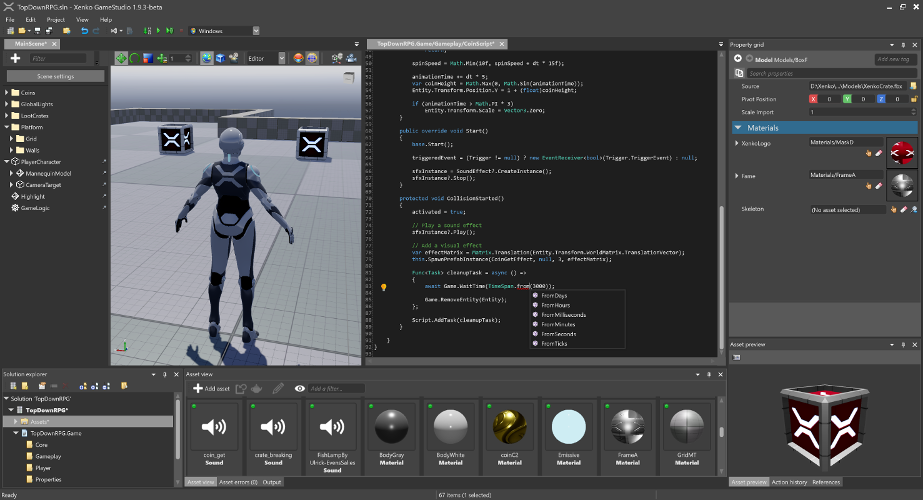
Stride’s editor, Game Studio, is the visual centerpiece for content creation. It lets you organize assets, build scenes, script gameplay logic, and preview results in real time. With a direct line to the engine, Game Studio helps you iterate quickly—from concept art to interactive prototypes.
- Asset management: import, organize, and reference textures, models, sounds, and animations within a coherent project structure.
- Scene composition: place 3D assets, lights, cameras, and post-processing effects to craft immersive environments.
- Scripting and behavior: connect gameplay logic with C# components, enabling rapid iteration on mechanics and systems.
- Live previews: test scenes and interactions in real time to validate visuals and feel.
- Extensible tooling: contribute to the editor and tooling through open-source collaboration, ensuring the suite grows with the needs of its community.
The Stride Editor image above showcases the kind of integrated editing experience you can expect when working with project content in Game Studio. The combination of a visual editor with a robust engine backend is designed to lower the barrier to entry while still offering the depth needed for serious development.
Try Stride from the Command Line
If you prefer a lean workflow or want to automate project creation, the Stride CLI is a powerful companion to Game Studio. It installs engine versions, creates templates, and can launch the editor when you’re ready to visualize your content.
- Install the Stride CLI: dotnet tool install -g Stride.Cli
- Install the latest engine: stride sdk install
- Create templates for common game types: stride new fps -n MyShooter
- Open Game Studio from your project: cd MyShooter && stride studio
If you’re more comfortable with standard .NET templates, Stride templates are also accessible via dotnet new, enabling familiar scaffolding patterns:
- dotnet new install Stride.Templates.Games
- dotnet new stride-game -n MyGame
- Run the Windows project: dotnet run --project MyGame.Windows
This dual-mode approach—CLI-driven project scaffolding and a rich, interactive editor—helps a wide range of developers adopt Stride in a way that matches their workflows and preferences.
Roadmap and the Path Forward
Stride maintains an active roadmap that outlines planned enhancements, new features, and areas for improvement. The roadmap is accessible to the community and is designed to be a living document, reflecting feedback, contributions, and evolving priorities. By keeping a transparent plan, Stride invites developers, artists, and designers to align their goals with the engine’s direction and to contribute in meaningful ways.
If you’re curious about upcoming changes, you can explore the Roadmap resource linked from the project’s documentation. This is a good way to gauge when features you care about might land and how the engine is evolving to better support realistic rendering, VR, and multi-platform development.
Building Stride from Source
Building Stride from source is a rewarding way to contribute, test, and tailor the engine to specific needs. The process is documented to guide developers through the prerequisites, setup, and build steps. Below is a concise overview inspired by the official instructions and the typical workflow described in the repository.
Prerequisites
- Latest Git: You’ll use Git to clone the repository and manage changes. The Windows installer can include Git LFS, so ensure it remains enabled for large assets.
- Visual Studio 2026 (Community is free): With two key workloads installed:
- .NET Desktop Development (includes the .NET 10 SDK)
- Desktop Development with C++
- Additional build prerequisites are documented in the official build guide, including MSVC toolsets, optional components for iOS/Android/ARM64, and command-line builds without Visual Studio.
Cloning and Opening
- Clone the Stride repository: git clone https://github.com/stride3d/stride.git
- Open the solution in Visual Studio: build/Stride.slnx (or the recommended solution in the editor’s workspace)
- Build the Stride.GameStudio project (the default startup project located in the 60-Editor folder) or run it directly from the IDE toolbar
Notes for developers
- The build and development workflow is designed to be approachable for contributors. If you’re contributing code, you’ll want to follow the Contributing Guidelines and the Documentation for contributors to understand how to format, test, and submit changes.
- The repository contains additional documentation for setting up local development environments, troubleshooting common build issues, and extending the engine.
From the command line, you can also leverage standard .NET tooling to work with Stride templates and projects:
- Install templates: dotnet new install Stride.Templates.Games
- Create projects from templates: dotnet new stride-game -n MyGame
- Run the Windows project: dotnet run --project MyGame.Windows
This integration with the .NET ecosystem ensures that developers who are familiar with modern C# tooling will find it comfortable to work with Stride, whether building from source or assembling new projects from templates.
Build Status and Verification Stride maintains automated build pipelines across platforms to validate builds and tests. Build status badges provide a quick snapshot of the health of the project:
- Windows runtime build: [badge image]
- Linux Vulkan/OpenGL runtime: [badge image]
- iOS build: [badge image]
- Tests (Simple): [badge image]
- Tests (Game/WARP): [badge image]
These status indicators are a reminder that the project is actively maintained and continuously integrated, with automated checks that help catch issues early in the cycle.
Documentation Landscape
Stride organizes its documentation across multiple hubs to help you learn, contribute, and extend the engine effectively.
- Stride Game Engine (Main repository)
- Contributing to Stride: A guide for developers who want to contribute to the engine itself
- Stride Website
- Features, blog posts, community resources, download links, and sponsor information
- Guides for contributing to the website
- Stride Docs
- Manual, Tutorials, Release Notes, API Reference, and community resources
- Ways to contribute to the documentation
- Demos, shaders, physics examples, and more
- Contributing to the docs guide
- Stride Community Toolkit
- A set of C# helpers and extensions for a smoother Stride experience
- Contributing to the toolkit’s source code
Together, these resources provide a comprehensive learning and development surface for Stride, from beginner tutorials to advanced API references. The documentation landscape is designed to reflect the engine’s modular nature, making it easier to locate the right information for a given task—whether you’re building a VR experience, a photorealistic scene, or a game prototype.
Community, Licensing, and Foundation
Stride is licensed under the MIT License, reflecting its open-source, community-focused ethos. The project is supported by the .NET Foundation, which provides a framework for open, collaborative software development around .NET-based projects. This backing helps ensure sustainability, governance, and continued collaboration.
- License: MIT (with some files possibly carrying third-party licenses)
- Foundation: .NET Foundation
- Contribution requirements: Contributors are expected to sign the Contribution License Agreement as part of engagement with the project
Contributors Stride acknowledges a broad community of contributors who have helped shape the project. The contributor roster includes developers, designers, and documentarians who have submitted code, reviews, tutorials, and design input. The project follows the all-contributors specification to recognize diverse forms of contribution, from code to documentation and beyond. If you’re interested in joining, the “Contributing” section of the repository provides guidelines on how to participate, how to report issues, and how to propose changes.
Getting Involved: How You Can Help
- Try Stride and share your feedback
- Contribute code, tests, or documentation
- Help with tutorials, guides, and sample projects
- Propose new features or improvements in line with the Roadmap
- Sponsor the project or contribute to open-source funds that support development
Stride’s community-oriented approach means every contribution helps. Whether you’re a seasoned engine developer or a passionate artist who wants to experiment with photorealistic rendering in VR, your input can help move Stride forward.
Final Thoughts
Stride stands as a compelling option for developers who want a realistic rendering pipeline and VR-ready capabilities within an open-source, modular C# framework. Its combination of an editor-driven workflow with a robust command-line interface makes it flexible enough to fit into a variety of development environments and pipelines. The project’s emphasis on collaboration—through clear contribution guidelines, an open documentation landscape, and transparent roadmaps—invites participants from all backgrounds to contribute, learn, and grow.
If you’re curious to dive deeper, the Stride project invites you to explore the repository, join the community chat, and experiment with builds and templates. The Stride initiative is built to evolve with the needs of its users, and your involvement can help shape the next generation of open-source, high-fidelity game development tools.
Citations and references
- Official Stride site and documentation
- Stride GitHub repository
- Contributing guidelines and contributor-license agreements
- Community resources and toolkit
Thank you for taking the time to explore Stride. If you’re ready, download the source, build from it, and begin crafting your next photorealistic project—or contribute to the ongoing development that makes Stride a vibrant, collaborative platform for game developers and VR creators alike.
Contributors and final notes This overview reflects the core knowledge and workflows described in the project’s README and documentation, including the CLI workflow, editor workflow, build prerequisites, and licensing. The Stride community continues to grow, and your participation—whether through code, documentation, design, or testing—helps advance the platform for everyone.
Enjoying this project?
Discover more amazing open-source projects on TechLogHub. We curate the best developer tools and projects.
Repository:https://github.com/stride3d/stride
GitHub - stride3d/stride: Stride Game Engine
Stride is a modular, open-source game engine written in C# designed for realistic rendering and immersive VR experiences. It features a robust rendering backend...
github - stride3d/stride
Maintain Stride Game Engine? Add the badge to your README
Show that the project is featured on TechLogHub and send readers to this write-up.

[](https://techloghub.com/open-source/stride-game-engine?utm_source=techloghub_badge&utm_medium=referral&utm_campaign=readme)