

Shutter Encoder: Free, Open-Source Media Transcoding Tool
Shutter Encoder: A Free, Open-Source Powerhouse for FFmpeg-Based Transcoding
Shutter Encoder is more than simply a frontend for FFmpeg. It’s a complete, free, and open-source media processing suite designed for video editors, post-production professionals, and power users who crave reliable, reproducible, and transparent workflows. Built around FFmpeg, this application combines a polished graphical interface with batch processing, reusable presets, and a spectrum of lossless operations to support both fast turnarounds and intricate production pipelines. Below is a detailed exploration of what Shutter Encoder offers, how it fits into professional workflows, and what you can expect when you dive in.
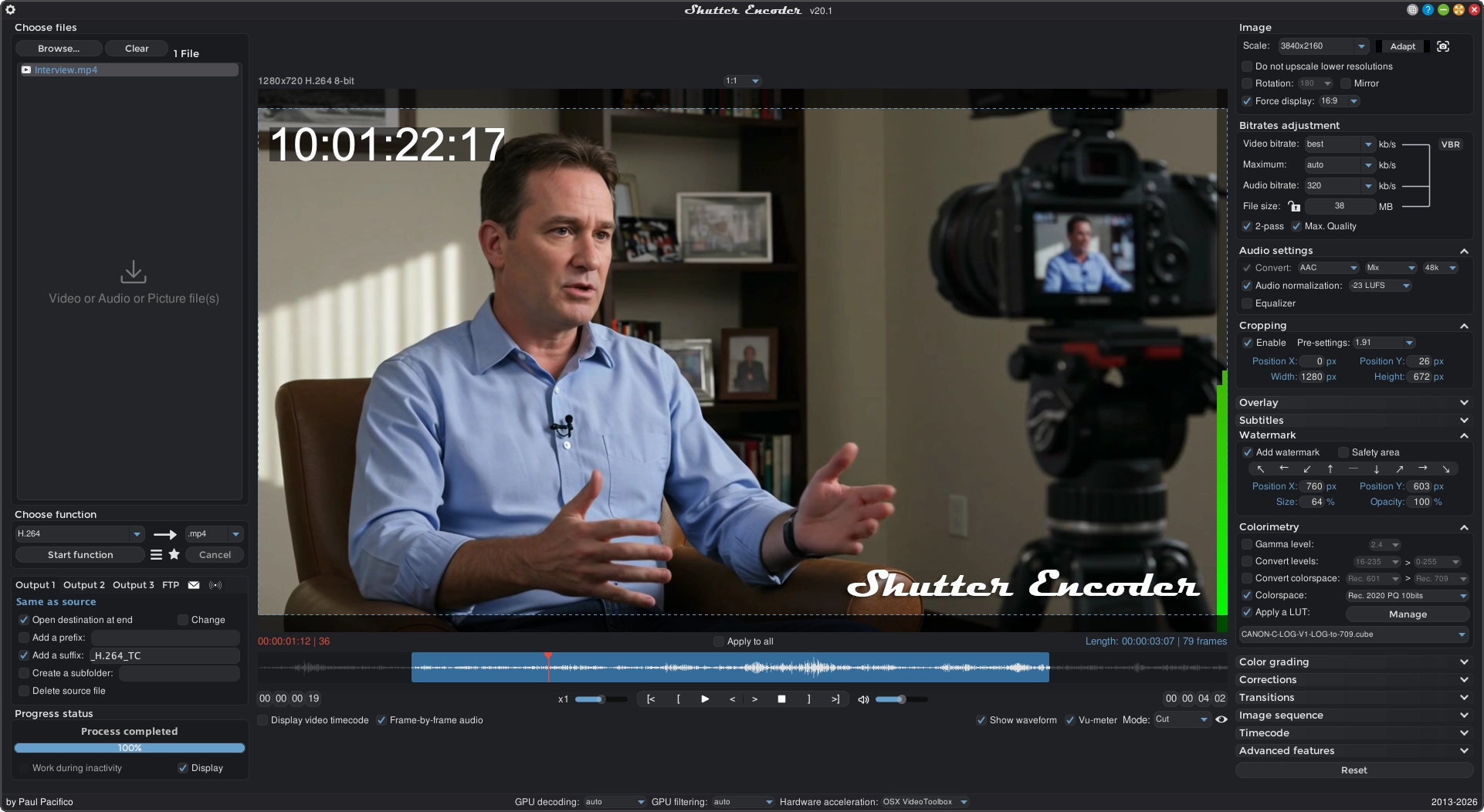
Overview: A GUI-Driven Gateway to FFmpeg
Shutter Encoder presents a visually accessible gateway to the formidable capabilities of FFmpeg. It aims to remove the steep learning curve traditionally associated with command-line encoders while preserving the power and precision required by industry-standard tasks. The interface is designed to streamline common tasks such as converting media between formats, remuxing containers without re-encoding, and performing lossless edits. Because it is free and open-source, Shutter Encoder is a practical choice for individuals and studios that value transparency and reproducibility in their media workflows.
Key traits of the project include:
- A graphical user interface built on top of FFmpeg, delivering reliable, well-supported transcoding and processing.
- A focus on batch processing to handle large numbers of files efficiently.
- A set of presets that enable quick, repeatable results, while still allowing in-depth customization for edge cases.
- An emphasis on lossless operations where preserving original quality is critical.
This combination makes Shutter Encoder suitable not only for quick conversions but also for more elaborate production pipelines that require consistent results across sessions and projects.
Core Features: A Closer Look
Shutter Encoder organizes its capabilities into cohesive groups, each addressing a facet of media processing. The following sections summarize these capabilities and the practical benefits they offer in real-world workflows.
🎞️ Media Encoding and Conversion
- Transcoding across video, audio, and image domains using FFmpeg as the core engine.
- Support for a broad range of codecs, including both consumer-focused formats and professional standards (H.264, H.265, ProRes, DNxHR, AV1, VP9, and more).
- Container remuxing without re-encoding, enabling quick format changes when quality preservation is paramount.
- Image sequence generation and conversion, useful for workflows that require frame-accurate exports or processing pipelines that operate on image series.
The encoding and conversion functions are designed to deliver reliable results with minimal manual intervention. The presets help standardize outputs for specific destinations (broadcast, streaming, archival, etc.), while still permitting fine-tuned control over codec parameters, bitrates, color spaces, and other critical variables.
♾️ Lossless Operations
- Lossless cut and trim to extract sections without introducing generation loss.
- Audio track replacement or removal for precise edits in post-production contexts.
- Stream extraction and remuxing to reorganize media streams without re-encoding.
- Subtitle extraction and multiplexing to preserve or repurpose subtitle data alongside video.
For editors and archivists, lossless workflows are a lifeline. They allow safe edits, quick revisions, and high-fidelity preservation—especially important when dealing with master materials or archival content.
🛠️ Editing and Processing Tools
- Subtitle embedding, burn-in, and editing support for common subtitle formats like SRT, VTT, and ASS.
- Loudness analysis and normalization to meet broadcast and streaming specs, as well as to ensure consistent playback volume across media.
- Black frame detection and media offline detection to identify gaps and issues in footage.
- Cropping, scaling, padding, and aspect-ratio control to adapt footage for different delivery environments.
- LUT support and color adjustments to refine look and ensure color accuracy across devices.
- Watermark and overlay insertion for branding, protection, or instructional overlays.
This toolbox makes Shutter Encoder not just a converter, but a capable helper for on-the-fly edits, quality adjustments, and content preparation tasks that commonly arise in production and delivery pipelines.
🔄 Workflow and Automation
- Batch queue processing to handle long-run jobs without manual intervention.
- Preset creation and reuse to ensure consistency across projects and teams.
- File renaming rules to enforce naming conventions automatically during processing.
- Media information and metadata inspection to verify inputs and document outputs.
- Optional FTP upload on completion to streamline delivery to remote servers or cloud workflows.
- EDL export for detected cuts to support editorial review and integration with other systems.
These workflow features help studios scale their operations while maintaining trackable, repeatable results. The combination of batch processing and automation reduces manual overhead and minimizes the risk of human error during repetitive tasks.
🧩 Additional Utilities
- Web video download via yt-dlp for convenient retrieval of publicly available content.
- RAW image processing using LibRaw for direct RAW file handling.
- MediaInfo integration for detailed technical analysis of media files.
- EXIF metadata handling to read and preserve camera information and other metadata during processing.
These supplemental tools broaden Shutter Encoder’s utility beyond straightforward transcoding, enabling users to handle source material in its native forms and extract meaningful metadata for cataloging and quality control.
Platform Availability and Prebuilt Binaries
Shutter Encoder provides installers and portable builds for Windows, macOS, and Linux, making it accessible across a wide range of development and production environments. The official distribution channel is the website, where users can download the appropriate package for their platform. Having native builds for multiple operating systems ensures compatibility with existing pipelines and hardware, as well as flexibility for standalone workstations, render farms, or mixed-environment studios.
- Windows: Installers and portable versions are available.
- macOS: Installers and portable versions are available.
- Linux: Installers and portable versions are available.
To obtain the latest builds, refer to the official downloads page: https://www.shutterencoder.com/#downloads
The interface image above provides a glimpse of the polished GUI that accompanies these builds, illustrating how the tool looks to end-users during typical tasks such as batch processing, preset selection, and metadata inspection.
Build from Source: Transparency and Customization
For users who value complete transparency or require customization beyond what binaries offer, Shutter Encoder supports building from source. The build process involves integrating several third-party dependencies into a Library folder and leveraging a custom Java Runtime Environment (JRE) built with jlink. This JRE is based on Java 25 and is configured to minimize extraneous components while preserving the modules needed for Shutter Encoder’s operation.
Key points about building from source:
- Required dependencies must be placed into the Library folder prior to build.
- A custom JRE is bundled to ensure a consistent runtime across environments.
- The JRE is built with specific modules and flags to optimize for size and performance.
- The configuration focuses on a lean, production-ready runtime suitable for media processing workloads.
This approach ensures that the resulting application behaves consistently regardless of the host system, provided the platform-specific build process is followed.
Open-Source Code Used: A Network of Supporting Projects
Shutter Encoder’s capabilities are augmented by a number of open-source projects. The integration of these tools enables advanced features such as AI-based upscaling, transcription, background removal, restoration, and the core FFmpeg processing engine. Notable open-source components include:
- Real-ESRGAN-ncnn-vulkan: High-performance neural network inference for AI-based upscaling and enhancement.
- Whisper-Ctranslate2: High-performance speech-to-text for audio transcription tasks.
- BackgroundRemover: AI-powered matting for background removal in images and videos.
- Demucs: Music source separation for isolating audio components.
- DeOldify: Image and video restoration, including colorization.
- FFmpeg: The central encoding, decoding, filtering, muxing, and transcoding engine.
- 7-Zip: Archive extraction and compression utilities.
- yt-dlp: Web video downloading engine for streaming content.
- LibRaw: RAW image decoding for importing and converting digital camera RAW files.
- ExifTool: Metadata reading and writing, used to preserve and edit metadata.
- tsMuxeR: Transport stream muxing for Blu-ray and AVCHD structure creation.
- MediaInfo: Detailed technical analysis of media files.
- dvdauthor: DVD structure authoring for DVD-Video projects.
- bmxtranswrap: MXF wrapping and OP-Atom/OP1a handling for broadcast workflows.
Together, these projects supply a robust backbone for Shutter Encoder’s wide range of features, ensuring that users can leverage cutting-edge techniques while retaining a straightforward workflow.
Changelog and Community
Keeping track of changes is essential in any production tool. Shutter Encoder maintains a changelog that outlines new features, improvements, bug fixes, and other updates. Access to the changelog is available from the official site: https://www.shutterencoder.com/changelog/
Beyond the changelog, the project benefits from a community of contributors and users who share presets, tips, and troubleshooting advice. This ecosystem enhances the value of the software as it grows and adapts to new formats, codecs, and workflows.
Getting Started: A Quick-Start Guide
If you’re new to Shutter Encoder, here is a concise roadmap to begin using the tool effectively:
- Download and install the appropriate binary for your platform from the official downloads page.
- Launch Shutter Encoder and explore the main interface, which centers around a file browser, preset manager, and a preview area for outputs.
- Add media files to the queue. You can drag and drop or use the file picker.
- Choose a preset or configure your own settings for encoding, remuxing, or editing tasks.
- Review input metadata and confirm any required changes (bitrate targets, color space, frame rate, etc.).
- Start the batch process. Shutter Encoder will process files in sequence, providing progress feedback and completion status.
- Retrieve outputs and perform post-processing checks. If necessary, export EDLs, reports, or metadata snapshots.
- If needed, configure optional FTP uploads to deliver completed media to a remote location automatically.
For longer workflows, take advantage of:
- Batch queue processing to manage multiple jobs in a single session.
- Preset creation and reuse to ensure consistency across projects.
- Metadata inspection to verify inputs and document outputs for archival purposes.
Practical Use Cases: Why Studios Choose Shutter Encoder
- Quick format conversions for streaming or compatibility with delivery requirements.
- Lossless editing tasks in post-production where frame-perfect edits are essential.
- Batch processing of large media libraries, such as archiving or preparing footage for delivery.
- AI-assisted upscaling, color restoration, or noise reduction as part of a pre-delivery polish.
- Subtitling workflows that require embedding, burning in, or muxing with video streams.
- Metadata preservation and standardization across a production pipeline.
In practice, Shutter Encoder’s blend of power and accessibility makes it suitable for freelance editors, small studios, and larger facilities that need a dependable, auditable processing trail.
What Makes Shutter Encoder Stand Out
- It is free and open-source, providing a transparent, community-driven alternative to proprietary tools.
- It combines a polished GUI with access to FFmpeg’s extensive capabilities, enabling both basic and advanced operations.
- It supports lossless processing workflows, which are critical for preserving quality in production pipelines.
- It includes automation features that support scalable workflows, reducing manual repetition and human error.
- It embraces a broad ecosystem of open-source components that extend its functionality into AI-based enhancement, transcription, stabilization, and more.
The result is a versatile, future-ready tool that remains faithful to the core goals of modern video production: speed, precision, and reproducibility without sacrificing control.
Final Thoughts: A Tool Worth Exploring
Shutter Encoder embodies a thoughtful synthesis of accessibility and depth. For those who work with media regularly—whether you’re a solo editor, a post-production technician, or part of a larger team—this application offers a well-considered balance of features. Its FFmpeg foundation ensures compatibility with a wide range of formats and codecs, while its GUI and presets help you achieve consistent results across dozens or hundreds of files.
Moreover, the project’s open-source nature invites customization, inspection, and contribution. If you’ve ever wanted to tailor a processor to your unique pipeline or contribute improvements back to the community, Shutter Encoder provides a transparent platform to do so. The combination of powerful processing tools, automation capabilities, and a collaborative ecosystem makes Shutter Encoder a compelling addition to any media professional’s toolkit.
If you’d like to explore further, start with the downloads page to grab the version that matches your operating system, review the changelog for recent improvements, and consider inspecting the library of open-source components that power the tool. As you grow more comfortable with its presets and automation features, you’ll likely discover Shutter Encoder to be an indispensable companion in your media production workflow.
Enjoying this project?
Discover more amazing open-source projects on TechLogHub. We curate the best developer tools and projects.
Repository:https://github.com/paulpacifico/shutter-encoder
GitHub - paulpacifico/shutter-encoder: Shutter Encoder: Free, Open-Source Media Transcoding Tool
Shutter Encoder is a free and open-source media processing suite built on FFmpeg. It provides professional video editors with a polished GUI for batch transcodi...
github - paulpacifico/shutter-encoder