

RocketRide: Open-Source AI Pipeline Builder and Runtime

RocketRide: An Open-Source, Developer-Native AI Pipeline Tool for Building, Debugging, and Deploying AI Workflows — Inside Your IDE
In the fast-moving world of AI and machine learning, RocketRide presents a compelling approach: an open-source data pipeline builder and runtime designed specifically for AI and ML workloads. With a developer-first mindset, RocketRide lets you design, test, and ship complex AI workflows entirely within your familiar IDE environment. Pipelines are defined as portable JSON, built visually in VS Code, and executed by a highly optimized multithreaded C++ runtime. The result is a production-grade platform that minimizes friction between idea and execution — real-time data processing, multimodal AI search, and everything in between, all on your own infrastructure.
Images: Visual summary of RocketRide’s ecosystem, showing languages and platforms


Why RocketRide Exists
RocketRide is designed to solve a central tension in AI pipeline development: the need for speed, reliability, and portability without sacrificing the flexibility developers expect. The project embraces open source so teams can inspect, contribute, and tailor the platform to their unique needs while preserving the ability to run pipelines anywhere — on your own servers, in Docker containers, or in on-prem deployments.
Key motivations include:
- End-to-end AI workflows that stay within a developer’s IDE workflow, minimizing context switches.
- A robust, production-ready runtime built in native C++ to deliver high throughput and low latency at scale.
- A growing library of pipeline nodes that cover LLM providers, vector databases, OCR, NER, PII anonymization, and more, all of which are Python-extensible for easy customization.
- A portable JSON representation of pipelines to simplify versioning, sharing, and deployment.
Core Concepts at a Glance
- Visual Pipeline Builder: A drag-and-drop canvas within VS Code where you connect nodes, wire inputs and outputs, and configure settings in real time. This eliminates boilerplate and accelerates iteration.
- Multithreaded C++ Runtime: Native performance engineered for AI workloads, ensuring throughput without compromising production reliability.
- 50+ Pipeline Nodes: A diverse ecosystem including 13 LLM providers, 8 vector databases, OCR, NER, PII redaction, chunking strategies, embedding models, and more. All nodes are Python-extensible so your own contributions can be shared with the community.
- Multi-Agent Workflows: Built-in CrewAI and LangChain support for orchestrating complex, multi-step reasoning with shared context across runs.
- Coding Agent Ready: RocketRide can auto-detect coding agents such as Claude, Cursor, and more, enabling pipeline creation and modification through natural language.
- SDKs in TypeScript, Python, and MCP: Seamless integration into native apps, exposure as callable tools for AI assistants, or embedding into existing codebases.
- Zero Dependency Headaches: Managed environments and toolchains simplify setup, from Python environments to C++ toolchains and Java/Tika integrations.
- One-Click Deploy: Production-ready by design, with Docker, on-premises, or upcoming RocketRide Cloud options.
- Observatory & Debugging: In-depth telemetry, tracing, token usage, and memory profiling to optimize pipelines before scale-up.
Visual Pipeline Builder and the Studio Experience
RocketRide’s flagship feature is the Visual Pipeline Builder, a design canvas that lives inside your IDE. It blends code and configuration into a coherent, observable pipeline that is portable and reproducible. The builder enables:
- Drag-and-drop construction of pipelines from a growing catalog of nodes.
- Real-time observability: track token usage, LLM calls, latency, and execution metrics as you wire and configure nodes.
- Versionable JSON pipelines: pipelines can be saved, shared, and run on any compatible runtime without vendor lock-in.
- Portability: the same pipeline can run locally, on a server, or in a data center, thanks to the portable JSON and the cross-platform runtime.
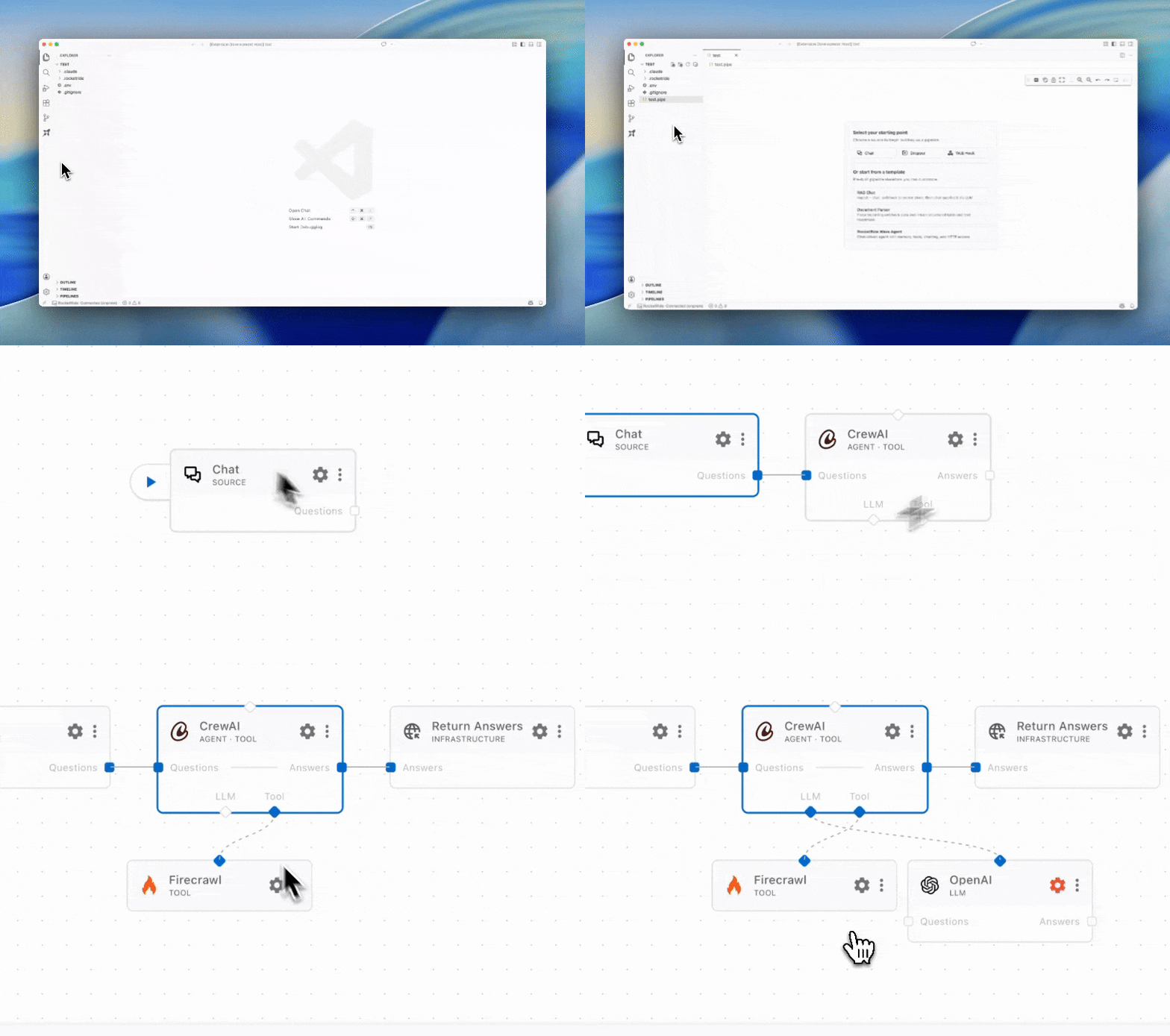
The experience is reinforced by a live image of the pipeline canvas to illustrate the interaction. See an example pipeline canvas in action in the image below.
A High-Performance Runtime Designed for AI
Under the hood, RocketRide embraces a high-performance, native C++ runtime designed around the throughput demands of AI and data workloads. Multithreading is central to the runtime, ensuring that pipelines scale to real-time ingestion, multimodal processing, and complex reasoning tasks. The architecture is crafted to minimize bottlenecks, providing a dependable foundation for production-grade AI workflows — not a demonstration scaffold.
- Multithreaded execution model: Each pipeline can leverage multiple cores to run simultaneous operations, including parallel calls to LLMs and parallel data processing steps.
- Low-latency orchestration: The runtime minimizes context switching overhead and preserves memory locality for faster throughput.
- Production-ready stance: The platform ships with the configurations and tooling needed to deploy on Docker, on-prem, or soon, RocketRide Cloud, ensuring you can move from prototype to production quickly.
A Rich Library of Pipeline Nodes
RocketRide ships with more than 50 pipeline nodes, spanning a wide array of AI capabilities:
- 13 LLM providers for flexible model choice and redundancy.
- 8 vector databases to support embedding storage and similarity search.
- OCR, NER, PII anonymization, and advanced text processing pipelines.
- Advanced chunking strategies and embedding models to optimize how data is sliced and indexed for AI reasoning.
- All nodes are Python-extensible. If you can imagine a node, you can contribute and publish your own to the ecosystem.
Multi-Agent Workflows and the Power of Collaboration
As pipelines grow in complexity, coordinating multiple agents becomes essential. RocketRide provides built-in support for multi-agent workflows, including CrewAI and LangChain integration. This enables you to:
- Chain agents together to perform multi-step reasoning, with shared memory across pipeline runs.
- Scale collaborative AI reasoning across several agents to tackle tasks such as planning, search, and synthesis.
- Manage tool invocation as part of a parent node’s execution, enabling complex, modular AI systems without reliance on external glue.
Coding Agent Readiness: Natural Language to Pipeline
RocketRide’s automation features extend to coding agents. The platform can auto-detect coding agents such as Claude, Cursor, and others, enabling you to:
- Build, modify, and deploy pipelines with natural language prompts.
- Use a conversational interface to assemble complex workflows, convert ideas into nodes, or alter configurations on the fly.
- Accelerate development pace by letting AI assist in the construction and refinement of pipelines directly within the IDE.
SDKs: TypeScript, Python, and MCP
RocketRide supports multiple SDKs to integrate pipelines into your applications and services:
- TypeScript SDK: Expose pipelines as callable tools for AI agents or integrate them directly into TypeScript/JavaScript apps.
- Python SDK: Seamlessly embed pipelines into Python projects, enabling programmatic control and data flow within Python applications.
- MCP SDK: A dedicated SDK for multiprocessing control and pipeline orchestration, expanding how you manage pipeline lifecycles.
Zero Dependency Headaches
One of RocketRide’s strongest claims is “Zero Dependency Headaches.” The platform aims to eliminate the friction of setting up complex AI pipelines by handling:
- Python environments and their package dependencies automatically.
- C++ toolchains required by the runtime.
- Java/Tika and related node dependencies, all managed by the platform.
- A streamlined “clone, build, run” workflow that minimizes manual setup and troubleshooting.
One-Click Deploy: Production-Grade from Day One
Deployment is designed to be straightforward and production-ready from the start:
- Docker: Pull the RocketRide engine image and deploy with a simple command sequence. This ensures you can stand up a scalable runtime quickly.
- Local Deployment: Use the standalone runtime process from the Deploy page in the Connection Manager to run pipelines on your own hardware.
- On-Premises: For full control and data residency, deploy on your own servers and manage everything locally.
- Upcoming RocketRide Cloud: A hosted option for teams who want the convenience of managed infrastructure while preserving a strong control plane over pipelines.
Quick Start: Getting Up and Running
To begin your RocketRide journey, the typical quick-start flow is as follows: 1) Install the RocketRide extension for your IDE. If you don’t see your IDE in the marketplace, you can open an issue or download directly from Open VSX.
- Install the extension, which provides the visual canvas, dataset access, and the tooling to deploy and manage servers from your IDE.
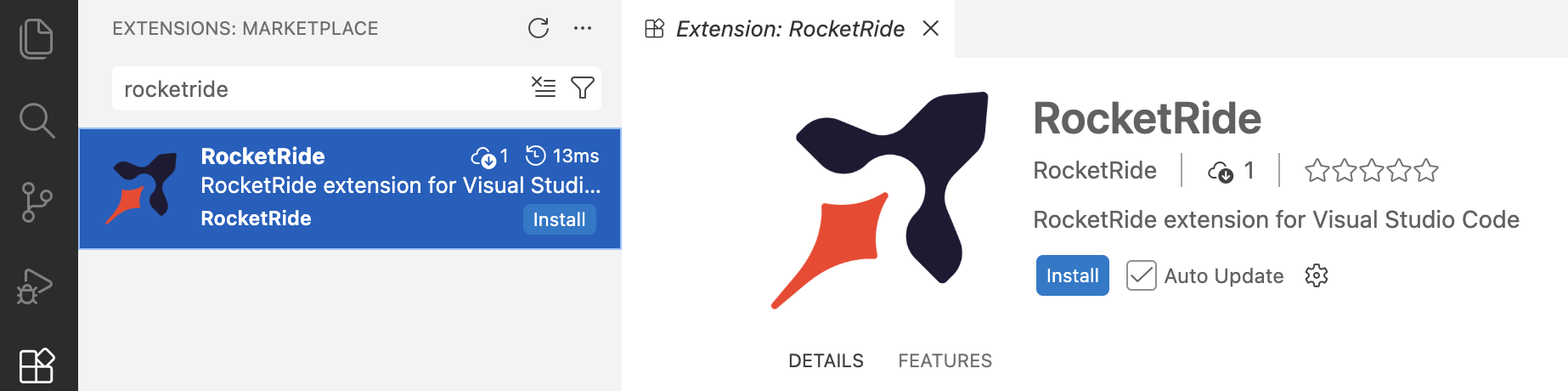
2) Click the RocketRide extension in your IDE to access the visual canvas, run servers, and start building pipelines.
3) Deploy a server and choose your preferred execution mode:
- Local (Recommended): The server runs directly within your IDE, with minimal setup.
- On-Premises: Run on your own hardware for enhanced data residency and governance.
- Docker-based deployment: Pull the engine image, create a container, and expose the runtime port for your pipelines.
Building Your First Pipe: A Step-by-Step Guide
Pipelines in RocketRide are recognized with the .pipe extension. They are JSON objects that the visual builder renders for you, enabling a fast iteration loop. A typical first pipeline starts from a source node and flows through a sequence of processing steps: 1) Start with a source node such as webhook, chat, or dropper to ingest data. 2) Connect input and output lanes by type to wire your pipeline correctly. 3) Some nodes, like agents or LLMs, can be invoked as tools for a parent node to call during execution. 4) Use the Run command on the source node or via the Connection Manager to execute the pipeline. 5) Deploy the pipeline to your chosen runtime (Docker, Local, On-Prem) and validate in production-like conditions.
A visual example of a pipeline in action helps demonstrate the concept:
Observability: Insightful Telemetry for Optimization
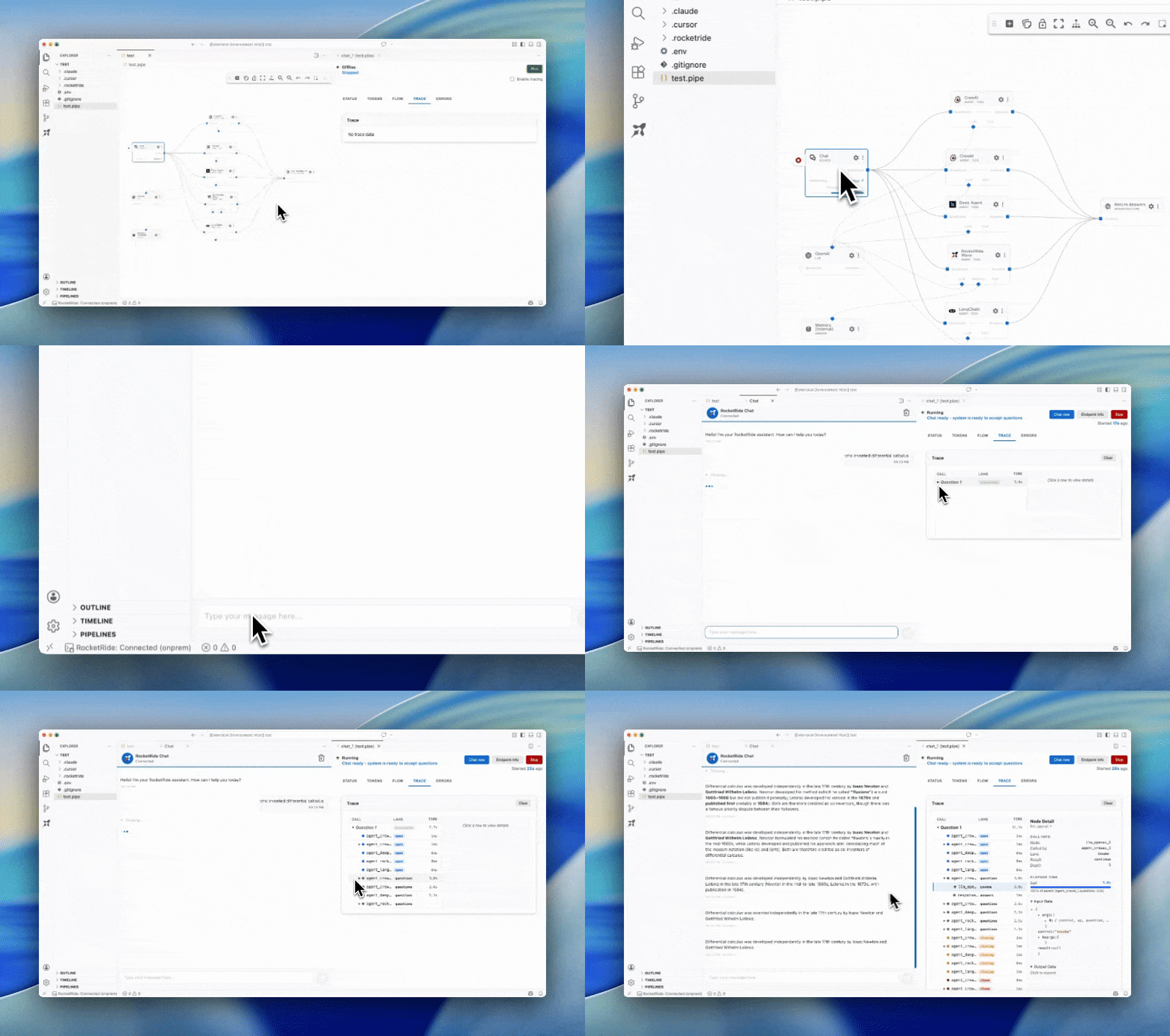
RocketRide places a strong emphasis on observability. Running pipelines can be inspected in depth to verify behavior, performance, and accuracy before you scale. Observability features include:
- Trace call trees to see the sequence of operations for each pipeline execution.
- Token usage monitoring to understand model interactions and cost implications.
- Memory consumption profiling to detect leaks and optimize resource usage.
- Model, agent, and tool discovery to help you select the best combination for a given task.
Contributors and Community
RocketRide is the product of a growing community of contributors who fix bugs, add nodes, improve documentation, and help one another through Discord. The project invites new contributors to engage via the contributing guide and join an active ecosystem of developers and researchers.
Made with ♥ in SF & EU
Contributing to RocketRide isn’t just about code. It’s about building a community that shares ideas, code, and feedback to push AI pipelines forward. The project welcomes maintainers and early adopters who want to help shape the roadmap, improve documentation, and collaborate on new nodes and connectors.
Images: Community mosaic and contributions
A Gallery of Real-World Use Cases
RocketRide’s flexible node library and its multi-agent capabilities translate well into practical applications. Some use cases include:
- Real-time data processing: ingest data streams, apply transformations, and route results to downstream systems with very low latency.
- Multimodal AI search: combine text, image, and other modalities to perform cross-modal retrieval and analysis.
- Complex decision-making: orchestrate multi-step reasoning across multiple models and tools, with shared state across pipeline executions.
- Compliance and security workflows: incorporate NER and PII anonymization to protect sensitive information while preserving data utility for analysis.
Deployment Scenarios: Docker, Local, On-Prem, and Beyond
RocketRide is designed to move from prototype to production with minimal friction:
- Docker: Quick-start deployments using the engine container, enabling reproducible environments.
- Local: A standalone runtime for fast development cycles and tight IDE integration.
- On-Prem: Full control over hardware, data residency, and governance policies.
- Cloud (Coming Soon): A hosted option for teams seeking managed infrastructure with robust security and observability features.
Observability and Debugging for Excellence
RocketRide’s observability suite enables developers to optimize pipelines to the maximum before scaling. By tracing, modeling usage patterns, and measuring latency, engineers can identify bottlenecks and iterate quickly. The combined visibility across models, agents, and tools ensures pipelines are sound, efficient, and auditable.
Imagery and Visual Assets
- Banner and logos: The project’s banner and language icons sit at the top of the page, reinforcing the cross-language, cross-platform nature of RocketRide.
- IDE integration: A screenshot shows how the pipelines come to life inside the IDE, with the visual builder coupled to the codebase.
- Observability visuals: A separate image demonstrates tracing and analytics in action.
- Quick-start visuals: Install prompts and the first-pipe canvas GIF illustrate the step-by-step flow for new users.
- Community and contributors: Images highlight the vibrant contributor ecosystem and a sense of global collaboration.
Contributing to the Ecosystem
RocketRide encourages broad participation. Whether you’re a student, a data scientist, a software engineer, or an ops person, your contributions can take many forms:
- Writing documentation to help others learn how to design, test, and deploy pipelines.
- Building and publishing new nodes to extend the platform’s capabilities.
- Improving the extension experience within the IDE to streamline the workflow.
- Providing code samples, tutorials, and guides to inspire new users.
The project maintains a straightforward contribution workflow to help newcomers get started and make meaningful commits quickly.
A Roadmap View, Data Residency, and Security Considerations
As teams adopt RocketRide for production AI pipelines, they often raise questions about deployment environments, data residency, and security. RocketRide’s design anticipates these concerns:
- On-Premises deployment supports data residency requirements and tighter governance.
- Local development workflows ensure sensitive data can be processed without leaving controlled environments.
- A future RocketRide Cloud option promises managed scalability with robust security, compliance, and observability features.
- Zero-dependency design reduces surprises during deployment, improving predictability and reliability.
Getting Started with the Ecosystem: Quick Links and Resources
- Home: The primary landing page for RocketRide information and updates.
- Documentation: Comprehensive guides covering installation, building pipelines, and best practices.
- Python SDK: Documentation and examples for Python integration.
- TypeScript SDK: Documentation and examples for TypeScript/JavaScript integration.
- MCP Server: A component used for pipeline management and control in certain configurations.
- CI and Release: Access to CI pipelines and server releases to keep you aligned with the latest improvements.
Images: A collection of platform images and icons to reinforce the visual narrative
What Makes RocketRide Distinctive?
- Developer-native experience: Everything you need to create, test, and deploy AI workflows lives within your IDE.
- Production-grade readiness: Built with a multithreaded C++ runtime and a robust deployment path.
- Extensive node ecosystem: A broad library of pre-built nodes with the ability to contribute your own.
- Observability first: Deep telemetry and tracing to ensure pipelines perform reliably at scale.
- Flexible deployment: Docker, local, and on-prem deployments with planned cloud options.
- Cross-language SDK support: TypeScript and Python integrations enable pipelines to be embedded in a wide range of applications.
- “Zero dependency” promise: Seamless setup and operation across environments.
Conclusion: The RocketRide Promise
RocketRide envisions a world where AI pipelines are not an afterthought but a native part of the developer workflow. By combining a visually intuitive pipeline builder with a high-performance runtime and a broad ecosystem of nodes, RocketRide lowers the barrier to building, debugging, and deploying AI workflows at scale. It invites developers to define pipelines as portable JSON, design and test them in VS Code, and run them on the infrastructure that suits their needs — from a laptop to enterprise clusters. The project’s emphasis on openness, community contribution, and practical production readiness makes it a compelling option for teams seeking an end-to-end AI pipeline platform that respects the realities of modern software development.
Images and resources note: The content above is drawn from the input materials, including banners, icons, and example visuals that demonstrate RocketRide’s IDE integration, pipeline canvas, observability, install prompts, and community contributions. You’ll find the banner, language icons, installation visuals, pipeline examples, and tracing demonstrations embedded where referenced in this article. The project remains committed to accessibility and collaboration, reflecting its open-source ethos and the energy of its global contributor base.
Made with love in SF & EU.
Enjoying this project?
Discover more amazing open-source projects on TechLogHub. We curate the best developer tools and projects.
Repository:https://github.com/rocketride-org/rocketride-server
GitHub - rocketride-org/rocketride-server: RocketRide: Open-Source AI Pipeline Builder and Runtime
An open-source AI pipeline builder and runtime for building, debugging, and deploying AI workflows in your IDE....
github - rocketride-org/rocketride-server