

Outline

A Fast, Collaborative Knowledge Base for Teams: Inside Outline
Outline is more than a simple wiki. It’s a fast, collaborative knowledge base designed to help teams capture, organize, and share information in real time. Built with modern web technologies and designed with the needs of growing teams in mind, Outline emphasizes speed, clarity, and a smooth editing experience. This detailed description invites you to explore what Outline is, how it’s built, and how you can leverage it—whether you use the hosted version or run your own copy.

Key Visual Signals
- Outline’s branding is clean and approachable, underscored by a fast, collaborative ethos.
- The platform showcases a modern UI focused on speed, searchability, and real-time collaboration.
- The project uses contemporary tooling and a thoughtful architecture to support scalable team knowledge bases.
What Outline Is
Outline positions itself as a fast, collaborative knowledge base for teams. It is built on a stack that emphasizes speed, reliability, and maintainability, with a strong emphasis on collaboration features that help teams share knowledge without friction. The core idea is simple: provide a place where teams can store documents, guides, procedures, and notes, and make them easy to find, edit, and discuss in real time.
Hosted Experience and Documentation
- The team offers a hosted version of the app at www.getoutline.com, making it possible to deploy and use Outline without managing infrastructure.
- Comprehensive documentation is available to guide users through setup, usage, and best practices at docs.getoutline.com.
- If you want to run your own copy or contribute to development, this repository is the source of truth for Outline and related services.
This separation—a hosted product alongside a robust, well-documented codebase—lets organizations choose the path that best fits their needs: quick rollout with a hosted service, or complete control and customization with a self-hosted deployment.
Tech Stack and Design Principles
Outline embraces a modern web development stack designed for maintainability and developer happiness. At the core, it uses:
- React for the frontend, delivering a responsive and interactive user experience.
- Node.js for the backend, providing a scalable foundation to support collaborative features and real-time updates.
- TypeScript, which adds strong typing to the codebase, improving reliability and developer productivity.
- Prettier for code formatting, ensuring consistent style across the project.
- Styled Components for CSS-in-JS styling, enabling modular, themeable UI components.
As reflected in the project’s badges and setup, these choices emphasize:
- Type safety and modern JavaScript tooling.
- A cohesive code style that reduces friction during development.
- A design system that supports a clean, readable user interface.
For a sense of the community and localization effort, you’ll also see badges related to translations and localization status, highlighting an openness to internationalization as part of the project’s ongoing evolution.
Where to Start: Hosting, Setup, and Documentation
If you’re evaluating Outline, start with the hosted version to get a feel for the experience, then explore the documentation to understand how to set up your own instance. The docs cover hosting and deployment scenarios, performance considerations, and operational details to help you run Outline in production.
If you’re considering contributions, the repository also points to GitHub discussions and issues, which serve as a forum to discuss features, report bugs, and plan enhancements. This two-faceted approach—hosted usage plus an active development community—helps Outline stay nimble while remaining accessible to teams of all sizes.
Contributing: Practical Guidelines and a Human-Centered Process
Outline’s contribution guidelines emphasize quality, collaboration, and thoughtful engagement. A principled stance against AI-generated pull requests helps ensure that changes reflect real understanding of the codebase and thoughtful design decisions. In practical terms, this means:
- Before submitting a pull request, discuss the idea with the core team by creating or commenting on an issue on GitHub. This helps align on scope, approach, and expectations.
- Explore the discussions channel to understand current priorities, gather feedback, and participate in planning.
- When contributing, consider areas where you can add value beyond code, such as documentation improvements, translations, or performance enhancements.
Ways to contribute include:
- Translation work to bring Outline’s documentation and UI to additional languages.
- Working on issues labeled good first issue to get started with small, manageable tasks.
- Performance improvements across server and frontend to improve responsiveness and scalability.
- Documentation improvements that make onboarding and maintenance easier for new developers.
- Bug fixing and quality improvements to strengthen reliability.
The architecture of Outline is described in dedicated documents, but the overarching message is that the project is designed to be approachable for new contributors while retaining depth for seasoned developers.
Development and Architecture: A Roadmap for Contributors
If you’re curious about how Outline is put together, a concise route is:
- Start with the development guide that explains setting up a local development environment. This is the entry point for contributors who want to run, test, and modify the app.
- Read the architecture document for a high-level view of how the application components fit together. This document helps new contributors understand how data flows through the system, how modules interact, and where performance-critical paths live.
- For debugging, Outline uses a simple, category-prefixed console log in development and JSON logging in production. This design supports straightforward log parsing by standard tools and pipelines.
- In development, you can enable HTTP logging by setting the DEBUG=http environment variable. Global logging can be enabled by setting DEBUG=* or targeted by enabling specific categories such as DEBUG=database. LOG_LEVEL can also be set to debug or even silly for very verbose logging.
Testing and Quality Assurance: Ensuring Reliability
Outline aims to provide robust coverage for critical parts of the application, with a pragmatic approach to testing. The testing philosophy emphasizes end-to-end correctness for API endpoints and authentication-related logic, ensuring that core workflows are reliable.
Tests are written using Vitest, and new tests follow a .test.ts extension. Typical commands you’ll encounter include:
- To run all tests: make test
- To run backend tests in watch mode: make watch
There are also ways to run tests selectively once you have a test database prepared:
- To run backend tests: yarn test:server
- To run a specific backend test in watch mode: yarn test path/to/file.test.ts --watch
- To run frontend tests: yarn test:app
These calls reflect a balanced strategy that targets critical security paths and core functionality while allowing targeted development feedback to remain fast and iterative.
Database Migrations and Schema Evolution
Outline uses Sequelize for migrations, enabling controlled changes to the database schema over time. The migration workflow typically includes:
- Creating a new migration: yarn db:create-migration --name my-migration
- Applying migrations: yarn db:migrate
- Rolling back migrations: yarn db:rollback
For testing environments, it’s common to apply migrations to a test database with a command like:
- yarn db:migrate --env test
This migration approach supports incremental changes as the project evolves, while maintaining the ability to reproduce and test those changes reliably.
Activity and Community Signals
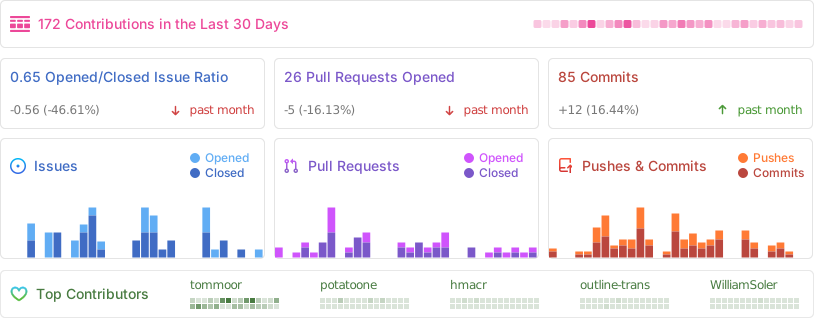
A small, but meaningful, note of activity is often visualized through monitoring and analytics. For Outline, a representative image from Repobeats provides a snapshot of activity over time, illustrating usage trends and the vitality of the project. These signals are useful for understanding how the project is evolving and how teams are engaging with it.
License and Ownership
Outline is released under the BSD-style license (BSL) 1.1. The license file (LICENSE) is included with the project, clarifying permissions, restrictions, and the scope of allowed usage. This licensing choice aligns with the project’s open-source posture, inviting collaboration while protecting intellectual property and ensuring a stable, permissive framework for adoption and contribution.
A Practical View: How to Use Outline in Real Teams
To maximize the value of Outline in a real-world setting, teams can adopt a structured workflow that aligns with Outline’s strengths:
- Create a central knowledge space for your team, including product docs, engineering runbooks, design guidelines, and onboarding materials.
- Leverage the fast search and hierarchical organization to ensure information is findable by team members, even as the knowledge base grows.
- Use collaborative editing to keep documents current, and empower subject matter experts to contribute and review within the platform.
- Integrate with translation workflows to support a global team, using the localization features that Outline and its ecosystem encourage.
- Rely on the hosted version for quick time-to-value, or deploy a self-hosted instance when stricter data governance or on-prem requirements apply.
- Follow the contribution guidelines if you want to influence the project’s direction and help improve the tool for others.
Visual Cues and User Experience
Outline emphasizes clarity, readability, and a frictionless editing experience. A well-designed interface helps teams draft, organize, and revise content with minimal context switching. The interface is built to scale from small teams to larger organizations, ensuring that navigation, search, and editing speed remain responsive as knowledge bases grow.
The hosted experience offers a plug-and-play solution with a polished UI, while the self-hosted approach prioritizes control, customization, and security through your own infrastructure. The dual-path approach gives organizations flexibility to adopt Outline at varying levels of maturity and scale.
Notes on Documentation and Community Engagement
Documentation is a cornerstone of Outline’s philosophy. The docs site provides guidance on hosting, deployment, and usage, and it is supplemented by discussions on GitHub where contributors and users can share ideas, report issues, and propose enhancements. If you have questions or improvements for the docs, creating a thread in GitHub discussions is encouraged, ensuring that suggestions are visible to the maintainers and the broader community.
Images and Visual References in the Output
To illustrate this description and give you a feel for Outline’s branding and interface, the following visuals are included from the input:
- The Outline logo image at the top, establishing branding and context.
- A screenshot image representing the app’s interface and user experience.
- The various badges that signal TypeScript, Prettier, Styled Components, and localization status, which reflect the project’s tooling and community approach.
A Quick Glance at the Developer Experience
For developers seeking to contribute or to understand the project deeply, Outline offers:
- A compact, well-structured architecture document for a high-level overview of how components are organized and how data flows.
- A straightforward development guide to set up a local development environment and begin contributing.
- A robust testing ecosystem powered by Vitest, with clear instructions for running tests, both for backend and frontend code.
- A migrations workflow backed by Sequelize to ensure controlled schema changes with predictable rollouts.
From Concept to Collaboration: The Value Proposition
Outline’s value proposition centers on speed, collaboration, and accessibility:
- Speed: The platform is designed to be fast for both readers and editors, ensuring that knowledge is accessible without delays.
- Collaboration: Real-time editing and collaborative workflows enable teams to capture and refine knowledge together.
- Accessibility: The hosted option lowers barriers to adoption, while the self-hosted option provides control and customization for organizations with specific requirements.
Conclusion: A Robust Foundation for Team Knowledge
Outline is not just a tool; it’s a framework for teams to build and share knowledge in an organized, scalable way. By combining a modern frontend (React) with a reliable backend (Node.js), backed by TypeScript and disciplined development practices, Outline seeks to deliver a robust, maintainable solution for growing organizations. The presence of official hosting, comprehensive docs, and a well-defined contribution process makes it accessible to teams at different stages of maturity. Whether you are evaluating a hosted deployment for immediate value or planning a self-hosted deployment for long-term governance, Outline offers a path that integrates speed, collaboration, and reliability.
If you’re ready to explore further, start with the hosted version to get a hands-on sense of the workflow, then dive into the docs to understand best practices and setup. When you’re ready to contribute, engage with the GitHub discussions and issues to align on the best path forward, and remember the guiding principles: thoughtful contributions, high-quality changes, and a collaborative spirit that keeps knowledge transparent, accessible, and useful for everyone on your team.
License Acknowledgment
Outline is BSD-licensed (BSL 1.1). This licensing choice reflects the project’s open-source ethos and its commitment to enabling broad usage and contribution while providing a stable framework for ongoing development and collaboration.
Images courtesy of the input:
- Outline logo:
- App screenshot:
- Activity visualization:
Notes for readers and potential contributors
- If you’re considering hosting your own Outline deployment, consult the hosting documentation for production setup considerations and best practices.
- For contributors, the guidelines about avoiding AI-generated PRs are an important reminder to maintain code quality and ensure that changes reflect real intent and understanding.
- The project’s localization and translation efforts show a commitment to internationalization, which can be a meaningful consideration for globally distributed teams.
By embracing Outline, teams can build a living knowledge base that grows with their needs—one that remains fast, collaborative, and adaptable in the face of changing requirements and expanding information demands.
Enjoying this project?
Discover more amazing open-source projects on TechLogHub. We curate the best developer tools and projects.
Repository:https://github.com/outline/outline
GitHub - outline/outline: Outline
Outline is a fast, collaborative knowledge base built with React and Node.js designed to help teams capture, organize, and share information in real time. It em...
github - outline/outline