

SRS(Simple Realtime Server)
SRS (Simple Realtime Server): A Detailed Guide to Real-Time Video Streaming
Introduction
SRS, short for Simple Realtime Server, is a compact, fast, and scalable real-time video server designed to make live streaming straightforward. With support for RTMP, WebRTC, HLS, HTTP-FLV, and SRT, SRS aims to cover the full spectrum of modern streaming needs—from live broadcasting to on-demand delivery and low-latency communications. The project is licensed under MIT, reflecting a commitment to openness and collaboration, though it distributes certain dependencies under their own licenses. For developers and operators, SRS offers a pragmatic blend of performance, ease of use, and a rich ecosystem of tutorials, examples, and community resources.
Visual snapshot
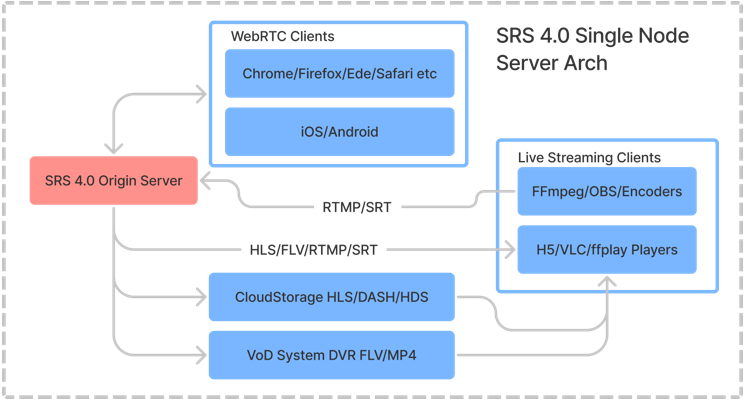
To get a quick feel for SRS, a compact architectural snapshot can be helpful. The SRS single-node diagram illustrates how a lightweight, high-efficiency server can handle ingest, processing, and delivery in a streamlined way. See the visual overview here:
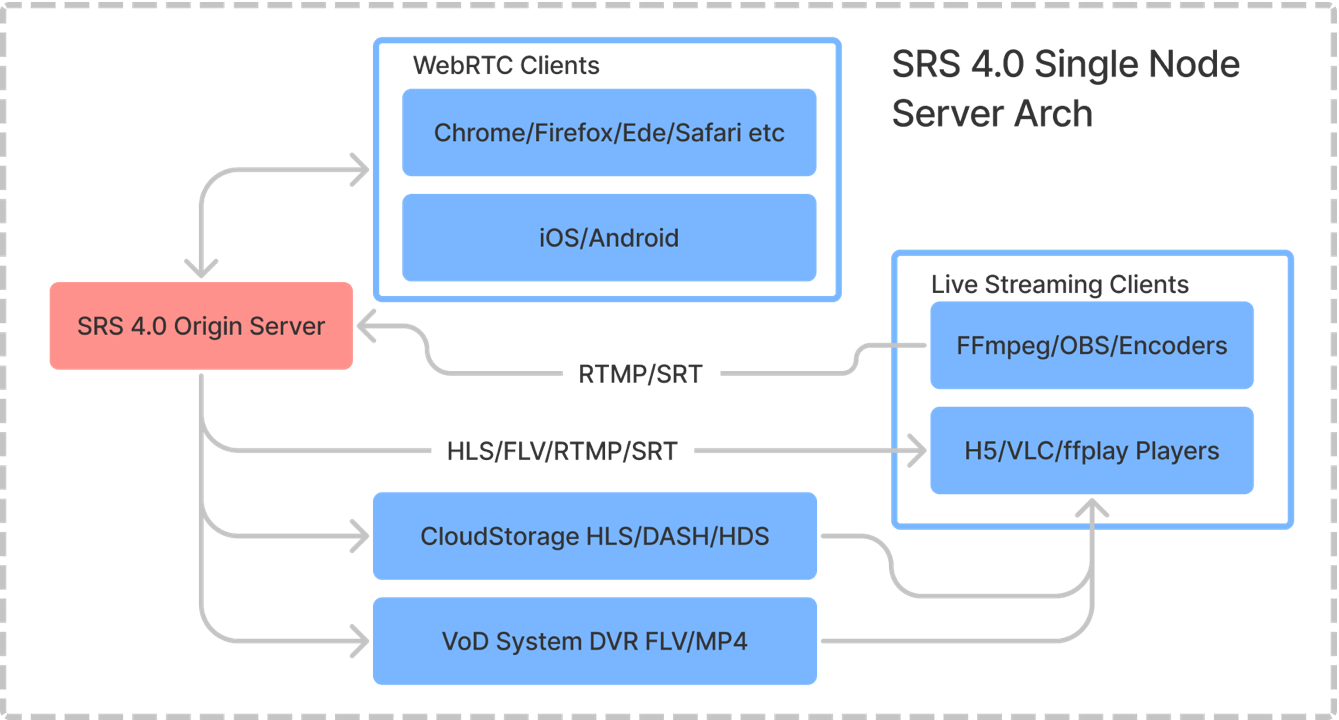
- For a high-definition representation, explore the HD diagram here:
Key capabilities at a glance
SRS is designed to be simple to deploy yet robust enough for production workloads. Its core capabilities include:
Real-time video server
Delivers low-latency live streams through multiple protocols.
Optimized for high efficiency with a focus on real-time performance.
Protocol support
RTMP: The traditional workhorse for ingest and distribution.
WebRTC: Low-latency, browser-friendly delivery for interactive scenarios.
HLS: Widely supported by players and CDNs for adaptive streaming.
HTTP-FLV: A lightweight HTTP-based FLV delivery path.
SRT: Reliable transport for long-haul, low-latency streaming.
Flexible publishing and playback
Ingest from FFmpeg or OBS with straightforward publishing commands.
Play back via popular clients such as VLC, browsers, and HLS/DASH players.
HTTPS API and callbacks
Provides modern API access with HTTPS for secure control and automation.
Supports HTTPS callbacks to integrate with external services and workflows.
Deployment options
Docker, cloud VMs, and Kubernetes-ready deployments to fit a range of operational models.
Designed to be simple to run in containerized environments, from development to production.
Open and community-driven
An active ecosystem with documentation, wiki pages, and community channels.
Transparent release history and a collaborative contributor model.
Visual anchor
A quick glance at the SRS overview reinforces the sense of a compact, highly integrated system that can be run on a single node yet scale through orchestration when needed. The provided diagrams emphasize the single-node approach while also hinting at the potential for more complex topologies.
Getting started with SRS: a practical road map
This section walks you through a pragmatic path to getting SRS up and running, publishing a stream, and playing it back.
1) Build from source
A typical development or testing workflow starts with building SRS from its source tree. The standard commands (as of the 4.0 release series) are:
Clone and build:
git clone -b 4.0release https://gitee.com/ossrs/srs.git && cd srs/trunk && ./configure && make && ./objs/srs -c conf/srs.confOpen a browser to verify the control panel:
Visit http://localhost:8080/
2) Publish a live stream
Once SRS is running, publish a stream from a common encoder like FFmpeg or OBS. A simple FFmpeg publishing command looks like:
ffmpeg -re -i ./doc/source.flv -c copy -f flv -y rtmp://localhost/live/livestream
This pushes a live stream into the RTMP ingest path at the vhost/live/application defined by your srs.conf.
3) Play the streams
SRS provides multiple ways to consume the same stream:
RTMP (desktop players)
Example: rtmp://localhost/live/livestream (viewable in VLC or any RTMP-capable player)
HTTP-FLV (web-friendly)
Example: http://localhost:8080/live/livestream.flv
You can launch a built-in SRS player page to view directly in a browser:
- http://localhost:8080/players/srs_player.html?autostart=true&stream=livestream.flv&port=8080&schema=http
HLS (HTTP Live Streaming)
Example: http://localhost:8080/live/livestream.m3u8
The same player page can be used with an HLS stream:
- http://localhost:8080/players/srs_player.html?autostart=true&stream=livestream.m3u8&port=8080&schema=http
WebRTC (browser-based, ultra-low latency)
Housed behind a WebRTC gateway and, when correctly configured, accessible at a webrtc://localhost/live/livestream
The WebRTC experience can be extended with a dedicated RTC player page:
- http://localhost:8080/players/rtc_player.html?autostart=true
4) Into the browser-based ecosystem
SRS is designed with web-friendly publishing and playback in mind. If you want to experiment with WebRTC or publish using WebRTC directly from a browser, you can enable WebRTC-related features and use the appropriate publishing endpoints (as described in the online docs and wiki).
Notes and important guidance
- If you plan to convert RTMP to WebRTC, you may need a converter configuration, such as rtmp2rtc.conf, to ensure compatibility and smooth signaling between RTMP inputs and WebRTC outputs.
- The SRS workflow is designed to be straightforward but also flexible enough to accommodate advanced uses, including custom modules and additional processing stages.
Propelled by simplicity: architecture and deployment
SRS emphasizes a practical, single-node architecture that remains capable of scaling through orchestration when necessary. The single-node footprint is designed to be lightweight, which makes it attractive for small teams, pilots, and edge deployments, while still providing a solid foundation for larger deployments.
Core characteristics
Lightweight, efficient, and real-time oriented.
A single-node architecture suitable for quick setups and development work.
Clear pathways to scale via Docker, cloud VMs, or Kubernetes as demand grows.
Visual architecture reference
The SRS single-node diagrams provide a concrete picture of how ingest, processing, and delivery are organized on a single machine. See the SD and HD diagrams linked above to understand how the components map to a physical host.
HTTPS API and security
HTTPS APIs are recommended for modern browsers and WebRTC, aligning with security best practices and compliance requirements. This includes HTTPS-based control endpoints and HTTPS callbacks for integration with external systems.
Deployment options: Docker, Cloud VM, and Kubernetes
SRS is designed to be practical for a variety of environments. The recommended pathways include:
Docker
A convenient, reproducible way to run SRS in containers, with straightforward image builds and tag usage.
The project provides documentation on Docker usage across CN/EN pages and has contributed containers to the ecosystem.
Cloud Virtual Machines
Deploy SRS on popular cloud platforms as a VM instance. This option is ideal for evaluating performance, setting up monitoring, and integrating with cloud-based storage or CDNs.
Kubernetes
For larger-scale deployments, Kubernetes (K8s) provides orchestration, autoscaling, and multi-node resilience.
The SRS wiki includes language-specific guides for CN/EN to help you set up a robust, production-grade K8s deployment.
Getting started with deployment
The wiki sections on Getting Started, Docker usage, and cloud deployment provide concrete steps, configuration files, and best practices to bring SRS into production quickly and safely.
Licensing, licensing caveats, and community
Licensing
SRS is licensed under MIT, which is permissive and widely compatible with various development and production environments.
Some dependent libraries are distributed under their own licenses, which means you should review LicenseMixing notes when including SRS in certain distributions or combinations.
Community and contributions
SRS fosters an engaged community with an Open Collective for financial support and a broad set of contributors.
Maintainers and core contributors include figures such as Winlin, ZhaoWenjie, ShiWei, XiaoZhihong, WuPengqiang, and others who actively maintain and extend different modules like WebRTC, SRT, and GB28181.
Community resources
Badges and channels indicate the activity level, CI checks, and social presence (GitHub actions, code coverage, YouTube channel, Discord, etc.).
WeChat and FAQ resources are available through the project wiki.
Acknowledgments
The project credits both maintainers and a broad set of contributors, including those who helped with the ST (state-threads) infrastructure and various modules.
The Open Collective and the community-driven approach underscore a collaborative ethos.
Releases, history, and project trajectory
SRS has a long release history that traces back through multiple major and minor versions. The 4.0 line, with r0 through r1 and the stable release family, reflects sustained development and a broad feature set. Highlights include:
4.0 series milestones
v4.0-r0 through v4.0-r1, with corresponding release tags and changelogs.
Earlier beta and alpha milestones spanning from late 2021 into 2022, showing a progressive refinement of RTMP, HLS, WebRTC, and related capabilities.
Legacy and evolution
The project traces releases back to v0.9.x and v1.0.x, documenting a long journey from early RTMP streaming to modern, multi-protocol delivery.
The changelogs and architecture notes provide a picture of how features matured, including performance improvements and new modules.
How to stay informed
Release notes, changelogs, and product pages are regularly updated in the wiki and GitHub repository.
Users are encouraged to read the Features, Architecture, Performance, and Delivery sections to understand what changed and how to adapt deployments.
Documentation and learning resources
SRS emphasizes a wiki-driven approach to learning and implementation. The key docs clusters include:
Getting Started (EN/CN)
Step-by-step guides that cover installation, basic configuration, and first streaming experiments.
Practical tutorials complement the code-level information found in the source repository.
Feature and API references
Features.md, Delivery HLS, and DeliveryHttpStream sections describe capabilities, limits, and usage patterns.
HTTPS API and HTTPS Callback sections outline secure access patterns for enterprise-grade deployments.
Architecture and performance
Architecture.md and PERFORMANCE.md detail the internal design choices and performance characteristics.
The architecture diagrams (single-node diagrams) provide a visual map of components, signaling paths, and data flow.
Community and support channels
Links to the Open Collective, social badges, and issue trackers indicate where to seek help, contribute, or support the project.
The wiki pages also connect you to related projects and tools in the ecosystem (such as ST, SRT, and GB28181 modules).
Practical tips and best practices
Getting started guides include best practices for secure deployment (HTTPS), edge delivery, and integration with clients.
The quick-start sections emphasize reliable publishing/playback loops and common pitfalls to avoid.
Images and visuals in context
Images from the input are used in this guide to anchor the narrative and provide visual references:
- SRS single-node overview (SD)
- SRS single-node overview (HD)
- WeChat badge and other community visuals
- FAQ and incubating badges (to reflect community vitality)
- YouTube channel badge (illustrating media presence)
- GitHub and Open Collective visuals (to signal transparency and collaboration)
These visuals serve as entry points for readers to connect the textual guidance with tangible references found in the project’s documentation and community footprint.
A practical mindset for SRS adoption
If you are evaluating SRS for a real-world project, here are practical takeaways to guide your decision-making:
Start small, then scale
Begin with a single-node deployment to validate ingest, processing, and delivery paths.
Use Docker or a cloud VM to accelerate the initial setup.
Choose the right publishing and playback mix
For browser-based viewers with low latency, WebRTC is compelling.
For broad compatibility and CDN-friendly delivery, HLS and HTTP-FLV are reliable options.
RTMP remains a robust ingress protocol for many existing pipelines.
Security and compliance
Leverage HTTPS for API access and WebRTC signaling where browser compatibility and security are priorities.
Review licensing for all shipped components when packaging SRS in constrained environments.
Community-driven improvement
Engage with the project’s wiki and issues to learn best practices, report issues, and contribute patches.
Consider supporting the project via Open Collective and contributing back to the community.
Observability and maintenance
Monitor builds, CI status, and test coverage if you rely on CI badges and workflows.
Regularly review release notes to stay ahead of changes that impact your deployment.
Conclusion
SRS represents a focused answer to the practical demands of real-time video streaming. Its design principles—simplicity, performance, and multi-protocol versatility—make it a compelling option for developers, broadcasters, and operators who need reliable ingest, processing, and delivery with modest operational overhead. The combination of a lightweight, single-node architecture and scalable deployment options positions SRS as a practical starting point for pilots and a solid backbone for production-grade streaming services. With an active community, transparent licensing, comprehensive documentation, and a clear path from development to deployment, SRS invites you to build, experiment, and grow your streaming infrastructure in a way that aligns with modern needs for speed, reliability, and ease of use.
Further reading and exploration
- Getting Started (EN/CN)
- FEATURES, ARCHITECTURE, and PERFORMANCE documentation
- Delivery: HLS, HTTP-FLV, and WebRTC specifics
- HTTPS API and HTTPS Callback guidance
- Release notes and historical context for v4.0.x
- Community resources: Open Collective, Discord, and YouTube channel
Images and links embedded in this guide
- SRS overview (SD): https://ossrs.net/wiki/images/SRS-SingleNode-4.0-sd.png?v=114
- SRS overview (HD): https://ossrs.net/wiki/images/SRS-SingleNode-4.0-hd.png
- WeChat badge: https://ossrs.net/wiki/images/wechat-badge4.svg
- FAQ badge: https://ossrs.net/wiki/images/srs-faq.svg
- Mulan incubating: https://ossrs.net/wiki/images/mulan-incubating.svg
- YouTube channel badge: https://img.shields.io/youtube/channel/views/UCP6ZblCL_fIJoEyUzZxC1ng?style=social
Appendix: Quick reference commands recap
- Build from source (example):
git clone -b 4.0release https://gitee.com/ossrs/srs.git && cd srs/trunk && ./configure && make && ./objs/srs -c conf/srs.conf- Publish a stream with FFmpeg:
ffmpeg -re -i ./doc/source.flv -c copy -f flv -y rtmp://localhost/live/livestream- Play RTMP:
- rtmp://localhost/live/livestream
- HTTP-FLV (browser):
- http://localhost:8080/live/livestream.flv
- HLS (browser):
- http://localhost:8080/live/livestream.m3u8
- WebRTC (browser):
- webrtc://localhost/live/livestream
This blog post synthesizes the essential information from the input, presenting a comprehensive, reader-friendly guide to SRS. It emphasizes practical steps, deployment options, and the vibrant community that surrounds the project, all while keeping the focus on clear, actionable content.
Enjoying this project?
Discover more amazing open-source projects on TechLogHub. We curate the best developer tools and projects.
Repository:https://github.com/ossrs/srs
GitHub - ossrs/srs: SRS(Simple Realtime Server)
A lightweight, real-time video streaming server supporting RTMP, WebRTC, HLS, HTTP-FLV, and SRT....
github - ossrs/srs