



OpenDataLoader PDF: AI-Powered PDF Parser & Accessibility Automation
OpenDataLoader PDF: A Comprehensive Overview of an AI-Powered Open-Source PDF Parser and Accessibility Automation Tool
Introduction
OpenDataLoader PDF is an open-source, AI-driven PDF parser designed for automated data extraction, structured document processing, and accessibility compliance automation. Developed as part of the broader OpenDataLoader project, this tool leverages hybrid processing—combining local Java-based analysis with advanced AI backends—to extract text, tables, images, formulas, and charts from PDFs accurately. Its primary strengths lie in its ability to handle complex layouts, scanned documents, and accessibility compliance without relying on cloud services or proprietary SDKs.
The following detailed description explores the tool’s architecture, capabilities, use cases, benchmarks, and future roadmap, supported by visual representations of its functionality.
1. Overview and Key Features
License and Availability
OpenDataLoader PDF is open-source under the Apache 2.0 license, ensuring permissive usage for commercial and non-commercial projects. It supports multiple programming languages:
- Python (via
pip install opendataloader-pdf) - Node.js (
npm install @opendataloader/pdf) - Java (Maven Central package)
The tool is available on PyPI, npm, and Maven Central, with a GitHub repository for community contributions.



Core Capabilities
OpenDataLoader PDF excels in the following domains:
- Structured Data Extraction:
- Extracts text, tables, images, and formulas with precise semantic labeling.
- Outputs structured formats like Markdown, JSON (with bounding boxes), and HTML.
- Hybrid Processing for Complex Documents:
- Uses a deterministic local mode for simple PDFs (fast processing).
- Routes complex pages (e.g., scanned documents, multi-column tables) to an AI backend for higher accuracy.
- OCR Support:
- Built-in Optical Character Recognition (OCR) for scanned or low-quality PDFs.
- Supports 80+ languages, including Korean (
ko), Japanese (ja), Chinese (ch_sim,ch_tra), and Arabic (ar).
- PDF Accessibility Automation:
- Automatically generates Tagged PDFs from untagged documents (coming Q2 2026).
- Follows the Well-Tagged PDF specification, validated by veraPDF (an open-source PDF validator).
- AI Safety and Security:
- Filters hidden prompt injection attacks, invisible text layers, and off-page content.
- Sanitizes sensitive data (e.g., emails, URLs) for privacy compliance.
2. Benchmark Performance
OpenDataLoader PDF ranks #1 in benchmarks across multiple metrics:
| Engine | Overall Accuracy | Reading Order | Table Extraction | Heading Detection | Speed (s/page) | |----------------------|-------------------|---------------|------------------|--------------------|----------------| | opendataloader [hybrid] | 0.90 | 0.94 | 0.93 | 0.83 | 0.43 | | opendataloader | 0.72 | 0.91 | 0.49 | 0.76 | 0.05 | | docling | 0.86 | 0.90 | 0.89 | 0.80 | 0.73 | | marker | 0.83 | 0.89 | 0.81 | 0.80 | 53.93 | | mineru | 0.82 | 0.86 | 0.87 | 0.74 | 5.96 | | pymupdf4llm | 0.57 | 0.89 | 0.40 | 0.41 | 0.09 |
Key Insights:
- Hybrid mode achieves 90% overall accuracy, outperforming competitors in table and heading extraction.
- Local mode is extremely fast (0.05s/page) but less accurate for complex layouts.
- Scanned PDFs and AI-enhanced hybrid mode improve accuracy to >90% for tables.

3. How It Works: Processing Modes
OpenDataLoader PDF supports multiple processing modes based on document complexity:
| Document Type | Mode | Installation Command | Server Command |
|-----------------------------|---------------|----------------------------------------------|------------------------------------|
| Standard digital PDF | Fast (default)| pip install opendataloader-pdf | None |
| Complex/nested tables | Hybrid | pip install "opendataloader-pdf[hybrid]" | opendataloader-pdf-hybrid --port 5002 |
| Scanned/OCR-based PDFs | Hybrid + OCR | Same as above | --force-ocr |
| Non-English scanned PDFs | Hybrid + OCR | Same as above | --ocr-lang "ko,en" |
| Mathematical formulas | Hybrid + Formula | Same as above | --enrich-formula |
| Charts needing descriptions | Hybrid + Picture | Same as above | --enrich-picture-description |
Example Workflow (Python)
import opendataloader_pdf

# Batch processing with hybrid mode for complex tables
opendataloader_pdf.convert(
    input_path=["file1.pdf", "folder/"],
    output_dir="output/",
    format="markdown,json",
    hybrid="docling-fast"
)
4. Output Formats and Data Structure
OpenDataLoader PDF generates structured outputs in multiple formats:
JSON Output Example
{
  "type": "heading",
  "id": 42,
  "level": "Title",
  "page number": 1,
  "bounding box": [72.0, 700.0, 540.0, 730.0],
  "heading level": 1,
  "font": "Helvetica-Bold",
  "font size": 24.0,
  "text color": "#000000",
  "content": "Introduction"
}
Key Fields:
type: Element type (e.g., heading, paragraph, table).bounding box: Coordinates ([left, bottom, right, top]) for precise source citation.page number: Identifies the page in the PDF.content: Extracted text.
Markdown Output Example
# Introduction
Here is a complex table extracted from the document:
| Column 1 | Column 2 |
|----------|----------|
| Data A | Data B |
 "AI-generated description: Bar chart showing waste generation by region."
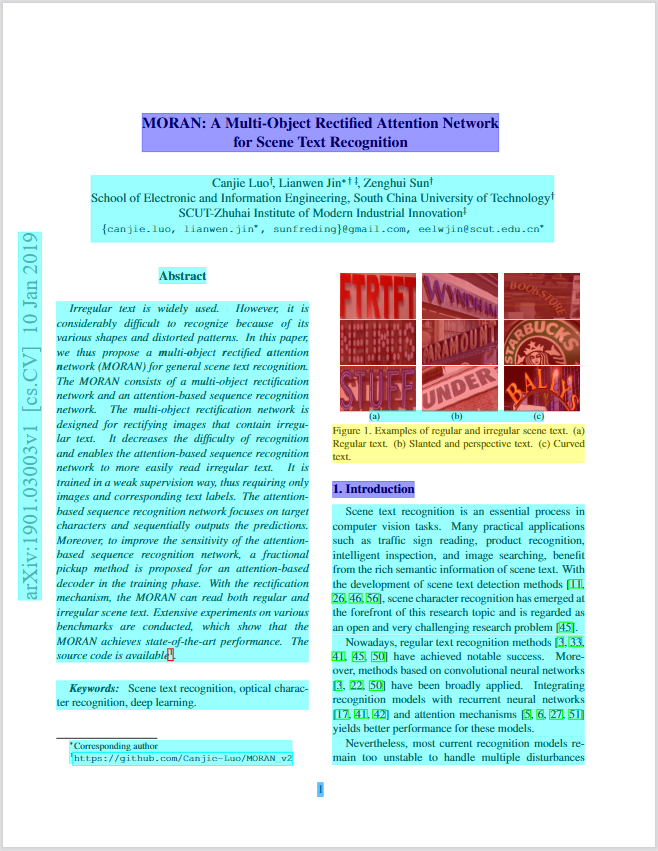
Annotated PDF Output
OpenDataLoader can generate an annotated PDF where detected elements (tables, images, headings) are visually tagged with bounding boxes.
5. Advanced Features
A. Tagged PDF Support
- Preserves the original document structure (headings, tables, lists) without heuristics.
- Works with existing PDF structure tags for accurate layout reconstruction.
opendataloader_pdf.convert(
    input_path=["file1.pdf"],
    output_dir="output/",
    use_struct_tree=True  # Preserves native PDF tags
)
B. AI Safety and Sanitization
- Filters hidden prompt injection attacks (e.g., transparent text, zero-size fonts).
- Supports explicit sanitization for sensitive data:
opendataloader-pdf file1.pdf --sanitize
C. LangChain Integration
- Seamlessly integrates with LangChain for RAG (Retrieval-Augmented Generation) pipelines.
- Example:
  from langchain_opendataloader_pdf import OpenDataLoaderPDFLoader

  loader = OpenDataLoaderPDFLoader(file_path=["file1.pdf"], format="text")
  documents = loader.load()
6. PDF Accessibility Automation
Problem: Manual Remediation Costs
- Manual PDF accessibility remediation costs $50–200 per document and fails to scale.
- Regulatory compliance (EAA, ADA/Section 508) requires structured Tagged PDFs.
Solution: Auto-Tagging Pipeline
- Audit: Detect untagged PDFs.
- Auto-Tag → Tagged PDF: Generate structure tags under Apache 2.0 (Q2 2026).
- Export PDF/UA-1 or -2: Enterprise add-on for full compliance.

Validation
- Auto-tagging follows the Well-Tagged PDF specification (PDF Association).
- Validated using veraPDF, an open-source PDF/A and PDF/UA validator.
7. Use Cases
A. RAG Pipelines
- Extracts structured data with bounding boxes for precise source citation.
- Ideal for semantic chunking in LLM-based applications.
B. Scanned Document Processing
- Hybrid mode + OCR converts low-quality scans into editable text.
- Supports 80+ languages (e.g., Korean, Japanese).
C. PDF Accessibility Compliance
- Automates Tagged PDF generation for EAA, ADA, and Section 508 compliance.
D. Enterprise AI Document Analysis
- Future integration with Hancom Data Loader will enable:
- Customized models trained on domain-specific documents.
- Production-grade OCR and VLM-based image/chart understanding.
8. Performance and Speed
| Mode | Accuracy | Speed (s/page) | |--------------------|----------|----------------| | Local Mode | 0.72 | 0.05 | | Hybrid Mode | 0.90 | 0.43 |
- Local mode: Processes 20+ pages per second on CPU.
- Hybrid mode: Slower but achieves >90% accuracy for complex tables.
9. Limitations
- Does not support Word/Excel/PPT formats natively (only PDF).
- No GPU acceleration required (runs entirely on CPU).
10. Future Roadmap
| Feature | Timeline | Tier | |-----------------------------|----------------|---------------| | Auto-tagging → Tagged PDF | Q2 2026 | Free (Apache 2.0) | | Hancom Data Loader Integration | Q2-Q3 2026 | Enterprise | | Structure validation | Planned | - |
Conclusion
OpenDataLoader PDF is a groundbreaking open-source tool that bridges the gap between traditional PDF parsing and AI-driven document processing. Its hybrid architecture, high accuracy benchmarks, OCR support, and accessibility automation make it indispensable for:
- Research & Development: Extracting structured data from scientific papers.
- Enterprise Compliance: Automating Tagged PDF generation for regulatory requirements.
- AI/ML Applications: Enabling precise source citation in RAG pipelines.
With upcoming features like auto-tagging (Q2 2026) and Hancom Data Loader integration, OpenDataLoader PDF is poised to redefine how organizations handle PDF documents. For developers and enterprises seeking a scalable, open-source solution for AI-powered PDF processing, this tool stands out as a leader in the field.
Next Steps:
- Install via
pip install opendataloader-pdf. - Explore hybrid mode for complex documents:
pip install "opendataloader-pdf[hybrid]".
Enjoying this project?
Discover more amazing open-source projects on TechLogHub. We curate the best developer tools and projects.
Repository:https://github.com/opendataloader-project/opendataloader-pdf
GitHub - opendataloader-project/opendataloader-pdf: OpenDataLoader PDF: AI-Powered PDF Parser & Accessibility Automation
OpenDataLoader PDF is an open-source, AI-driven PDF parser designed for automated data extraction, structured document processing, and accessibility compliance ...
github - opendataloader-project/opendataloader-pdf